
The business question What is our vendor roadmap? shows contracts from both the vendor perspective as well as the buyer perspective.
Review contract lifecycles and costs as well as the applications and components that the contracts provide. Manage contract renewal dates in a timely manner by ensuring that successor contracts are available in order to mitigate risks to your enterprise. This business questions sheds light on which products your organization is buying so that you can consolidate software purchasing and optimize costs by using preferred third-party vendors.
The license package Contract Management is required to work with this business question. The use case Contract Library must be activated.
Navigate to What is our vendor roadmap?
Use the method that is most convenient for you:
- In the left navigation panel, enter What is our vendor roadmap? in the Search Navigation field.
- In the left navigation panel, click Home. In the content area, go to the Business Questions page and click the tile for What is our vendor roadmap?
- In the left navigation panel, expand the sections Business Questions and Roadmapping and click What is our vendor roadmap?
What information is displayed in What is our vendor roadmap?
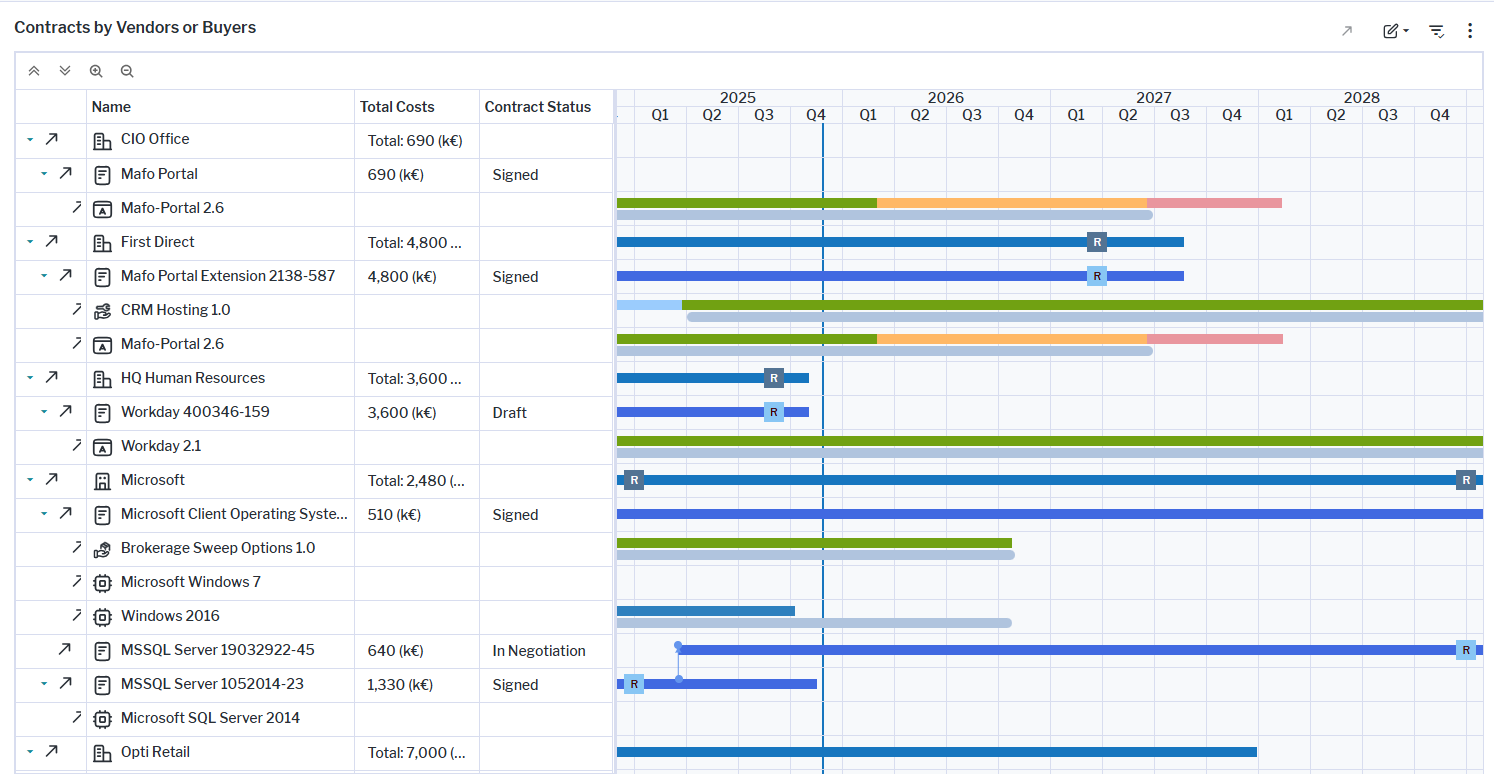
The visualization is a Gantt chart that shows the lifecycles of vendors/organization providing contracts or organizations buying the contracts. The assets displayed on the first and third level of the Gantt chart depend on report settings.
- Click What is our vendor roadmap? in the Analysis content page and then click the
 local filter button.
 - Specify the Vendor View / Buyer View field to determine whether vendors/organizations providing contracts or organizations buying the contracts are displayed on the first level.
- Specify the 3rd Level Elements field. Select Contract Item to show the lifecycles of contract items on the third level of the hierarchy. Or select Architecture to display the lifecycles of the applications, components, business services, and support services specified as contract deliverables on the third level.
Here's how to interpret the information:
- If you selected Vendor View, the first level shows
 vendors and
  organizations that provide the contracts. The Buyer View shows the organizations that buy the contracts. The columns show the total costs of the contracts for the vendor/buyer. The timeline shows a colored bar starting with the earliest start date of the contracts of the vendor/buyer and ending with the latest end date of the contracts. A
  dark blue rectangle on the timeline highlights impending dates to review the contract.
 - The second level shows the
 contract. The colored bar shows the period of validity (start date - end date) of the contract. The total costs of the contract and its contract items are shown in the Total Costs column. The Contract Status column indicates whether the contract has been signed or not. A
  light blue rectangle on the timeline highlights the contract's review date. A
  rectangle on the bar will highlight an overuse if more licenses are allocated for the contract deliverable than are permissible.
 - are permissible.If you selected Architecture in the 3rd Level Elements field, the third level shows the
 applications,
  components,
  business services, and
  support services specified as contract deliverables. If you selected Contract Items , you will see the
  contract items and their individual costs. The colored bar shows the time period that the licenses are valid.
 - The blue vertical line indicates the current date.
- Relationships between predecessor and successor applications as well as predecessor and successor contracts are displayed as blue vertical lines.
- A blue vertical line begins at the end of the predecessor contract and points to the start of the successor contract. Point to the blue line to view a tooltip showing the predecessor contract, successor contract, and end date of the predecessor contract.
- A grey vertical line begins at the end of the lifecycle of an application or component and points to the start of the successor application/component lifecycle. Point to the grey line to view a tooltip showing the predecessor application, successor application, and end date of the predecessor application.
How can I edit the contracts in What is our vendor roadmap?
If you have the relevant access permissions , you can edit the contracts in this business question. Click the  edit button > Edit Contracts. In the Contracts data workbench. You can edit the following for a contract.
- Release Status: Describes the governance status of the contract over its lifecycle and thus indicates how well users can trust the information.
- Start Date and End Date: The start and end date captures the contract's period of validity.
- Cost: The total cost of the contract deliverable.
- Monthly Cost: The monthly cost of the contract deliverable.
- Review Date: Each contract should have a date defined for when the contract should be reviewed.
Click the  navigate button to open the content area of a contract and go to the Architecture Context to review the specification of the contract deliverables and make changes if necessary.
What data is required for What is our vendor roadmap?
Data about your vendors , organizations and the contracts must be in the repository and well-documented. The following data is required about contracts in order to have meaningful results:
- Every contract should have the Start Date, End Date, and Review Date attributes defined.
- If contract items are specified, their Start Date, End Date, and Review Date attributes should also be defined.
- Every contract (or its contract items) should have contract deliverables defined. The specification of each contract deliverable should include the Architecture Element which indicates the application or component as well as the volume of licenses that is being bought.
- The applications, components, business services, and support services specified as architecture elements should have the Start Date and End Date attributes defined as well as their lifecycle statuses defined.
- Ideally each contract also has a predecessor contract specified so that it is clear what dependencies exist between predecessor and successor contracts.
Go to the Data Quality page. The Data Completeness view indicates the data that is recommended for meaningful results to the business question. Scroll to the Pending Issues view to resolve the issues and to ensure that the data is complete. Only the first 5000 issues are displayed.
Go to the Data Source page to review the application data that is used to answer the business question. The data source is a list report and cannot be edited.