
The business question What are our service overlaps? helps you to quickly identify the overlap of business services and support services due to common assets specified to deliver the services. Review the business services impacted by applications, deployments, or support services as well as the support services delivered by components, standard platforms, physical servers, or virtual servers and establish clear objectives for service delivery in order to minimize risk and reduce the number of service collisions.
The license package Enterprise Architecture Management is required to work with this business question. The use case Service Portfolio Management must be activated.
Navigate to What are our service overlaps?
Use the method that is most convenient for you:
- In the left navigation panel, enter What are our service overlaps? in the Search Navigation field.
- In the left navigation panel, click Home. In the content area, go to the Business Questions page and click the tile for What are our service overlaps?
- In the left navigation panel, expand the sections Business Questions and Rationalization and click What are our service overlaps?
What information is displayed in What are our service overlaps?
A filter setting is mandatory for this business question. Click the  local filter button and click in the Service field. In the selector, select either Business Service or Support Service in the Search for field. Enter search criteria to find the service you want compare other services to.
The Overlapping Services field shows the services that share assets with the service selected in the Service field. Select a service in the Overlapping Services field or make no selection to compare all common services.
Here's how to interpret the information:
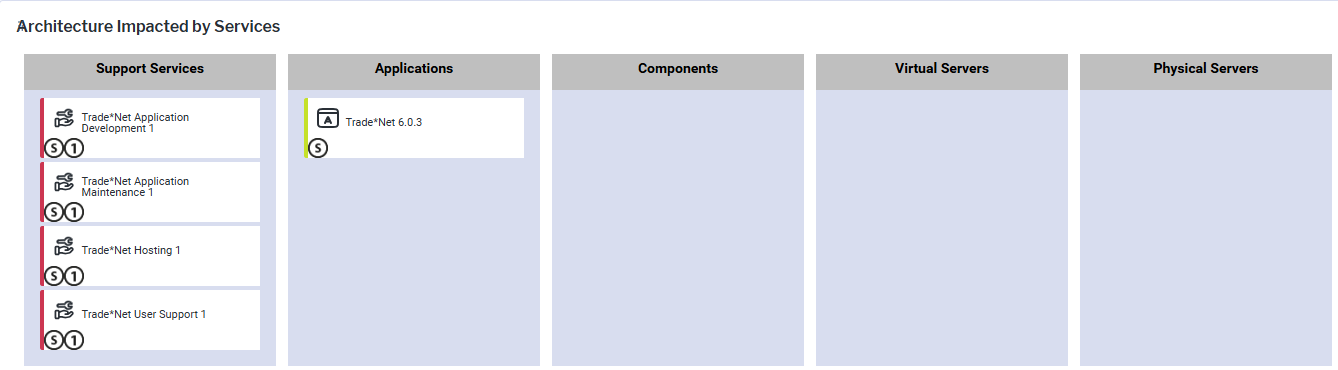
- The lanes indicate the object class of the assets specified as service items that deliver the services.
- Business services are delivered by applications, deployments, and support services.
- Support services are delivered by components, standard platforms, physical servers, and virtual servers.
- Assets showing a
 symbol indicate that the asset is delivered by the service selected in the Service field.
 - Point to the symbol to view the name of the service.
- Click the the symbol to open the editable object inspection pane.
- Double-click the symbol to open a data workbench with all service items for the service including the assets that deliver the service.
- Point to the
- Assets with
 ,
,  number symbols indicate that the asset is delivered by one of the services selected in the Overlapping Services field. Click Show Legend to understand the numbers added to the assets.
 - Point to the , number symbols to view the name of the service.
- Click the , number symbols to open the editable object inspection pane.
- Double-click the symbol to open a data workbench with all service items for the service including the assets that deliver the service.
- Point to the
- An asset highlighted red delivers more than one service and requires attention. To understand more about the service overlaps, double-click the asset in the matrix to open its the content area. Go to the Service Context page to understand all services that the asset delivers.
Edit the data in What are our service overlaps?
If you have the relevant access permissions, you can edit the business service items and support service items in this business question.
Double-click the , , , etc. number symbols to open a data workbench where they can see all service items for the selected service. For each service item, edit the business service, providing asset, or the Guaranteed column. Use the features of the data workbench to slice-and-dice your data to focus on data and do the analyses you are interested in.
What data is required for What are our service overlaps?
Business service data must be in repository as well as support service data to have meaningful results for this business question. The following data is required for this business question:
- Providing business support service item: Specify the service item that describes the asset delivering the business service.
- Providing support support service item: Specify the service item that describes the asset delivering the support service.
Go to the Data Quality page. The Data Completeness view indicates the data that is recommended for meaningful results to the business question. Scroll to the Pending Issues view to resolve the issues and to ensure that the data is complete. Only the first 5000 issues are displayed.
Go to the Data Source page to review the data that is used to answer the business question. The data source is a list report and cannot be edited.