
The business question What is our application landscape? helps you to understand the business capabilities and the applications that support them. Analyze the current and planned application landscape based on various indicators to identify potential risks to your IT portfolio roadmap as well as rationalization opportunities for your business.
Navigate to What is our application landscape?
Use the method that is most convenient for you:
- In the left navigation panel, enter What is our application landscape? in the Search Navigation field.
- In the left navigation panel, click Home. In the content area, go to the Business Questions page and click the tile for What is our application landscape?
- In the left navigation panel, expand the sections Business Questions and Roadmapping and click What is our application landscape?
What information is displayed in What is our application landscape?

A nested matrix shows the business capability model and the applications that support the business capabilities. Click the  global filter button and specify the filter fields to show applications based on an owner organization, supported business capability, a specified date, or an application group. Here's how to interpret the information:
- Each business capability is represented by a nested box in the matrix.
- Shows all levels of business capabilities in the business capability hierarchy per default. To see all levels, ensure that the Aggregate to Business Capability Level filter is not specified. Each business capability is colored according to its hierarchy level.
- Applications that provide the business capability are displayed inside the nested box representing the business capability.
- If there are more than 11 applications providing the business capability, an element will show how many applications are not displayed in the matrix. Double-click the element to open a data workbench showing a complete list of applications providing the business capability.
- Hide business capabilities that are not provided by applications via the Include Only Provided Business Capabilities filter.
- Applications may be aggregated to business capability on the second or third level via the Aggregate to Business Capability Level filter. For example, select 2 to aggregate the applications from business capabilities on the 3rd and 4th levels to their parent business capability on the second level.
- Applications may be colored based on the Color Rule field and indicators may be added for applications via the Application KPI field. Click the
 3-dots button > Show Legend to understand the color coding.
How can I edit the data in What is our application landscape?
If you have the relevant access permissions, you can edit the business capabilities and application in this business question.
- To edit a single application or business capability, click the application or business capability to open the object inspection pane or double-click to go to the content area.
- To open a data workbench to edit all business capabilities, click the 3-dots button >
 edit button > Edit Business Capabilities. Or click Edit Applications of Business Capabilities to open a data workbench showing applications. Use the features of the data workbench to slice-and-dice your data to focus on data and do the analyses you are interested in.
What data is required for What is our application landscape?
Business question: What is our application landscape?
Purpose: Understand the business capabilities and the applications that support them.
DATA REQUIREMENTS
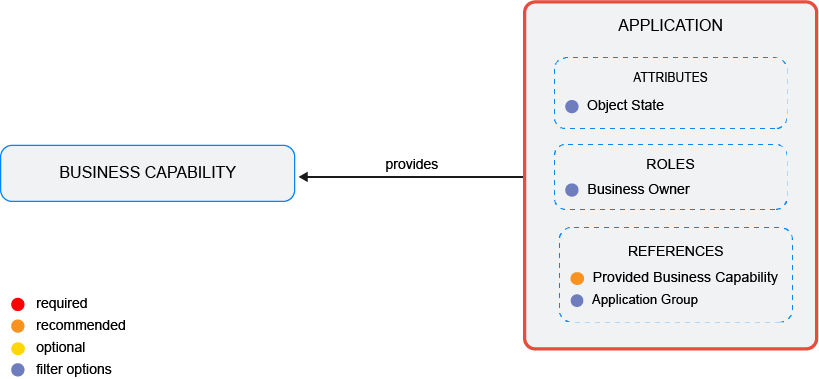
Capture the data necessary for the business question. Applications and business capabilitiesmust be in the repository and well documented. Try to capture as much information as possible about the applications because complete data considerably improves the results of the business question and your ability to focus on the data that is most important to you.
Improve the data and correct data quality issues. Go to the business question's Data Quality > Data Completeness. This visualization helps you to assess whether sufficient data is available to produce meaningful and reliable results for the business question.
- Go to Pending Issues to resolve data quality issues and improve the data that the business question is based on. Only the first 5000 issues are displayed.
- Go to the Data Source page to understand the underlying data relevant to the business question. The data source is a list report and cannot be edited.