
The business question What are our cost drivers? visualizes business capabilities based on their application and project costs and their business relevance. It helps you to differentiate between critical and standard business capabilities, identify the major cost drivers in the organization, and make sound rationalization and investment decisions.
Navigate to What are our cost drivers?
Use the method that is most convenient for you:
- In the left navigation panel, enter What are our cost drivers? in the Search Navigation field.
- In the left navigation panel, click Home. In the content area, go to the Business Questions page and click the tile for What are our cost drivers?
- In the left navigation panel, expand the sections Business Questions and Finance and click What are our cost drivers?
What information is displayed in What are our cost drivers?

The treemap report shows the first-level and second-level business capabilities in the business capability model sized according to their application (OPEX) and project costs (CAPEX). Costs are calculated only for applications and projects with defined values defined for the current year. Click the  local filter button > Aggregate Costs By field to specify whether you want the sizing of the business capabilities to be based on OpEx or CapEx. Select neither to calculate both OPEX and CAPEX costs.
Here's how to interpret the information:
- The first-level IT capabilities are colored dark blue.
- The second-level IT capabilities are colored according to the value defined for the Business Relevance attribute of a business capability. The Business Relevance attribute indicates how relevant the business capability is for the business. The most critical business capabilities are shades of purple. The less critical business capabilities are shades of green.
- Mission Critical: The business capability is crucial to the organization's business and therefore essential to the accomplishment of the vision, goals and objectives.
- Business Evolving: The business capability responds to internal and external change and helps to support the necessary steps to transition the organization's business.
- Business Enabling: The business capability is currently core to the business of the organization and describes what currently exists in the business.
- Business Operating: The business capability is not unique to the business but does provide the support required to operate the business. Because it is not unique to the business, it does not constitute a core business capability.
- The business capabilities are sized based on their current year costs. Costs are calculated only for applications and projects with defined budget values. Costs are calculated only for applications and projects with defined values defined for the current year. The larger the box, the more expensive are the application (OpEx) and project (CapEx) costs for the business capability. Point to a business capability to show a tooltip with the following information: Business capability name, current year operational expenditure (OpEx), current year capital expenditures (CapEx), Business Relevance value.
- Click the
 three vertical dots button > Show Legend to understand the color coding.
- For an overview of all business capabilities, select Edit Business Capabilities in the toolbar to view a data workbench that displays the business capabilities, their business relevance, and the applications and projects that contribute to them.
- For an overview of all application costs, select Edit Applications in the toolbar to view a data workbench that displays the budgeted applications, the business capabilities they support, and their current-year OPEX costs. Sort the data in the Current Year OpEx column to identify the most expensive applications and understand which business capabilities they enable.
- For an overview of all project costs, select Edit Projects in the toolbar to view a data workbench that displays the budgeted projects, the business capabilities they impact, and their current-year project budgets. Sort the data in the Current Year Project Budget column to identify the most expensive projects and understand which business capabilities they support.
How can I edit the data in What are our cost drivers?
If you have the relevant access permissions , you can edit the business capabilities, applications, and projects in this business question. Go to the business question What are my cost drivers? and click the  edit button.
- For an overview of all business capabilities, select Edit Business Capabilities in the toolbar to view a data workbench that displays the business capablities, their business relevance, and the applications and projects that contribute to them.
- For an overview of all application costs, select Edit Applications in the toolbar to view a data workbench that displays the budgeted applications, the business capabilities they support, and their current-year OPEX costs. Sort the data in the Current Year OpEx column to identify the most expensive applications and understand which business capabilities they enable.
- For an overview of all project costs, select Edit Projects in the toolbar to view a data workbench that displays the budgeted projects, the business capabilities they impact, and their current-year project budgets. Sort the data in the Current Year Project Budget column to identify the most expensive projects and understand which business capabilities they support.
What data is required for What are our cost drivers?
Business question: What are our cost drivers?
Purpose: Understand business capabilities based on their application and project costs.
DATA REQUIREMENTS
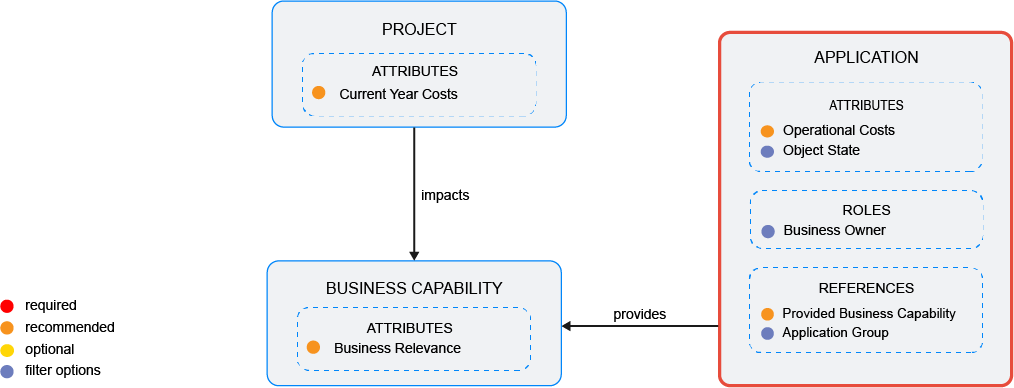
Capture the data necessary for the business question. Applications , business capabilities , and projects must be in the repository and well documented. Try to capture as much information as possible about the applications because complete data considerably improves the results of the business question and your ability to focus on the data that is most important to you.
- Document the business capabilities that the application pro..
- Capture the application's planned operational costs.
- Specify the business capability's attributes including the Business Relevance attribute.
- Document the project's planned costs.
Improve the data and correct data quality issues. Go to the business question's Data Quality > Data Completeness. This visualization helps you to assess whether sufficient data is available to produce meaningful and reliable results for the business question.
- Go to Pending Issues to resolve data quality issues and improve the data that the business question is based on. Only the first 5000 issues are displayed.
- Go to the Data Source page to understand the underlying data relevant to the business question. The data source is a list report and cannot be edited.