
The business question What are our service costs? helps decision-makers understand the cost breakdown as well as analyze cost evolution over time of the enterprise's business service and support service costs. Multiple reports helps you identify the most costly services, breaking down information so that you understand the costs drivers, costs types, and costs per lifecycle phase for current and planned costs. What-if analyses provide insight to phasing in and phasing out services.
The license package IT Transformation - Enterprise is required to work with this business question. The use case Service Portfolio Management must be enabled.
Navigate to What are our service costs?
Use the method that is most convenient for you:
- In the left navigation panel, enter What are our service costs? in the Search Navigation field.
- In the left navigation panel, click Home. In the content area, go to the Business Questions page and click the tile for What are our service costs?
- In the left navigation panel, expand the sections Business Questions and Finance and click What are our service costs?
What information is displayed in What are our service costs?
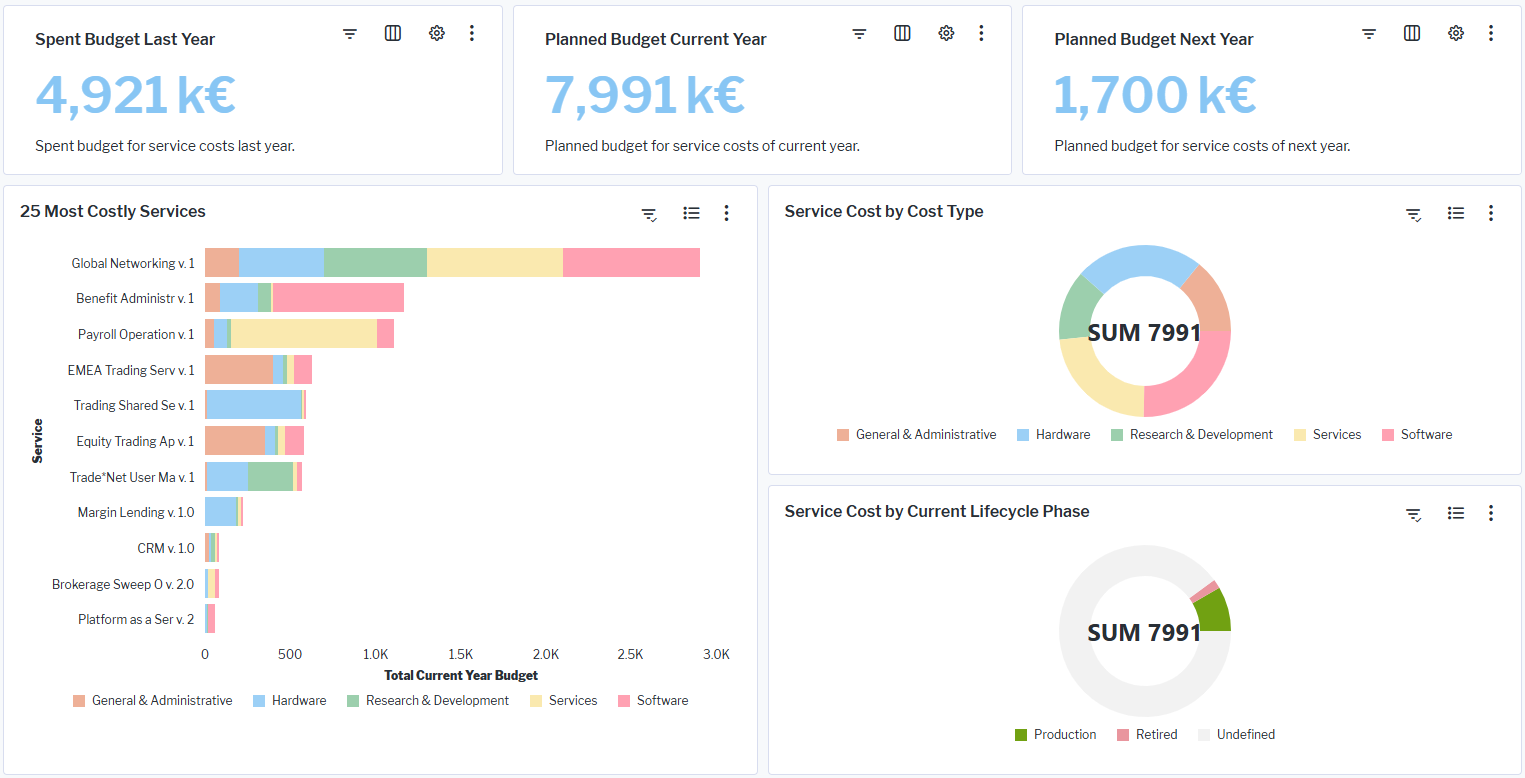
Cards showing the budget for service costs for the last, current, and next years: Point to the  rescan button to see when the indicator was last updated. Click the button to rescan the costs based on the most recent data.
25 Most-Costly Services: Shows a bar chart with the most expensive business services and support services for the current year. Each bar shows a break down of the costs based on cost type.
Service Cost by Cost Type: Shows the distribution of the current year business service and support service costs based on cost type. Point to a doughnut slice to display a tooltip with the percentage of service costs for the cost type. Double-click a doughnut slice to open a report showing all business services and support services with a cost specified for that cost type.
Service Costs by Current Lifecycle Phase: Shows the distribution of the current year costs for business services and support services based on their lifecycle phases. Point to a doughnut slice to display a tooltip with the percentage of business services and support services in a specific lifecycle phase. Double-click a doughnut slice to open a report slowing all business services and support services and their costs for the selected lifecycle phase.
Cards showing business service/support service costs: Point to the rescan button to see when the indicator was last updated. Click the button to rescan the costs based on the most recent data.
What data is required for What are our service costs?
Business question: What are our service costs?
Purpose: Understand cost evolution over time of the enterprise's business service and support service costs.
DATA REQUIREMENTS
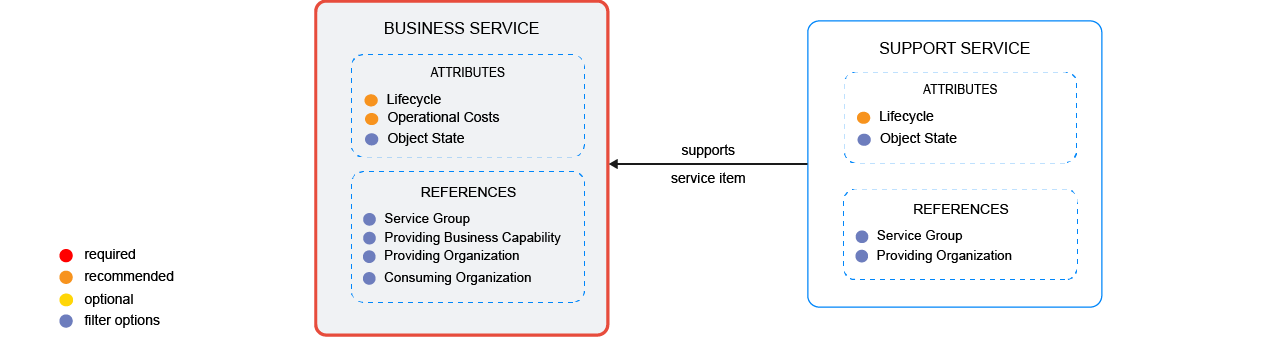
Capture the data necessary for the business question. Business services as well as support services must be in the repository and well documented. Try to capture as much information as possible about the business services and support services because complete data considerably improves the results of the business question and your ability to focus on the data that is most important to you.
- Document the lifecycle of the business service.
- Document the business service's operational costs
- Document the support services providing the business service
- Document the lifecycle of the support services.
Improve the data and correct data quality issues. Go to the business question's Data Quality > Data Completeness. This visualization helps you to assess whether sufficient data is available to produce meaningful and reliable results for the business question.
- Go to Pending Issues to resolve data quality issues and improve the data that the business question is based on. Only the first 5000 issues are displayed.
- Go to the Data Source page to understand the underlying data relevant to the business question. The data source is a list report and cannot be edited.