
The business question Where are our applications deployed? helps you to understand where applications are located and provides a quick overview about the deployment hotspots. The information is a source of input about security and disaster recovery activities for locations with critical applications.
Alfabet supports two use cases to manage deployments . Depending on the use case implemented by your company, the business question Where are our applications deployed? may show either the locations based on the the physical/virtual servers that deploy the application or based on the application deployments that specifically describe how the application is deployed on the physical and virtual servers via the logical set of installed elements that constitute one instantiation of an application.
Deployment management is specified by your solution designer in the XML object ProductUseCaseScope in the configuration tool Alfabet Expand.
The license package Enterprise Architecture Management is required to work with this business question.
Navigate to Where are our applications deployed?
Use the method that is most convenient for you:
- In the left navigation panel, enter Where are our applications deployed? in the Search Navigation field.
- In the left navigation panel, click Home. In the content area, go to the Business Questions page and click the tile for Where are our applications deployed?
- In the left navigation panel, expand the sections Business Questions and Transparency and click Where are our applications deployed?
What information is displayed in Where are our applications deployed?

A branching diagram visualizes locations and their subordinate locations and the number of applications that are deployed at the location. Parent locations are on the left. The subordinate locations branch out towards the right. For each location deploying applications, a number is displayed in parenthesis next to the location name.
You can gather detailed information about the location. Click any location and click the  navigate button to open the content area and review the Deployment Structure view which visualizes all physical servers and virtual servers hosted at the location and the applications that the physical and virtual servers support. You can review and edit application details in the Applications data workbench.
How can I edit the data in Where are our applications deployed?
If you have the relevant access permissions, you can edit the applications, physical servers, and virtual servers in this business question.
- Go to the business question Where are our applications deployed? For each location deploying applications, a number is displayed in parenthesis next to the location name.
- Click the
 edit button > and select either Edit Applications, Edit Physical Servers, or Edit Virtual Servers. Use the features of the data workbench to slice-and-dice your data to focus on data and do the analyses you are interested in. Use the features of the data workbench to slice-and-dice your data to focus on data and do the analyses you are interested in.
What data is required for Where are our applications deployed?
Alfabet supports two use cases to manage deployments . Depending on the use case implemented by your company, the business question Where are our applications deployed? may show either the locations based on the the physical/virtual servers that deploy the application or based on the application deployments that specifically describe how the application is deployed on the physical and virtual servers via the logical set of installed elements that constitute one instantiation of an application. Deployment management is specified by your solution designer in the XML object ProductUseCaseScope in the configuration tool Alfabet Expand.
Business question: Where are our applications deployed?
Purpose: Understand where applications are located and understand potential risk to deployment hotspots.
DATA REQUIREMENTS
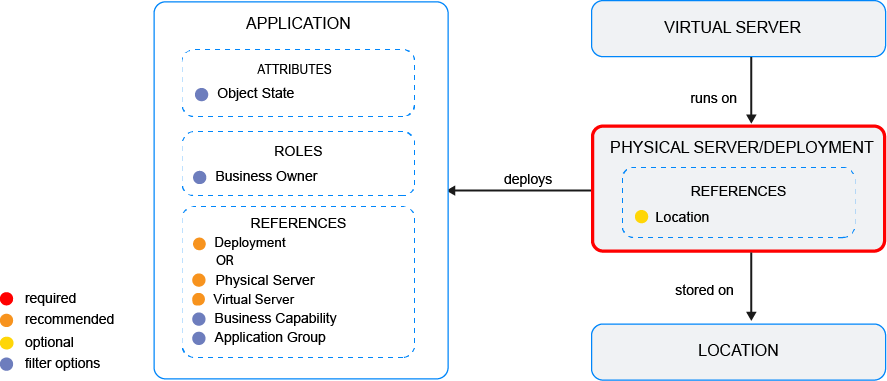
Capture the data necessary for the business question. Applications , locations , physical servers /virtual servers or application deployments must be in the repository and well documented. Try to capture as much information as possible about the applications and deployment environment because complete data considerably improves the results of the business question and your ability to focus on the data that is most important to you.
- Depending on the device/deployment management use case data management use case implemented in your solution: Document the application's deployed on the physical server or Document application deployments.
Improve the data and correct data quality issues. Go to the business question's Data Quality > Data Completeness. This visualization helps you to assess whether sufficient data is available to produce meaningful and reliable results for the business question.
- Go to Pending Issues to resolve data quality issues and improve the data that the business question is based on. Only the first 5000 issues are displayed.
- Go to the Data Source page to understand the underlying data relevant to the business question. The data source is a list report and cannot be edited.