
The business question What is the status of our project portfolio? shows an overview of the project portfolio with a view to all projects from start to finish.
Review project monitoring indicators to indicate whether projects are within the budget and resource allotment. Understand project dependencies and keep track that project milestones are met on time. This business question helps you to understand changes as they occur and react before a project becomes unmanageable and threatens to fail.
Navigate to What is the status of our project portfolio?
Use the method that is most convenient for you:
- In the left navigation panel, enter What is the status of our project portfolio? in the Search Navigation field.
- In the left navigation panel, click Home. In the content area, go to the Business Questions page and click the tile for What is the status of our project portfolio?
- In the left navigation panel, expand the sections Business Questions and Transformation and click What is the status of our project portfolio?
What information is displayed in What is the status of our project portfolio?
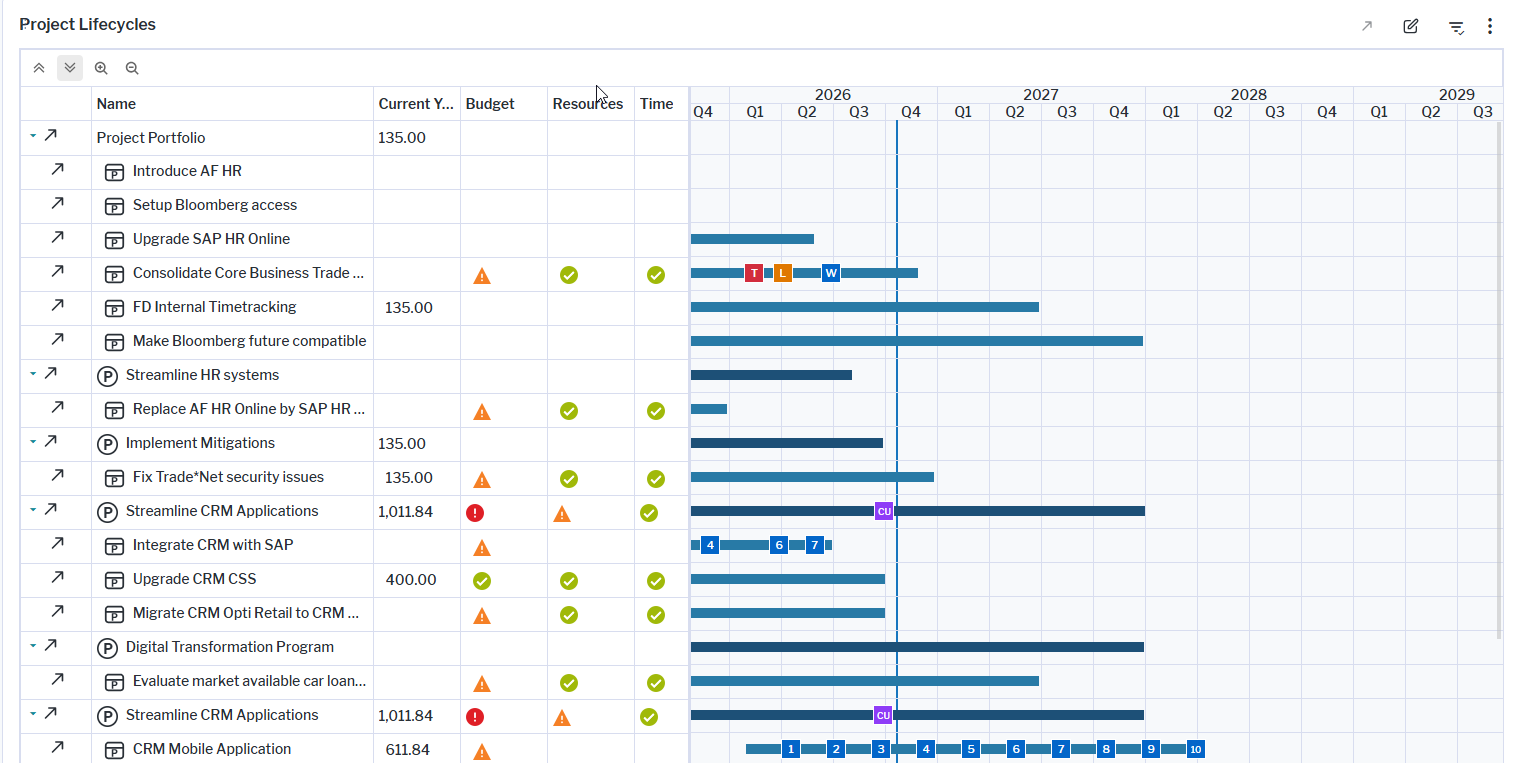
The visualization is a Gantt chart that shows the lifecycles of all projects. Here's how to interpret the information:
- The rows show
 programs and
 projects.
- Columns show the total costs of the project's current year budget. Budget, Resources, and Time columns indicate whether projects are in good shape
 or have a warning
 or error
 .
- Milestones are displayed on the timeline with traffic signal colors to indicate success, warning, or danger regarding their completion. Point to a milestone to display a tooltips with the milestone name and target date.
- The blue vertical line indicates the current date.
- Dependencies between projects are displayed as a black line that starts with a project's end date and points to the start of the dependent project. A dependency exists if a project must first be completed before another project can begin. Point to the black line to view a tooltip explaining the reason for the dependency and the start date of the dependent project.
How can I edit the data in What is the status of our project portfolio?
If you have the relevant access permissions, you can edit the projects in this business question.
- In the Project Lifecycles view, click the
 edit button to open the Projects data workbench.
- Edit a project directly in the data workbench or select a project and click the
 navigate button to open it's content area
What data is required for What is the status of our project portfolio?
Business question: What is the status of our project portfolio?
Purpose: Provides an overview of the project portfolio with a view to all projects from start to finish.
DATA REQUIREMENTS
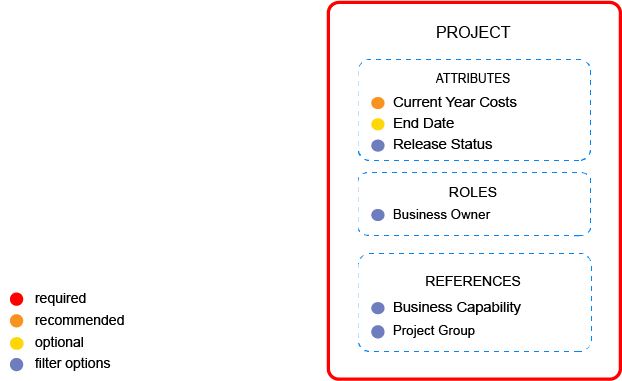
Capture the data necessary for the business question. Projects must be in the repository and well documented. Try to capture as much information as possible about the projects because complete data considerably improves the results of the business question and your ability to focus on the data that is most important to you.
- Capture the project's current costs.
- Specify the project's attributes including the End Date.
Improve the data and correct data quality issues. Go to the business question's Data Quality > Data Completeness. This visualization helps you to assess whether sufficient data is available to produce meaningful and reliable results for the business question.
- Go to Pending Issues to resolve data quality issues and improve the data that the business question is based on. Only the first 5000 issues are displayed.
- Go to the Data Source page to understand the underlying data relevant to the business question. The data source is a list report and cannot be edited.