
The business question What is our service roadmap? provides a comprehensive overview of the business services and support services that are implemented and when they will reach end-of-life.
Look for business services and support services that are approaching their end-of-life but have no successor services planned. Identify gaps in the service portfolio and take corrective action for business services and support services that are at risk.
The license package Enterprise Architecture Management is required to work with this business question. The use case Service Portfolio Management must be activated.
Navigate to What is our service roadmap?
Use the method that is most convenient for you:
- In the left navigation panel, enter What is our service roadmap? in the Search Navigation field.
- In the left navigation panel, click Home. In the content area, go to the Business Questions page and click the tile for What is our service roadmap?
- In the left navigation panel, expand the sections Business Questions and Roadmapping and click What is our service roadmap?
What information is displayed in What is our service roadmap?
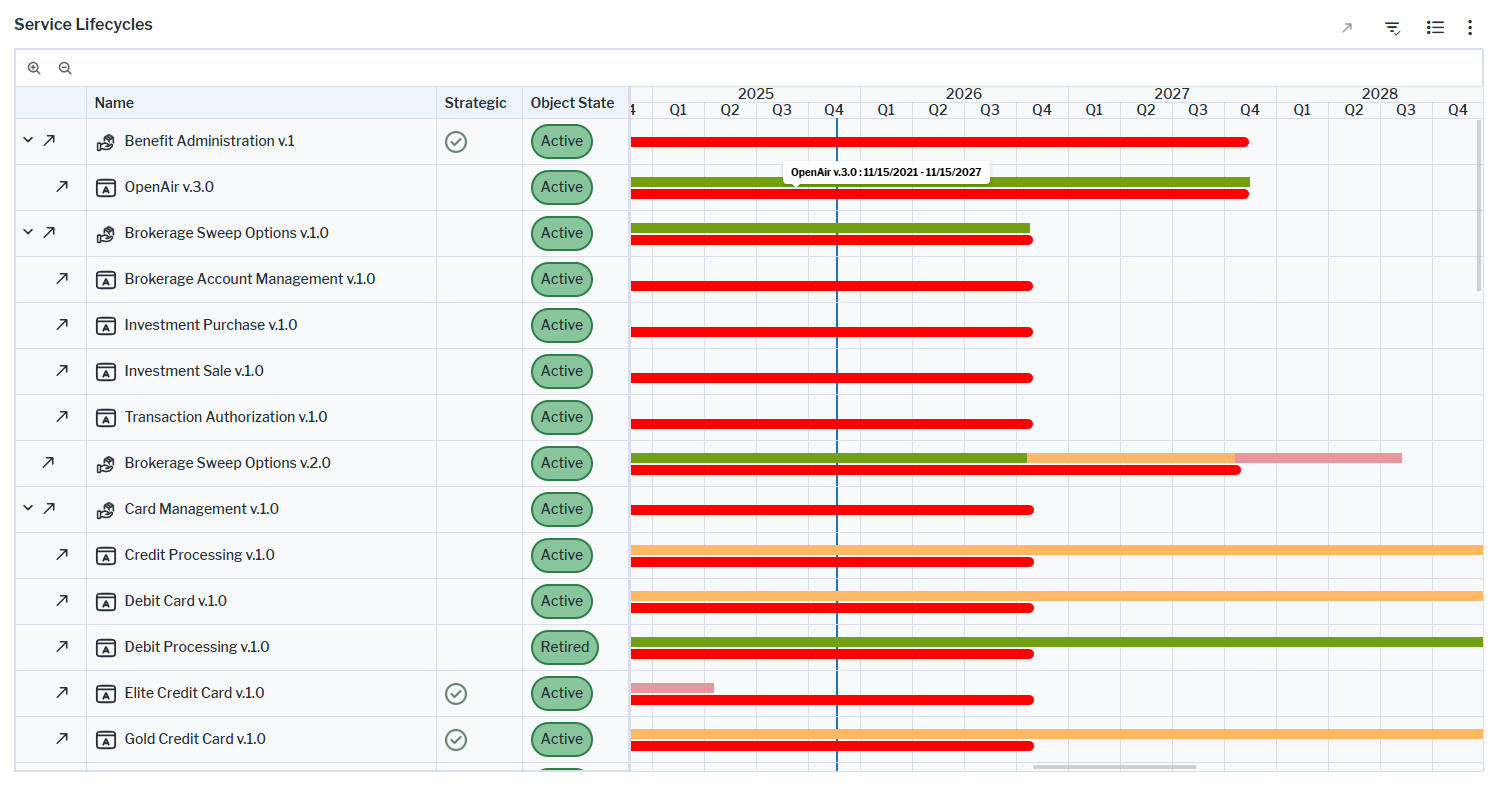
The visualization is a Gantt chart that shows the lifecycles of all business services and the service items that support the services. Here's how to interpret the information:
- The first rows show
 business services
 - Columns show a checkmark if a business service's Strategic Service attribute is set to Yes. The Object State column indicates if a business service is
 active,
  plan, or
  retired.
 - The timeline shows a red bar visualizing the active period (start date - end date) of the business service. If a business service lifecycle is defined, lifecycle phases will be displayed in a multi-colored bar above the red bar.
 Plan
Plan Pilot
Pilot Production
 Sunset
 Retired
- The blue vertical line indicates the current date.
- The relationships between predecessor and successor business services are displayed as black lines. If a business service has a successor business service defined, a black line will begin at the end of the predecessor business service's lifecycle and point to the start of the successor business service lifecycle. Point to the black line to view a tooltip showing the predecessor business service, successor business service, and end date of the predecessor business service.
-
Service items that deliver the business services may be displayed in the Gantt chart. To add the assets specified to deliver the business services, click the
 local filter button and in the Show Service Items field, select the type of support you want to include in the Gantt chart.
 - Business services are provided by applications, deployments, and support services.
- Support services are provided by components, physical servers, and virtual servers.
How can I edit the data in What is our service roadmap?
If you have the relevant access permissions, you can edit the business services in this business question.
-
To edit a business service's lifecycle: Select the business service you want to edit and click the
 edit button > Edit Business Service Lifecycle to open the Lifecycle Editor. Activate the slider for the lifecycle phases to include and specify their start and end dates
 -
To edit business services: Click the business service to open the object inspection pane or double-click to go to its content area. Or click the edit button > Edit Business Services to open the Business Service data workbench. Use the features of the data workbench to slice-and-dice your data to focus on data and do the analyses you are interested in.
What data is required for What is our service roadmap?
Business service data must be in the repository to have meaningful results for this business question. The following data is required for this business question:
- Start Date attribute
- Lifecycle
Go to the Data Quality page. The Data Completeness view indicates the data that is recommended for meaningful results to the business question. Scroll to the Pending Issues view to resolve the issues and to ensure that the data is complete. Only the first 5000 issues are displayed.
Go to the Data Source page to review the service data that is used to answer the business question. The data source is a list report and cannot be edited.