
The business question What are our middleware integrations? visualizes a flow diagram that offers a comprehensive overview of middleware systems and the technical implementation of information flows across connected applications. It illustrates how applications and components function as middleware to enable the exchange of information between source and target systems.
This visualization clarifies the integration landscape and highlights opportunities to optimize data flows by leveraging middleware systems. Serving as a technical reference, it supports stakeholders in maintaining governance and oversight of middleware integrations. By focusing on end-to-end information flows, the diagram enables effective management and control of planned changes. It provides the necessary context to understand and anticipate the impacts of change initiatives at any point in time, ensuring informed decision-making and sustainable integration practices.
The business question What are our middleware integrations? is available with the base package IT Transformation Server - Enterprise. The use case Information Portfolio Governance must be activated.
Navigate to What are our middleware integrations?
Use the method that is most convenient for you:
- In the left navigation panel, enter What are our middleware integrations? in the Search Navigation field.
- In the left navigation panel, click Home. In the content area, go to the Business Questions page and click the tile for What are our middleware integrations?
- In the left navigation panel, expand the sections Business Questions and Transparency and click What are our middleware integrations?
What information is displayed in What are our middleware integrations?
The Information Flows and Middleware view is an information flow diagram that shows the middleware specified to realize the information flow.
- Click the
 local filter button and specify the Middleware field to see data in the view.
- Information flows with the specified middleware are displayed.
- The selected middleware is displayed as a label on the information flow.
- Specify the Active Date filter to understand middleware systems on a future date.
- Specify the Object State filter to show only middleware systems based on applications with that state.
- Specify the Application Details filter to visualize an attribute on applications in the diagram.
- Specify the Information Flow Details filter to visualize one or more attributes on the information flows. For example, select Data to display the business data that is transferred.
How can I edit the data in What are our middleware integrations?
If you have the relevant access permissions, you can edit the information flows in this business question.
- To edit a single information flow or application, click the element to open the editable object inspection pane. Double-click the information flow or application to open its content area.
- To open a data workbench to edit all information flows, click the
 edit button > Edit Information Flows. Use the features of the data workbench to slice-and-dice your data to focus on data and do the analyses you are interested in.
What data is required for What are our middleware integrations?
Business question: What are our middleware integrations?
Purpose: Understand middleware systems and the technical implementation of information flows across connected applications.
DATA REQUIREMENTS
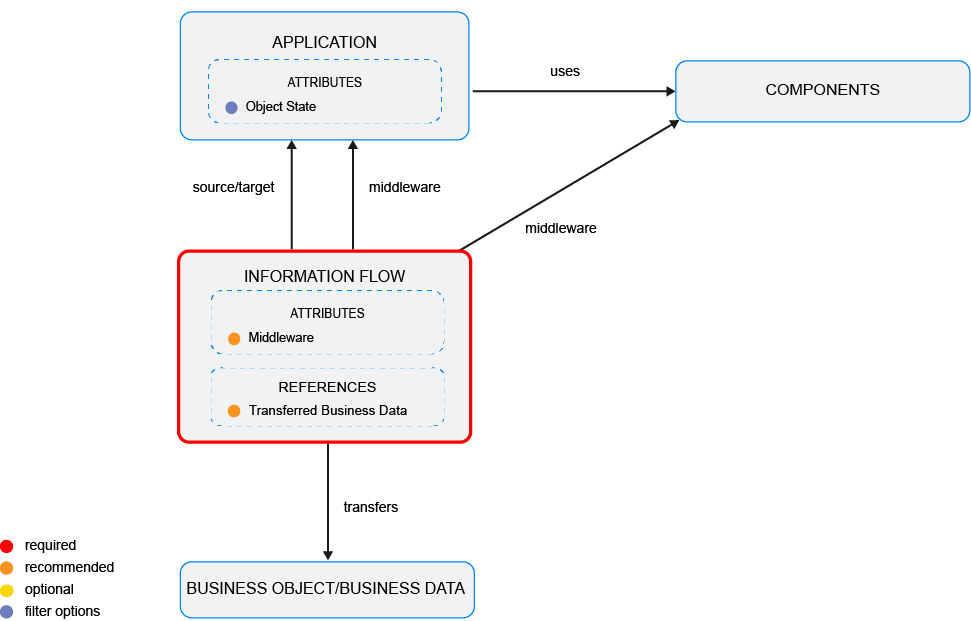
Capture the data necessary for the business question. Applications and their information flows as well as business objects and components must be in the repository and well documented. Try to capture as much information as possible about the information flows, applications, business objects, and components because complete data considerably improves the results of the business question and your ability to focus on the data that is most important to you.
- Document the application's attributes including the Object State attribute.
- Document the application's information flows.
- Document the information flow's attributes including the Middleware attribute.
- Depending on the data management use case implemented in your solution: Document the business objects that the information flow transfers or document the business data that the information flow transfers.
Improve the data and correct data quality issues. Go to the business question's Data Quality > Data Completeness. This visualization helps you to assess whether sufficient data is available to produce meaningful and reliable results for the business question.
- Go to Pending Issues to resolve data quality issues and improve the data that the business question is based on. Only the first 5000 issues are displayed.
- Go to the Data Source page to understand the underlying data relevant to the business question. The data source is a list report and cannot be edited.