
The business question Where do we have technology risk? shows the business capability model focusing on the components used by the applications that support the business. For each business capability, understand the risk to components that provide functional support and the remaining time that the vendor will support the component.
The business question helps you to understand risks to the business due to the discontinuation of technology support as well as to identify areas to standardize and rationalize components in technology-dense business capabilities.
The license package IT Transformation Server - Enterprise is required to work with this business question.
Navigate to Where do we have technology risk?
Use the method that is most convenient for you:
- In the left navigation panel, enter Where do we have technology risk? in the Search Navigation field.
- In the left navigation panel, click Home. In the content area, go to the Business Questions page and click the tile for Where do we have technology risk?
- In the left navigation panel, expand the sections Business Questions and Risk and click Where do we have technology risk?
What information is displayed in Where do we have technology risk?

A nested matrix shows the business capability model with information about the amount of time that components will support the business capabilities. A component supports a business capability via the applications that use the component in order to support the business capability. Component support is provided during the lifecycle phases Manufacturer Support and Manufacturer Extended Support, which indicate that the vendor of component still provides support for the component.
Here's how to interpret the information:
- Each business capability is represented by a nested box in the matrix.
- Per default, the top 2 levels of business capabilities in the business capability hierarchy are displayed.
- Each second-level business capability displays matrix cells indicating the amount of time that components will support the business capabilities on a specified date. Each matrix cell also shows the number of components available to the business capabilities. The number is an aggregation of the components used by all applications that provide support to the second-level business capability and its subordinate business capabilities.
- Second-level business capabilities are colored based on how many components do not have vendor support on the specified date. The most critical business capabilities are shades of red. The less critical business capabilities are shades of yellow.
- The matrix cells are colored based on the remaining time that the component is supported by the vendor. The amount of time is based on the end date of the component's lifecycle phase Manufacturer Extended Support. Matrix cells representing components that no longer have support are red and components with only 6 months of support are pink. If component lifecycle phases are not specified, the matrix cell is grey.
- Click a matrix cell to navigate to a data workbench showing the respective components.
- Click the
 three vertical dots button > Show Legend to understand the color coding.
How can I edit the data in Where do we have technology risk?
If you have the relevant access permissions, you can edit the business capabilities and components in this business question.
- To edit a single business capability, double-click the business capability in the matrix to open its content area.
- To open a data workbench to edit components, click the
 edit button > Edit Components. Use the features of the data workbench to slice-and-dice your data to focus on data and do the analyses you are interested in.
- To open a data workbench to edit the components with a specific amount of vendor support for a business capability, double-click the matrix cell in the business capability.
What data is required for Where do we have technology risk?
Business question: Where do we have technology risk?
Purpose: Understand the risk to components that provide functional support to the business.
DATA REQUIREMENTS
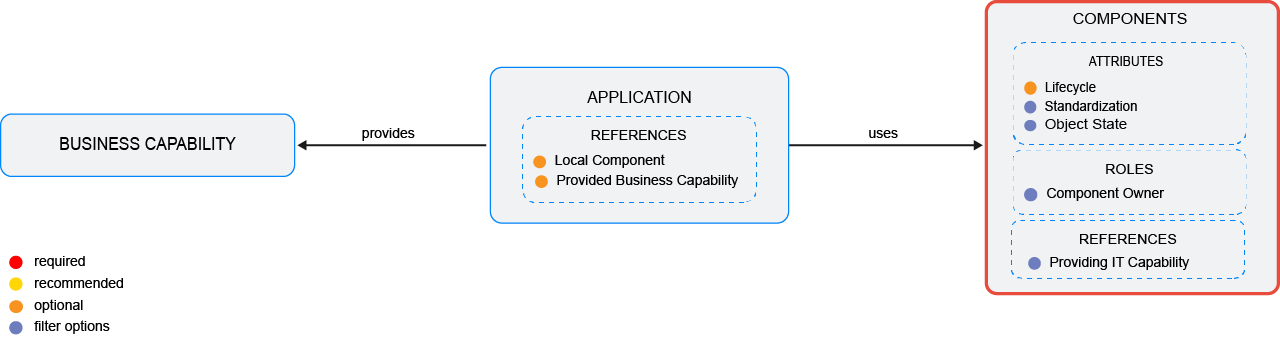
Capture the data necessary for the business question. Applications , business capabilities , and components must be in the repository and well documented. Try to capture as much information as possible about the components and applications because complete data considerably improves the results of the business question and your ability to focus on the data that is most important to you.
- Document the component lifecycle.
- Document the components that the application uses.
- Document the business capabilities that the application pro..
Improve the data and correct data quality issues. Go to the business question's Data Quality > Data Completeness. This visualization helps you to assess whether sufficient data is available to produce meaningful and reliable results for the business question.
- Go to Pending Issues to resolve data quality issues and improve the data that the business question is based on. Only the first 5000 issues are displayed.
- Go to the Data Source page to understand the underlying data relevant to the business question. The data source is a list report and cannot be edited.