
The business question What is our service catalog? consolidates the most important information about the service portfolio in one place and helps to establish a single-source of truth for the service portfolio data. Maintaining an enterprise-wide service catalog saves time in project scoping and ensures that risks are mitigated when changes are made to the service landscape.
The license package Enterprise Architecture Management is required to work with this business question. The use case Service Portfolio Management must be activated.
Navigate to What is our service catalog?
Use the method that is most convenient for you:
- In the left navigation panel, enter What is our service catalog? in the Search Navigation field.
- In the left navigation panel, click Home. In the content area, go to the Business Questions page and click the tile for What is our service catalog?
- In the left navigation panel, expand the sections Business Questions and Transparency and click What is our service catalog?
What information is displayed in What is our service catalog?
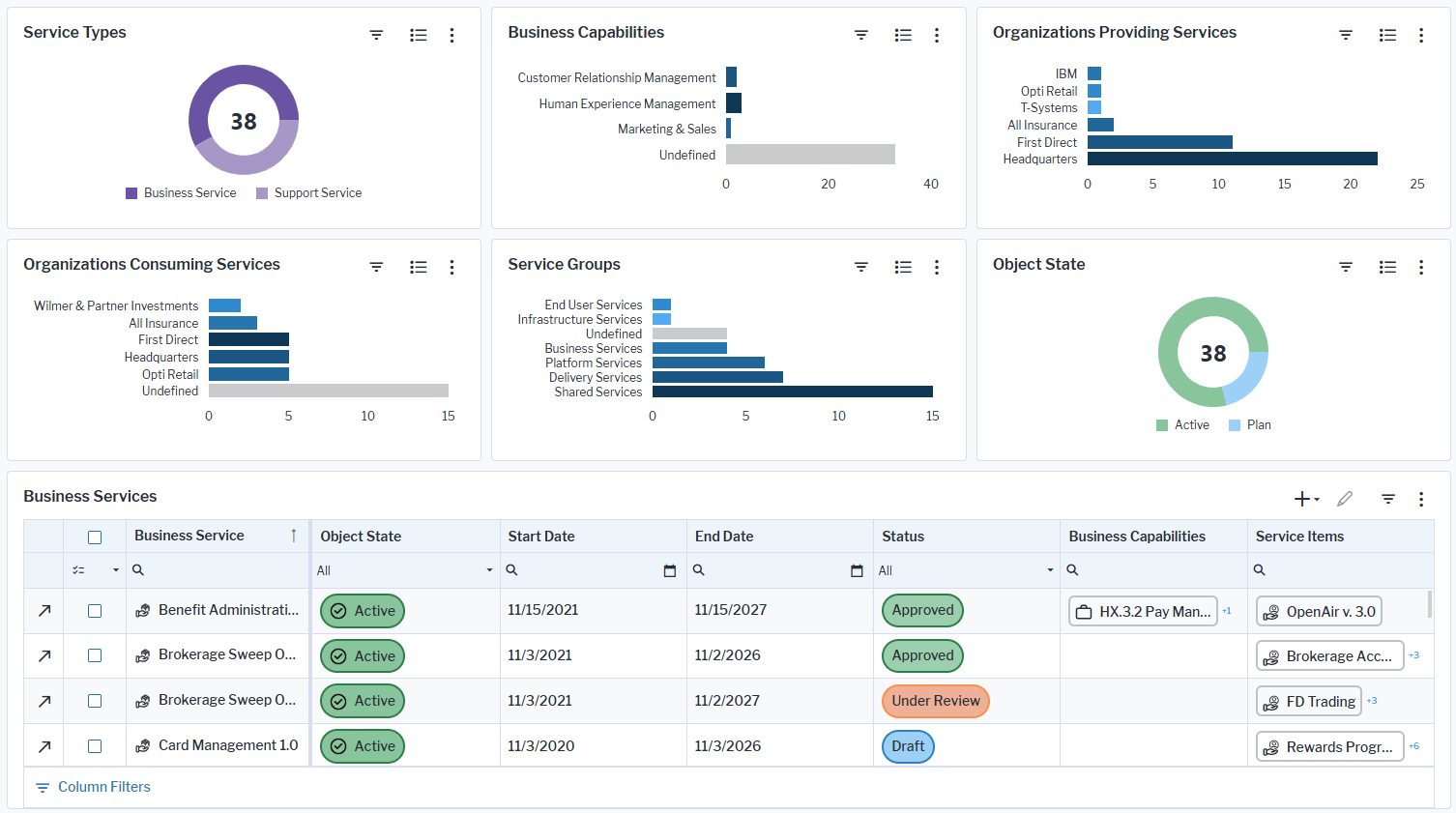
Click the  global filter button and specify the filter fields to show services based on a specific type of service, provider organization, consumer organization, supported business capability, and service group. The global filter will be applied to all business charts and the Business Services and Support Services data workbenches.
Service Types: Shows the number of business services vs. support services in the repository. Point to a doughnut slice to display the number of services for each type.
Business Capabilities: Visualizes the number of business services per level one business capability. The business services specified for a business capability are aggregated to the first-level business capabilities. Point to a bar to display the number of business services that support a business capability. To understand which business services support the business capability, double-click a bar to navigate to the business capability content area > Service Context > Supporting Business Services.
Organizations Providing Services: Visualizes the organizations providing business services and support services. Point to a bar to display the number of business services and support services that the organization provides.
Organizations Consuming Services: Visualizes the organizations consuming business services. Point to a bar to display the number of business services that the organization consumes.
Service Groups: Visualizes the number of business services and support services assigned to service groups. Point to a bar to display the number of business services and support services assigned to the support group. Double-click a bar to navigate to the content area of the service group.
Object State: Shows the number of services in the repository that have the object states Plan or Active. Point to a doughnut slice to display the number of services with the respective object state.
Business Services: Visualizes a data workbench showing business services including the service items that deliver the business services. Business services are delivered by applications, deployments, and support services.
Support Services: Visualizes a data workbench showing support services including the service items that deliver the support services. Support services are delivered by components, and physical servers, and virtual servers.
How can I edit the data in What is our service catalog?
If you have the relevant access permissions, you can edit the business services and support services in this business question.
The Business Services and Support Services data workbenches show a master list of all business services and support services. Use the features of the data workbench to slice-and-dice your data to focus on data and do the analyses you are interested in. For example, review how many services will soon reach an end date, understand which assets are delivering the business services and support services, and understand the operational costs of the each service.
- Click the caption Business Services or Support Services to drill down to have more space and to focus only on the data workbench.
- Click Structure and add or remove columns to the data table. A tooltip explains the purpose of each attribute, indicator, and role that you can add.
- Set filters for columns by entering filter criteria in the column header. Click Clear in the bottom right corner to remove the filter settings.
- Click Visualize to view the data in a different graphic visualizations. You can save these visualizations to your content repository and used them in other content area pages.
- Click the
 plus sign button to create new services directly in the context of the business question.
 - Click a business service or support service to open the object inspection pane or double-click to go to its content area.
What data is required for What is our service catalog?
Business service data must be in repository as well as support service data to have meaningful results for this business question. Specify all attributes and KPIs for the business services and support services to ensure a single source of truth for all services in the service catalog. The following data is required for this business question:
- Provider attribute: Specify the organization providing the business service/support service.
- Start Date attribute: Specify when the business service/support service is available in the enterprise.
- Lifecycle: Specify to understand dependencies between the business service/support service and the assets delivering the business service/support service.
- Consuming organization: Specify the organization that consumes the business service
- Service groups: Assign the business service/support service to a service group.
Go to the Data Quality page. The Data Completeness view indicates the data that is recommended for meaningful results to the business question. Scroll to the Pending Issues view to resolve the issues and to ensure that the data is complete. Only the first 5000 issues are displayed.
Go to the Data Source page to review the service data that is used to answer the business question. The data source is a list report and cannot be edited.