
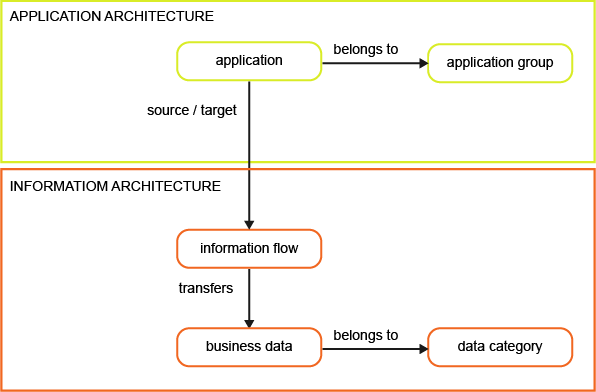
Establish a structured and reliable application portfolio to support an effective APM practice. Capture detailed information about every application in use to ensure strategic decisions are based on accurate, comprehensive data. Document each application's lifecycle, define its stakeholders, and evaluate its performance using preconfigured indicators to identify optimization opportunities and reduce risk.
Describe the information context of your application portfolio by capturing the relationships between applications and the data they exchange. Documenting information flows allows you to trace how information is used across the enterprise and uncover redundancies. Structure your portfolio by creating application groups and assigning applications to them for targeted analysis.
Where to begin
 |
Capture information about your applications. All applications should be documented to ensure that the application portfolio is reliable to make good strategic decisions. Define the application stakeholders, the lifecycle of each application, and evaluate the applications based on preconfigured indicators. |
 |
Capture information about the application's relevance for the business. Document which business capabilities the applications provide, which business processes the applications support, etc. |
 |
Add application groups to the repository. Assign applications to the application groups for portfolio analysis. |
 |
Describe the information context of the application portfolio. Specify the information flows between applications and document the data that is transferred by the information flows. The transfer of data might be captured via business objects or business data. Learn more about data management use cases for the information architecture. |