
In the Alfabet query language, the columns of the resulting data set are defined via the Show properties. The standard name of a column resulting from an Alfabet query is ClassName.PropertyName and the standard caption is ClassName PropertyName.
A simple Alfabet query displays the name and the version of applications:
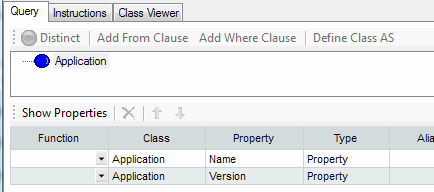
In the Alfabet Query Builder, you can see the object class name in the Show Property section in the column Class and the value of the property name in the column Property. In the Show properties of the resulting Alfabet query, the object class name is defined with the attribute ClassName and the object property name with the attribute Name.
- ALFABET_QUERY_500
- FIND
- Application
- QUERY_XML
- <QueryDef>
- <ShowProperty Type='Property' ClassName='Application' Name='Name' />
- <ShowProperty Type='Property' ClassName='Application' Name='Version' />
- </QueryDef>
The resulting column names and captions are:
| Column Name | Column Caption |
|---|---|
| Application.Name | Application Name |
| Application.Version | Application Version |
The column caption is concatenated from the caption of the object class and the caption of the object class property. Usually these strings are available in all language cultures and are automatically displayed in the language used to render the user interface when displaying the query results. However, the class name and the property name are translated separately and not as a combined string which may lead to differen translation results in some languages.
You can set an alias for the class name in the Alfabet query both for the FIND class and for classes added to the class via a JOIN. This alias changes the name, but not the caption of the column.
The alias App is defined for the object class Application in the Alfabet query:
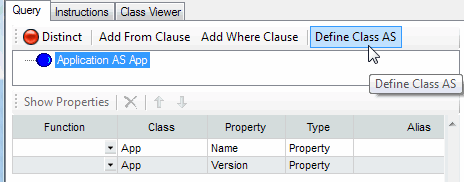
In the Alfabet Query Builder, you can see the value of the object class alias in the Show Property section in the column Class and the value of the property name in the column Property. In the Show properties of the resulting Alfabet query, the object class alias is defined with the attribute ClassAlias and the property name with the attribute Name.
- ALFABET_QUERY_500
- FIND
- Application AS App
- QUERY_XML
- <QueryDef>
- <ShowProperty Type='Property' ClassName='Application' ClassAlias='App' Name='Name' />
- <ShowProperty Type='Property' ClassName='Application' ClassAlias='App' Name='Version' />
- </QueryDef>
The resulting column names and captions are:
| Column Name | Column Caption |
|---|---|
| App.Name | Application Name |
| App.Version | Application Version |
You can set an alias for a column in the Show properties. This alias does not change the name, but only the caption of the database column.
An alias is defined for the columns in the Show properties of the Alfabet query defined to find applications:
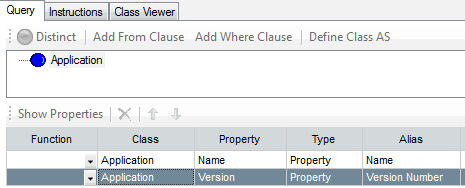
In the Alfabet Query Builder, the alias is defined in the Show Property section in the column Alias. In the Show properties of the resulting Alfabet query, the object class alias is defined with the attribute Alias.
- ALFABET_QUERY_500
- FIND
- Application
- QUERY_XML
- <QueryDef>
- <ShowProperty Type='Property' ClassName='Application' Name='Name' ShowName='Name' />
- <ShowProperty Type='Property' ClassName='Application' Name='Version' ShowName='Version Number' />
- </QueryDef>
The resulting column names and captions are:
| Column Name | Column Caption |
|---|---|
| Application.Name | Name |
| Application.Version | Version Number |