
For some queries, it is necessary to join the same object class two times with different JOIN conditions.
For example, an Alfabet query is defined for a report about assignments for applications. The name and responsible user of the application, the name of the assignment, and the status, target date and user responsible for the assignment shall be displayed in the report.
JOIN s to the classes Assignment and Person must be added to the Alfabet query in order to find the relevant assignments of the query and the users that are the originators and the responsible users/organizations for the assignment.
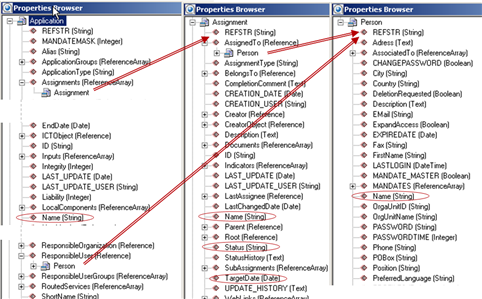
The Assignments property of the class Application references the class Assignment . The attribute ResponsibleUser of the class Application and the attribute AssignedTo of the class Assignment reference the class Person . That means that the class Person is referenced twice in the Alfabet query, each JOIN finding a different subset of objects of the class Person. The name of the person shall be displayed twice in the report: in a column for responsible user and in a column for the assignment’s responsible person/organization.
To specify two different JOIN s to the same object class, you must define an alias for the object class in the first JOIN before adding the second JOIN . The alias can contain letters and numbers, but no special characters or whitespaces. The alias will be used as the object class name for the object classes matching the specified JOIN conditions. You must use the alias instead of the original object class name in the specification of the JOIN condition, WHERE clauses, and Show and Sort properties.
To define the alias for a joined class in the Alfabet Query Builder:
- In the Query tab of the Alfabet Query Builder, add a JOIN for the object class.
- Click the JOIN and select Define Class As in the toolbar. A dialog box opens.
- Define the alias name in the dialog box and click OK. You can see the alias class name in the property selector and, if a condition for the JOIN was already defined, in the JOIN conditions.
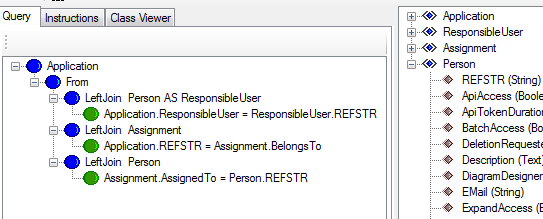
In the following example, the class Person is renamed to ResponsibleUser in the specification of the user that is the assigned responsible user for the base class application. The class is not renamed for the JOIN that specifies the relation between the classes Person and Assignment . In the property selector, ResponsibleUser is listed as well as Person . Both sections contain all properties, roles and indicators for the object class Person.
Specification of an alias is also required to add a JOIN to the base object class of the Alfabet query. The alias is then required on the base class. In the Alfabet Query Builder, an alias on the base class can be specified by clicking the base class instead of the JOIN and following the procedure described above.
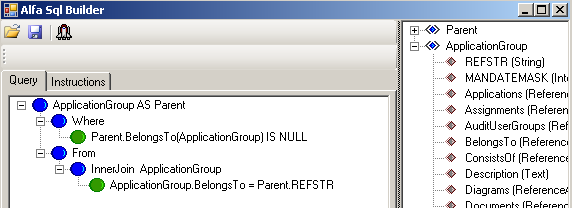
In the following example, application groups that are assigned to top-level application groups shall be displayed in a report. The base class is ApplicationGroup , specified with the alias Parent . A WHERE clause defines that only application groups with no superordinate application groups are found as parent. Subordinate application groups are defined with a JOIN to all objects of the class ApplicationGroup that belong to one of the parent application groups.
In the Alfabet query language, the code for the definition of an alias is as follows:
- ObjectClassName AS AliasName
To define an alias for the base class:
- FIND
- ObjectClassName AS AliasName
To define an alias for a joined class:
- JoinType ReferencedObjectClass AS AliasName ON ObjectClassName.PropertyNameRelationalOperatorAliasName.PropertyName
In the XML definition of Show and Sort properties, the original object class name must be defined in the attribute ClassName and an additional attribute ClassAlias must be added that specifies the alias name.
For example, the following Alfabet query:
- FIND
- Application
- LeftJoin Person AS ResponsibleUser ON Application.ResponsibleUser = ResponsibleUser.REFSTR
- LeftJoin Assignment ON Application.REFSTR = Assignment.BelongsTo
- LeftJoin Person AS Assignee ON Assignment.AssignedTo = Assignee.REFSTR
- QUERY_XML
- <QueryDef>
- <ShowProperty Type='Property' ClassName='Application' Name='Name' />
- <ShowProperty Type='Property' ClassName='Person' ClassAlias='ResponsibleUser' Name='Name'/>
- <ShowProperty Type='Property' ClassName='Assignment' Name='Name' />
- <ShowProperty Type='Property' ClassName='Person' ClassAlias='Assignee' Name='Name' />
- </QueryDef>
finds all applications, their assignments and all users that are defined as the responsible user for an application or assignee of an assignment. In the Show properties, the Name property of the object class person is displayed two times. Because of the specification of an alias, the distinction can be made between the responsible user and the assignee.