
In some cases, you may need to define that more than one property from the first class must match a property of the second class. To do so, you must define all JOIN conditions in one JOIN and specify in the JOIN whether the JOIN conditions are AND or OR related:
AND: Returns True when all expressions are true.
OR: Returns True when at least one expression is true.
In the Alfabet Query Builder, you can decide to use multiple JOIN conditions directly after defining the JOIN . If a JOIN already has a condition, you must first delete that condition to be able to specify multiple conditions.
- In the Query tab of the Alfabet Query Builder, click the JOIN that has no condition specified.
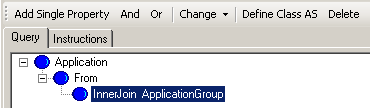
- In the toolbar, select either And or Or to define whether the conditions are AND or OR related. The selected condition is added to the JOIN.
- In the toolbar, select Property and specify the JOIN condition as usual.
- Repeat step 3) to add the second condition.
You can later decide to change the condition from AND to OR and vice versa. To do so, click the condition in the Alfabet query. You will see the buttons Property, AND, and OR in the toolbar and behind that another button for the condition that you might want to change to. Click that button to change the condition.

In the Alfabet query language, multiple JOIN conditions in an Alfabet query are defined as follows:
- JoinType ObjectClassName ON (And|Or Condition1Condition2)
The expression:
- InnerJoin ApplicationGroup ON (And Application.ApplicationGroups=
- ApplicationGroup.RESTR Application.MANDATEMASK
- <>ApplicationGroup.MANDATEMASK)
finds all application groups that the application is assigned to and that have a different mandate specification as the application.
More than two JOIN conditions can be related with each other in an AND or OR relationship.
You can combine multiple AND and OR conditions hierarchically. For example, you can define that condition A and either condition B or condition C should apply.
In the Alfabet Query Builder, you can select a new AND or OR relation from the toolbar when you click an existing AND or OR relation in the Alfabet query.
In the Alfabet Query Builder, the combination of AND or OR relations results in a code similar to the following:
- JoinType ObjectClassName ON (And|Or Condition1 (And|OrCondition2Condition3))
The expression:
- InnerJoin ApplicationGroup ON (And Application.ApplicationGroups=ApplicationGroup.RESTR (Or Application.MANDATEMASK<>ApplicationGroup.MANDATEMASK Application.ResponsibleUser<>ApplicationGroup.ResponsibleUser))
finds all application groups that the application is assigned to and that have either a different mandate specification or a different responsible user as the application.