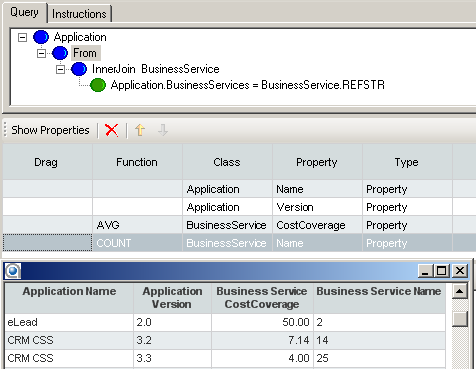
You can assign aggregation functions to Show properties of the type Property . Aggregation functions cannot be assigned to Show properties of the type Role or Indicator.
You can use the following functions in the Show properties of Alfabet queries:
| Function | Description |
|---|---|
| MIN | Return the minimum of a set of values (Only works with numeric values - Real or Integer) |
| MAX | Return the maximum of a set of values (Only works with numeric values - Real or Integer) |
| SUM | Return the sum of a set of values (Only works with numeric values - Real or Integer) |
| AVG | Return the average of a set of values (Only works with numeric values -Real or Integer) |
| COUNT | Return the number of references. |
You can assign a function to a Show property in the Alfabet Query Builder in the Show Properties section:
- In the Show Properties section, click the Function cell of the Show property to which you want to assign a function and select the function in the drop-down menu.
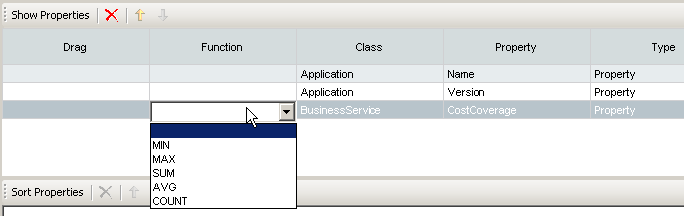
To assign a function to a Show property in the Alfabet query language, add the XML attribute Function='FunctionName' to the ShowProperty XML element of the Show property that you want to assign the function to:
- <ShowProperty ClassName='BusinessFunction' Name='CostCoverage' Function='AVG'/>
In the alternative specification of Show properties in SHOW clauses, the function is specified in the SHOW clause with the prefix AQL_:
General syntax:
- SHOW AQL_FUNCTION(ObjectClassName.PropertyName)
Example:
- SHOW Application.Name Application.Version AQL_AVG(BusinessService.CostCoverage)
The query syntax AQL_<PROPERTY> is reserved for Alfabet queries and may not be used as a name for custom properties.
If a function is defined for a Show property, the result dataset will be grouped by all properties not aggregated. Calculation is done within the lowest possible grouping level. The lowest level is the FIND class. There is at least one row in the report for each object of the FIND class.
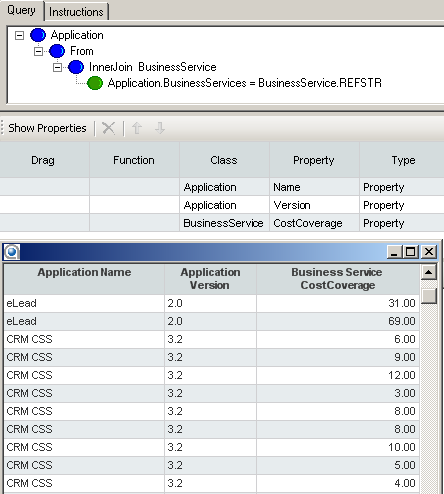
For example, an Alfabet query shall show the average of cost coverage values of all business services assigned to an application. If you define the Show properties for the Alfabet query to show the name and version of the application and the cost coverage values of the assigned business services, you will get a report displaying multiple rows for each application:
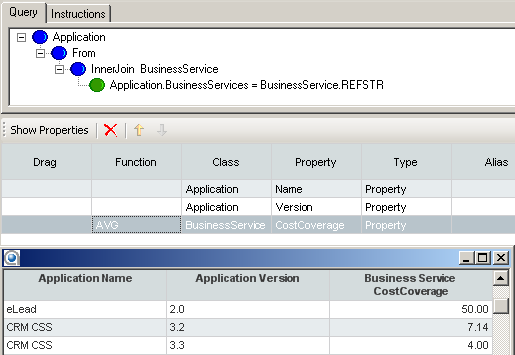
To display the average cost coverage value per application, you must define in the Show properties that the function AVG is applied to the Show property BusinessService.CostCoverage. The report now displays one row for each application that displays the name and version of the application and the average cost coverage of the business services:
To see the average of the defined cost coverage values, you must make sure that no other properties of the business services are defined in the Show properties. If, for example, the report shows the name of the business service as well as the cost coverage values, a separate result row is displayed for each business service of the application to include the business service name in the report. Although the AVG function was assigned on the business service cost coverage, the function cannot be executed:
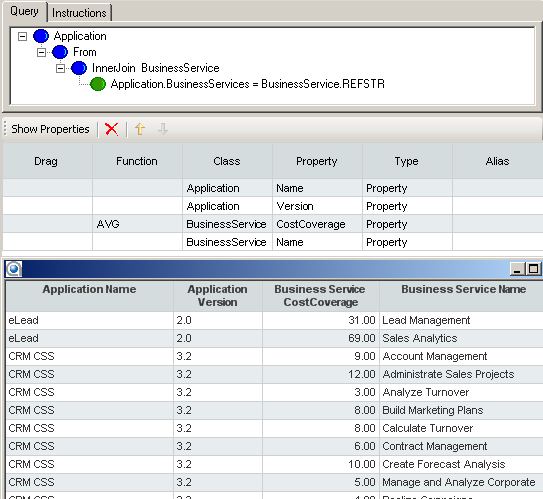
To see a report that not only shows the average cost coverage, but also the number of business services for which the average was calculated, you must include the business service name as Show property, but assign the COUNT function to it: