
If you open an Alfabet query with the Alfabet Query Builder, you will see an interface with three main workspaces that represent the main structure of an Alfabet query written in Alfabet query language.
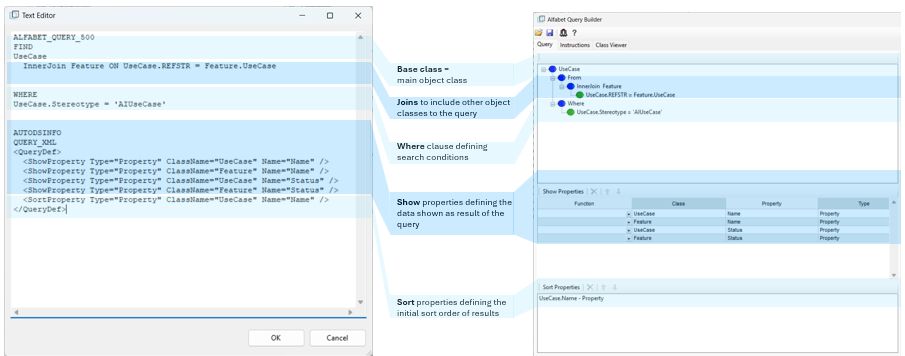
- The first section of the Alfabet query defines the objects to be searched for in the Alfabet database.
- The Alfabet query starts with the base class, which is the class that is being searched for. In a report, the user can navigate to the object profile of this object class by clicking on an object displayed in the search results. In the example above, the base class is Application.
- A JOIN allows you to include other object classes in the Alfabet query. The Alfabet Query Builder specifies the JOINs in a FROM clause. If your search shall include data from object classes other than the base object class, you must define the relation between that object class and the base object class with a JOIN . For example, to create a report about the applications that are assigned to a defined application group, you must define the relation between applications and application groups in a JOIN.

Please note that whereas the Alfabet Query Builder specifies JOIN s via a FROM clause, the Alfabet query language does not use the expression FROM for a JOIN.
- A WHERE clause allows you to define the conditions that objects must meet to be included in the search condition. For example, you can search for applications that are assigned to a specific ICT object or that are members of a specific application group.
- In the Show Properties window, you can define which properties of the objects found by your Alfabet query shall be displayed in the resulting report or delivered as output to the processing functionality. If the output of your Alfabet query is a report table, you must define the columns of the report in Show Properties window. A column is added to the report for each show property defined.
- In the Sort Properties window, you can define the sort order of your Alfabet query results. You can sort the results in alpha-numerical order for any property included in the Show Properties section
A typical tabular report based on an Alfabet query is shown below:

Each result found by the Alfabet query is displayed in its own row in the report. The user can click the arrow in the first column of the table to navigate to the base class object. In the example above, the base class is the class Use Case. Clicking the arrow in the first row will open the content area of the use case Financial fraud detection.