
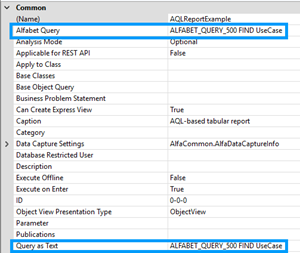
In Alfabet Expand, Alfabet queries are defined in attributes of configuration object. In most configuration objects, there are two attributes to define the Alfabet query.
-
Alfabet Query: Click the Browse
 button to open the Alfabet Query Builder. The tool Alfabet Query Builder supports the definition of valid Alfabet queries in a dedicated user interface for query building.
Please note that the query that you define with the Alfabet Query Builder is only saved if you close the Alfabet Query Builder using the OK button. If you click the X on the upper right corner of the window, the Alfabet Query Builder will close without saving your changes. After closing the Alfabet Query Builder, you must also save the configuration element the query is defined for to the Alfabet database via the Save button in the menu of Alfabet Expand.
-
Query as Text: Click the Browse button in the Alfabet Query as Text field to open a text editor. You can write the Alfabet query based on the Alfabet query language directly in the editor.