
Alfabet supports two use cases to manage the exchange of data. The use cases Basic Data Management and Advanced Data Management are mutually exclusive and only one may be enabled. Both Basic Data Management and Advanced Data Management use cases are available with either the license IT Transformation Server - FastLane or IT Transformation Server - Enterprise.
- The use case Basic Data Management is activated per default. In this case, the transfer of data is captured via business objects.
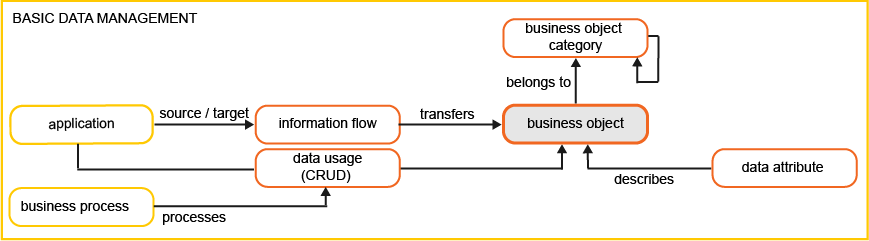
- Business objects are at the leaf level of the hierarchy Business Object Category > Business Object.
- Data workbenches will be available in the navigation panel for Business Object Categories and Business Objects.
- Information flows transfer business objects between applications. A Transferred Business Objects view is available in the information flow content area where transferred data can be captured from the perspective of the incoming or outgoing information flow.
- Data usage and CRUD (Create, Read, Update, Delete) operations are captured for the business object.
- The business questions Where do we use sensitive data? and Where is our data processed? visualize business objects.
- The use case Advanced Data Management adds business data as a child of business object. The business object represents an entity such as a customer, invoice, or order. It is defined by a set of attributes (e.g., Name, Phone Number). Business objects are used and exchanged in business processes. A business data is the concrete, logical instantiation of a business object.
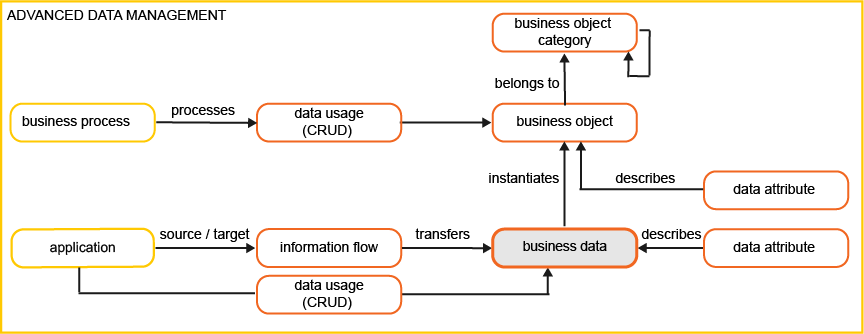
- Business data are at the leaf level of the hierarchy Business Object Category > Business Object > Business Data.
- Data workbenches are available in the navigation panel for Business Object Categories, Business Objects, and Business Data.
- Information flows transfer business data between applications. A Transferred Business Data view is available in the information flow content area where transferred data can be captured from the perspective of the incoming or outgoing information flow.
- Data usage and CRUD (Create, Read, Update, Delete) operations are captured for the business data.
- A Business Data data workbench is available in the business object content area to capture the business data that instantiates a business object. A Business Data Governance view shows all business data associated with the business object, the compliance of the data, and analysis of its attributes.
- The business questions Where do we use sensitive data? and Where is our data processed? visualize business data.
To implement Advanced Data Management for FastLane Customers:
- Contact Alfabet Support and request the use case to be activated.
- Once advanced data management is activated, execute the ADIF job DataMigrationFromBasicDataToAdvancedData . Open the Alfabet user interface via the Portfolio Admin user profile. Go to ADIF Jobs Administration, expand the Data Migration section in the dataset and trigger the ADIF scheme DataMigrationFromBasicDataToAdvancedData.
To implement Advanced Data Management for Enterprise Customers:
- Go to Alfabet Expand > Presentation tab > XML Objects > Administration > ProductUseCaseScope . Alternatively you can access the XML object via Alfabet Administrator. connect to the server alias and click XML Objects > ProductUseCaseScope.
- To implement the Advanced Data Management use case, specify the XML attributes <UseCase Name='Advanced Data Management' Active='true'/> and <UseCase Name='Basic Data Management' Active='false'/>
- To implement the Basic Data Management use case, specify the XML attributes <UseCase Name='Advanced Data Management' Active='false'/> and <UseCase Name='Basic Data Management' Active='true'/>
- Restart the Microsoft Internet Information Services®.
- Execute the ADIF job DataMigrationFromBasicDataToAdvancedData . Open the Alfabet user interface via the Portfolio Admin user profile. Go to ADIF Jobs Administration, expand the Data Migration section in the dataset and trigger the ADIF scheme DataMigrationFromBasicDataToAdvancedData . Alternatively you can access the ADIF job via Alfabet Expand.