
- View an ArchiMate Diagram
- Create an ArchiMate Diagram
- Create an ArchiMate Diagram
- Application Cooperation Viewpoint
- Application Usage Viewpoint
- Business Process Cooperation Viewpoint
- Capability Map Viewpoint
- Goal Realization Viewpoint
- Implementation and Deployment Viewpoint
- Implementation and Migration Viewpoint
- Information Structure Viewpoint
- Layered Viewpoint
- Migration Viewpoint
- Motivation Viewpoint
- Organization Viewpoint
- Outcome Realization Viewpoint
- Physical Viewpoint
- Product Viewpoint
- Project Viewpoint
- Requirements Realization Viewpoint
- Resource Map Viewpoint
- Service Realization Viewpoint
- Stakeholder Viewpoint
- Strategy Viewpoint
- Technology Usage Viewpoint
- Technology Viewpoint
ArchiMate is an open and standardized modeling language for describing, analyzing, and visualizing enterprise architectures. It provides a consistent way to represent business, application, technology, physical, and implementation aspects of an enterprise and the relationships between them. By using ArchiMate diagrams, architects and stakeholders can create clear visual models that help communicate how an organization operates and how its various architectural components interact.
Unlike conventional drawing tools ArchiMate diagrams in Alfabet are directly linked to the underlying architecture repository, ensuring that visualizations remain connected to the data they represent. As architecture data evolves, related diagrams, viewpoints, and analyses can be updated accordingly, enabling consistent and accurate representations of the enterprise landscape.
If an asset is included in the design of an ArchiMate diagram, that ArchiMate diagram will be available in the ArchiMate Diagrams in the content areas of the assets included in the diagram. For example, if a project and application are added to an Implementation and Migration Viewpoint diagram, the diagram will be available in the ArchiMate Diagrams views of the project and application.
Be sure to read the section Quick guide: Build diagrams with the Diagram Designer familarize yourself with the basics of diagram creation and design.
View an ArchiMate Diagram
- ArchiMate diagrams are available in the following locations in Alfabet
- Go to the navigation pane > Analysis Tools > ArchiMate Diagrams. This view shows existing ArchiMate diagrams that you have access permissions for.
- Go to the content area of the asset you have access permissions for and navigate to the Diagrams page > ArchiMate Viewpoints. The view shows existing ArchiMate diagrams designed for the asset you are working with.
- Click the
 navigate button to open the diagram.
 - You can edit the basic attributes of any asset displayed in the diagram that you have access permissions for.
- Click the asset to open the inspection pane, where you can edit the displayed attributes.
- Double-click the asset to navigate to the content area, where you can edit the assets attributes and relationships.
- The Open Diagram button is visible for users who have been granted to the Diagram Designer access via an administrative user . To design or edit an Archimate diagram , click the
 edit button > Open Diagram.
Create an ArchiMate Diagram
ArchiMate diagrams in Alfabet are designed using the Diagram Designer tool. If a user has permissions to design and edit diagrams, the Open Diagram button available will be available via the edit button. Access to the Diagram Designer is limited to the users that have been granted access to the Diagram Designer and the Open Diagram button is only visible for users who have been granted access via an administrative user.
- Go to then navigation panel > Analysis Tools > ArchiMate Diagrams . Or go to the content area of the asset you want to design the diagram for and navigate to the Diagrams page, and go to ArchiMate Viewpoints.
- Click New > Create New Diagram.
- Specify a name for the diagram and select the ArchiMate viewpoint of the diagram in the Diagram Definition field. All ArchiMate viewpoints are described below.
- If you are working in the Analysis Tools > ArchiMate Diagrams, click the navigate button to open the diagram.
- To edit the design of the diagram, click the edit button > Open Diagram. This button is only be visible for users who have been granted access via an administrative user
- The Diagram Designer opens. Add the diagram elements and shapes displayed in the toolbox and refine the diagram visualization.
- Save the diagram by clicking the Save Changes button.
- The ArchiMate diagram will be available in Analysis Tools > ArchiMate Diagrams as well as in the ArchiMate Diagrams in the content areas of the assets included in the diagram. For example, if a project and application are added to an Implementation and Migration Viewpoint diagram, the diagram will be available in the ArchiMate Diagrams views of the project and application.
Create an ArchiMate Diagram
ArchiMate diagrams in Alfabet are designed using the Diagram Designer tool. If a user has permissions to design and edit diagrams, the Open Diagram button available will be available via the edit button. Access to the Diagram Designer is limited to the users that have been granted access to the Diagram Designer and the Open Diagram button is only visible for users who have been granted access via an administrative user.
- Go to then navigation panel > Analysis Tools > ArchiMate Diagrams . Or go to the content area of the asset you want to design the diagram for and navigate to the Diagrams page, and go to ArchiMate Viewpoints.
- Click New > Create New Diagram.
- Specify a name for the diagram and select the ArchiMate viewpoint of the diagram in the Diagram Definition field. All ArchiMate viewpoints are described below.
- If you are working in the Analysis Tools > ArchiMate Diagrams, click the navigate button to open the diagram.
- To edit the design of the diagram, click the edit button > Open Diagram. This button is only be visible for users who have been granted access via an administrative user
- The Diagram Designer opens. Add the diagram elements and shapes displayed in the toolbox and refine the diagram visualization.
- Save the diagram by clicking the Save Changes button.
- The ArchiMate diagram will be available in Analysis Tools > ArchiMate Diagrams as well as in the ArchiMate Diagrams in the content areas of the assets included in the diagram. For example, if a project and application are added to an Implementation and Migration Viewpoint diagram, the diagram will be available in the ArchiMate Diagrams views of the project and application.
Application Cooperation Viewpoint
The Application Cooperation Viewpoint enables modeling of information flows between application components and the services the components provide and require.
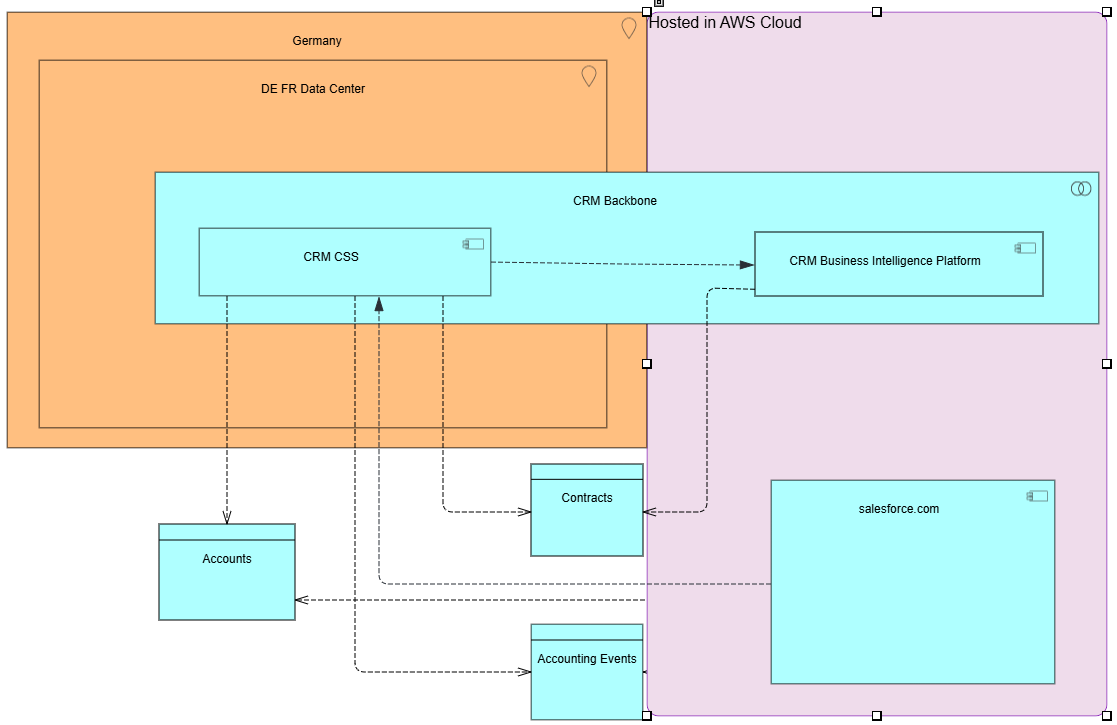
The table shows ArchiMate business elements that can be added as diagram elements to the diagram and the Alfabet classes they are mapped to.
| ArchiMate Element | Alfabet Class |
|---|---|
|
Location |
Location |
|
Application Collaboration |
Application Group |
|
Application Component |
Application |
|
Business Data |
Business Data |
|
Information Flow |
Information Flow |
|
Business Data Usage |
Data Usage |
Follow basic guidelines to create and design the ArchiMate viewpoint in the Diagram Designer.
Application Usage Viewpoint
The Application Usage Viewpoint shows the application support to business processes, and how applications are used by other applications. It helps stakeholders understand which applications support specific business activities.
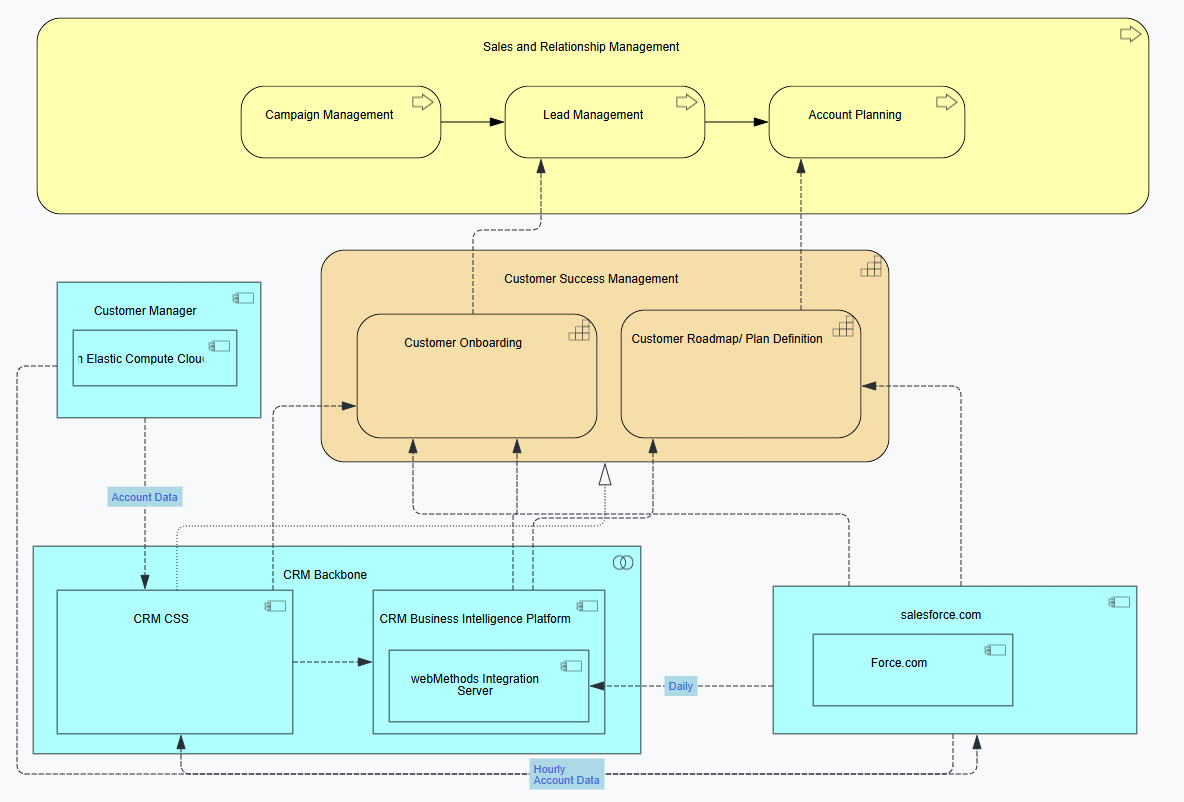
The table shows ArchiMate business elements that can be added as diagram elements to the diagram and the Alfabet classes they are mapped to.
| ArchiMate Element | Alfabet Class |
|---|---|
|
Business Process |
Business Process |
|
Business Capability |
Business Capability |
|
Application Collaboration |
Application Group |
|
Application Component |
Application |
|
Business Process Flow |
Business Process Flow |
|
Information Flow |
Information Flow |
Follow basic guidelines to create and design the ArchiMate viewpoint in the Diagram Designer.
Business Process Cooperation Viewpoint
The Business Process Cooperation Viewpoint enables modeling of the flow of main business processes of an enterprise.
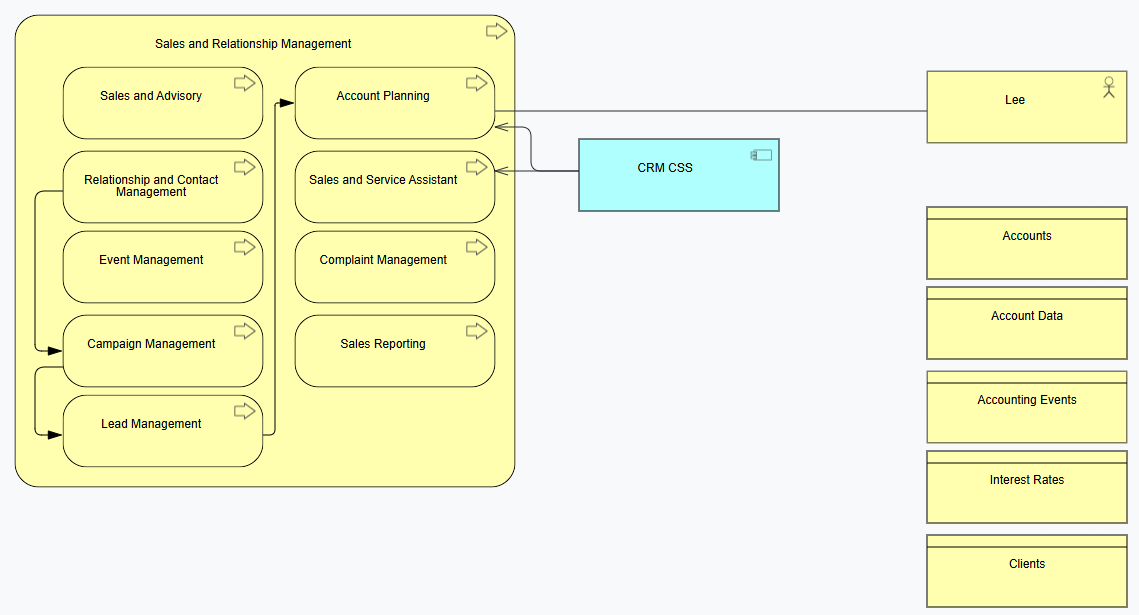
The table shows ArchiMate business elements that can be added as diagram elements to the diagram and the Alfabet classes they are mapped to.
| ArchiMate Element | Alfabet Class |
|---|---|
|
Business Process |
Business Process |
|
Business Capability |
Business Capability |
|
Application Collaboration |
Application Group |
|
Application Component |
Application |
|
Business Process Flow |
Business Process Flow |
|
Information Flow |
Information Flow |
Follow basic guidelines to create and design the ArchiMate viewpoint in the Diagram Designer.
Capability Map Viewpoint
The Capability Map Viewpoint provides a high-level overview of an organization's business capabilities. It helps identify what the organization does without focusing on how capabilities are implemented by processes, applications, or technologies.
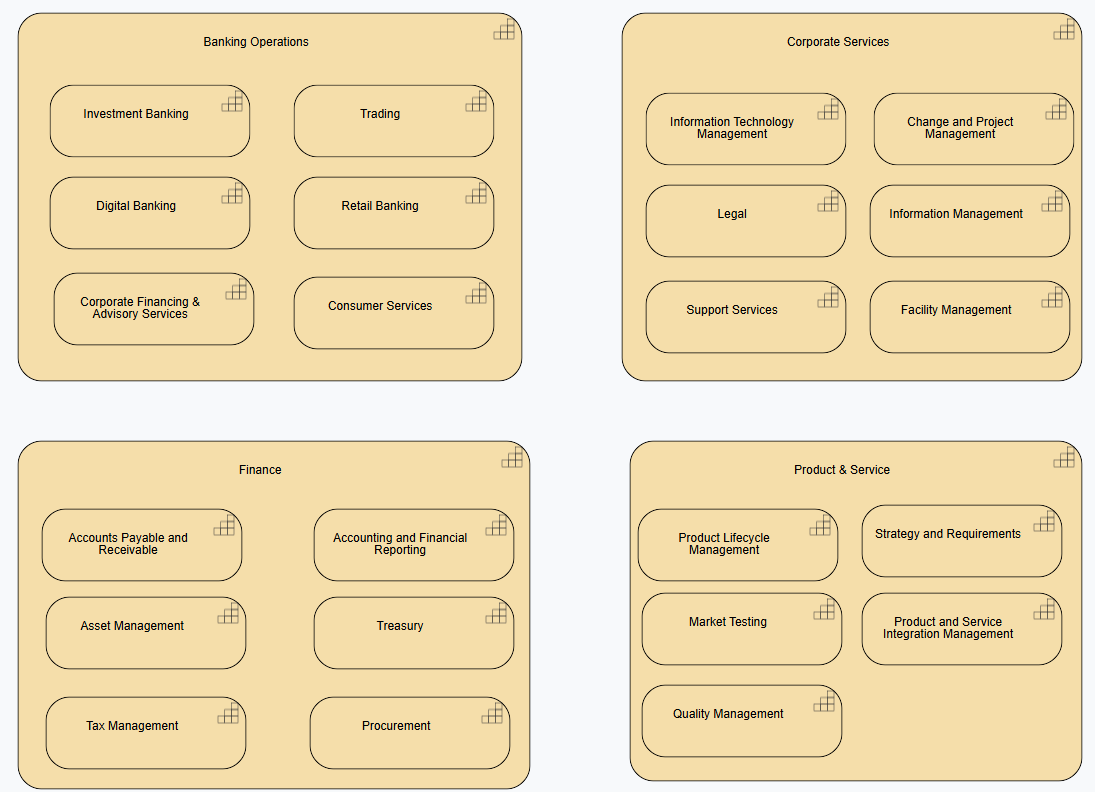
The table shows ArchiMate business elements that can be added as diagram elements to the diagram and the Alfabet classes they are mapped to.
| ArchiMate Element | Alfabet Class |
|---|---|
|
Business Capability |
Business Capability |
Follow basic guidelines to create and design the ArchiMate viewpoint in the Diagram Designer.
Goal Realization Viewpoint
The license Strategic Portfolio Management is required to work with the Archimate diagram type Goal Realization Viewpoint.
The Goal Realization Viewpoint models the refinement of high-level goals into more specific goals, and the refinement of these specific goals further into requirements or constraints.
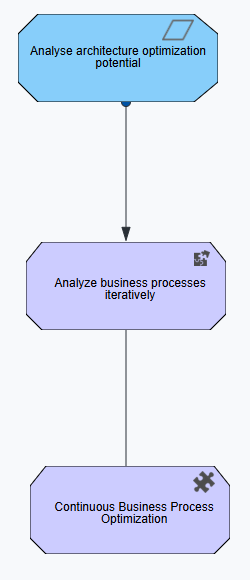
The table shows ArchiMate business elements that can be added as diagram elements to the diagram and the Alfabet classes they are mapped to.
| ArchiMate Element | Alfabet Class |
|---|---|
|
Demand |
Demand |
|
Demand to Strategy |
Reference between Demand and Strategy |
|
Goal |
Goal |
|
Objective |
Objective |
|
Strategic Theme |
Strategic Theme |
Follow basic guidelines to create and design the ArchiMate viewpoint in the Diagram Designer.
Implementation and Deployment Viewpoint
The Implementation and Deployment Viewpoint eShows how software artifacts, applications, and infrastructure components are deployed in the operational environment. It is commonly used to document runtime architectures and deployment configurations.
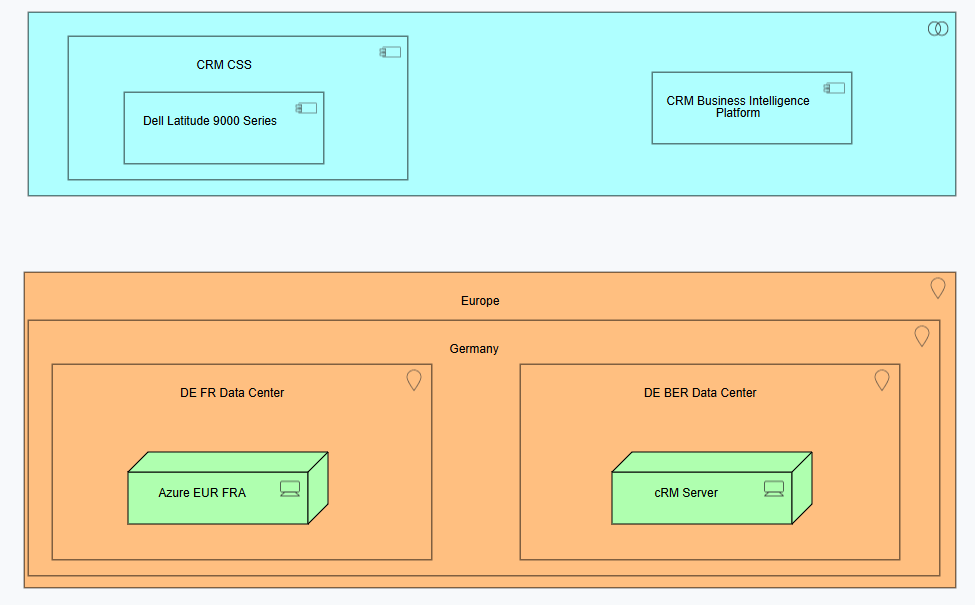
The table shows ArchiMate business elements that can be added as diagram elements to the diagram and the Alfabet classes they are mapped to.
| ArchiMate Element | Alfabet Class |
|---|---|
|
Location |
Location |
|
Application Collaboration |
Application Group |
|
Application Component |
Application |
|
Server |
Physical Server or Virtual Server |
|
Information Flow |
Information Flow |
Follow basic guidelines to create and design the ArchiMate viewpoint in the Diagram Designer.
Implementation and Migration Viewpoint
The Implementation and Migration Viewpoint viewpoint is used to relate programs and projects to the parts of the architecture that they implement.
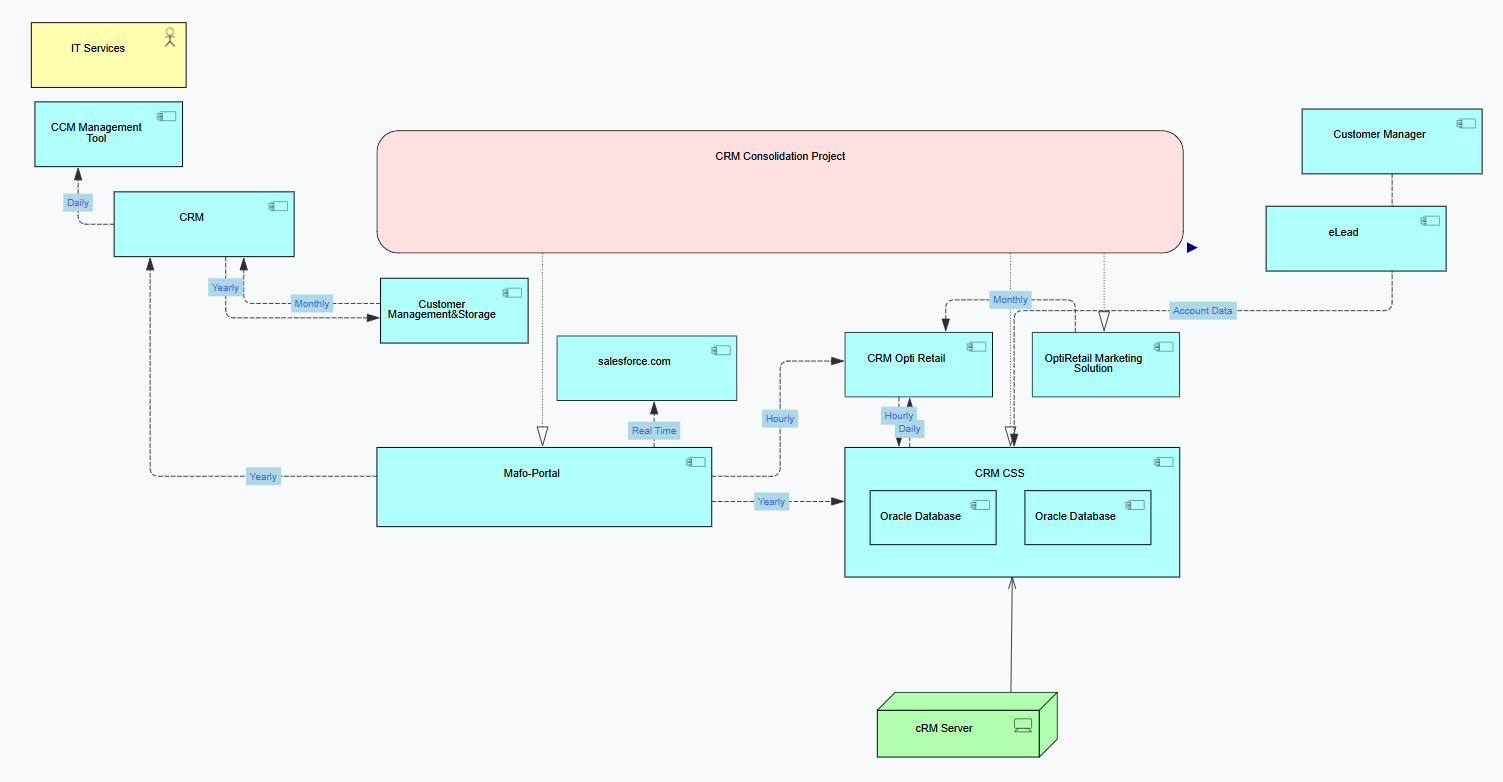
The table shows ArchiMate business elements that can be added as diagram elements to the diagram and the Alfabet classes they are mapped to.
| ArchiMate Element | Alfabet Class |
|---|---|
|
Work Package |
Work Package |
|
Application Component |
Application |
|
Server |
Physical Server or Virtual Server |
|
Business Actor |
Person or Organization |
|
Business Actor to Work Package |
Role (for Organization |
|
Work Package to Application Component |
Affected Architecture |
Follow basic guidelines to create and design the ArchiMate viewpoint in the Diagram Designer.
Information Structure Viewpoint
The Information Structure Viewpoint represents the structure and relationships of business objects and their business data across the enterprise.
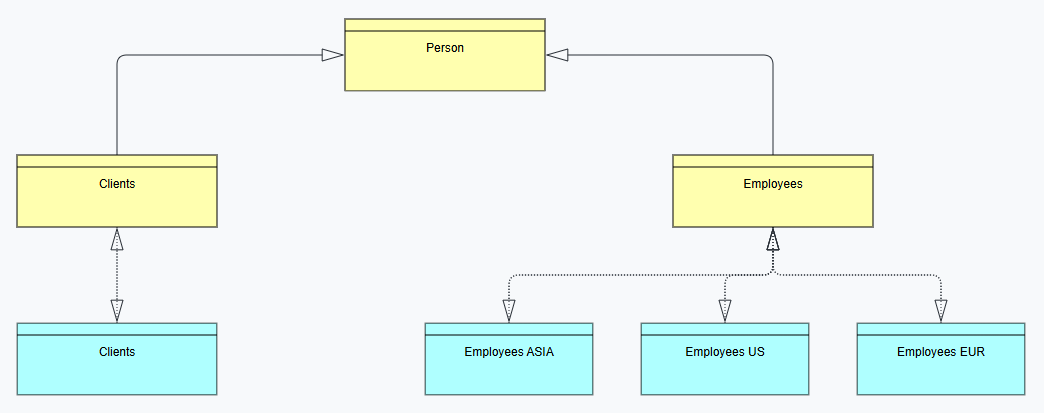
The table shows ArchiMate business elements that can be added as diagram elements to the diagram and the Alfabet classes they are mapped to.
| ArchiMate Element | Alfabet Class |
|---|---|
|
Data Categories |
Business Object |
|
Business Data |
Business Data |
Follow basic guidelines to create and design the ArchiMate viewpoint in the Diagram Designer.
Layered Viewpoint
The Layered Viewpoint presents a bird's-eye view of the core elements across all layers and aspects of the enterprise architecture, showing how business, application, and technology domains relate to one another. This viewpoint provides executives and architects with a high-level overview of the enterprise architecture.
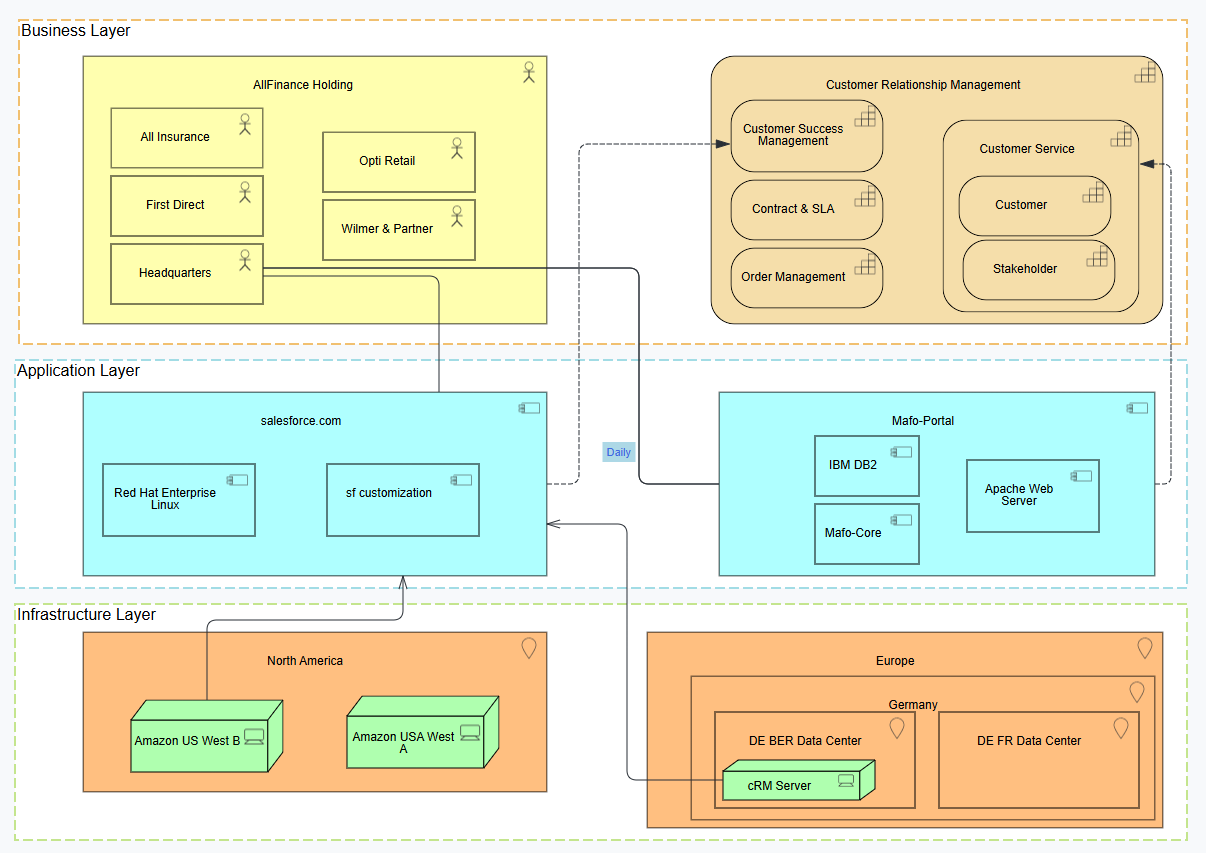
The table shows ArchiMate business elements that can be added as diagram elements to the diagram and the Alfabet classes they are mapped to.
| ArchiMate Element | Alfabet Class |
|---|---|
|
Capability |
Business Capability |
|
Business Actor |
Person or Organization |
|
Location |
Location |
|
Application Component |
Application |
|
Server |
Physical Server or Virtual Server |
|
Business Actor to Application |
Role |
Follow basic guidelines to create and design the ArchiMate viewpoint in the Diagram Designer.
Migration Viewpoint
The Migration Viewpoint models the transition from a baseline (current-state) architecture to a target-state architecture.
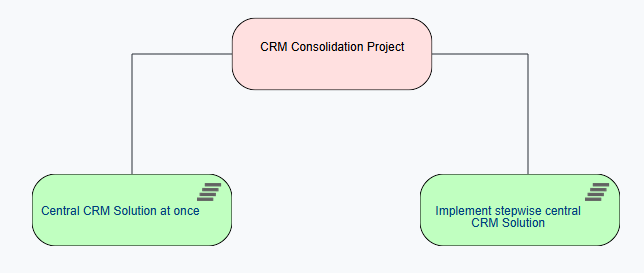
The table shows ArchiMate business elements that can be added as diagram elements to the diagram and the Alfabet classes they are mapped to.
| ArchiMate Element | Alfabet Class |
|---|---|
|
Work Package |
Work Package |
|
Work Package Scenario |
Project |
Follow basic guidelines to create and design the ArchiMate viewpoint in the Diagram Designer.
Motivation Viewpoint
The license Strategic Portfolio Management is required to work with the Archimate diagram type Motivation Viewpoint.
The Motivation Viewpoint presents a complete or partial overview of the motivational aspects of the enterprise architecture by relating stakeholders, goals, drivers, principles, assessments, and requirements. It explains the rationale behind architectural decisions. This viewpoint helps communicate why changes are needed and how architectural decisions align with business objectives.
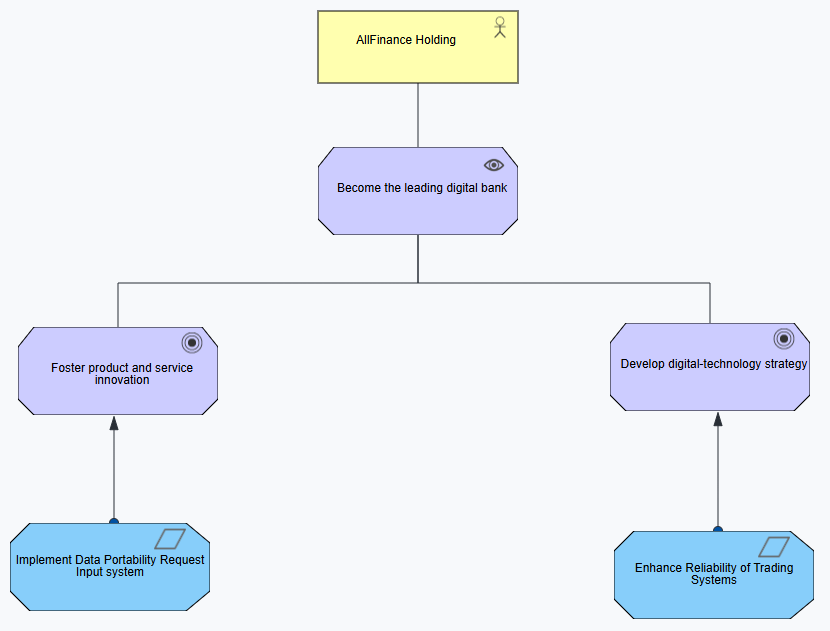
The table shows ArchiMate business elements that can be added as diagram elements to the diagram and the Alfabet classes they are mapped to.
| ArchiMate Element | Alfabet Class |
|---|---|
|
Business Actor |
Person or Organization |
|
Business Actor to Strategy |
Role |
|
Demand |
Demand |
|
Demand to Strategy |
Reference between Demand and Strategy |
|
Vision |
Vision |
|
Goal |
Goal |
|
Objective |
Objective |
|
Strategic Theme |
Strategic Theme |
Follow basic guidelines to create and design the ArchiMate viewpoint in the Diagram Designer.
Organization Viewpoint
The Organization Viewpoint diagram shows organizational structures and helps clarify responsibilities, ownership, and collaboration within the enterprise.
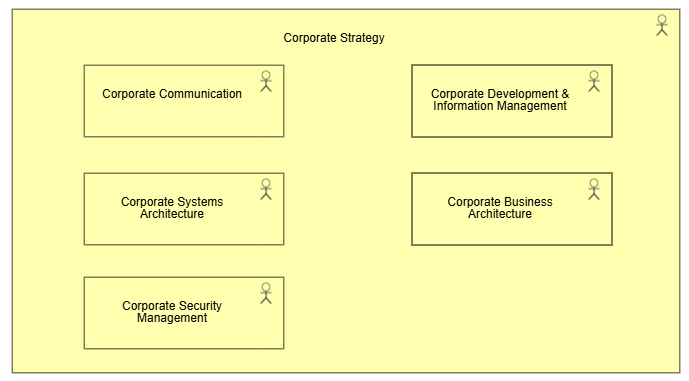
The table shows ArchiMate business elements that can be added as diagram elements to the diagram and the Alfabet classes they are mapped to.
| ArchiMate Element | Alfabet Class |
|---|---|
|
Business Actor |
Organization |
Follow basic guidelines to create and design the ArchiMate viewpoint in the Diagram Designer.
Outcome Realization Viewpoint
The license IT Transformation - Enterprise is required to work with the Archimate diagram type Outcome Realization Viewpoint.
The Outcome Realization Viewpoint shows how outcomes are achieved through capabilities, resources, services, and processes. It provides traceability between strategic goals and the outcomes that the organization intends to realize. This viewpoint is commonly used to demonstrate how architectural initiatives contribute to business value and strategic objectives.
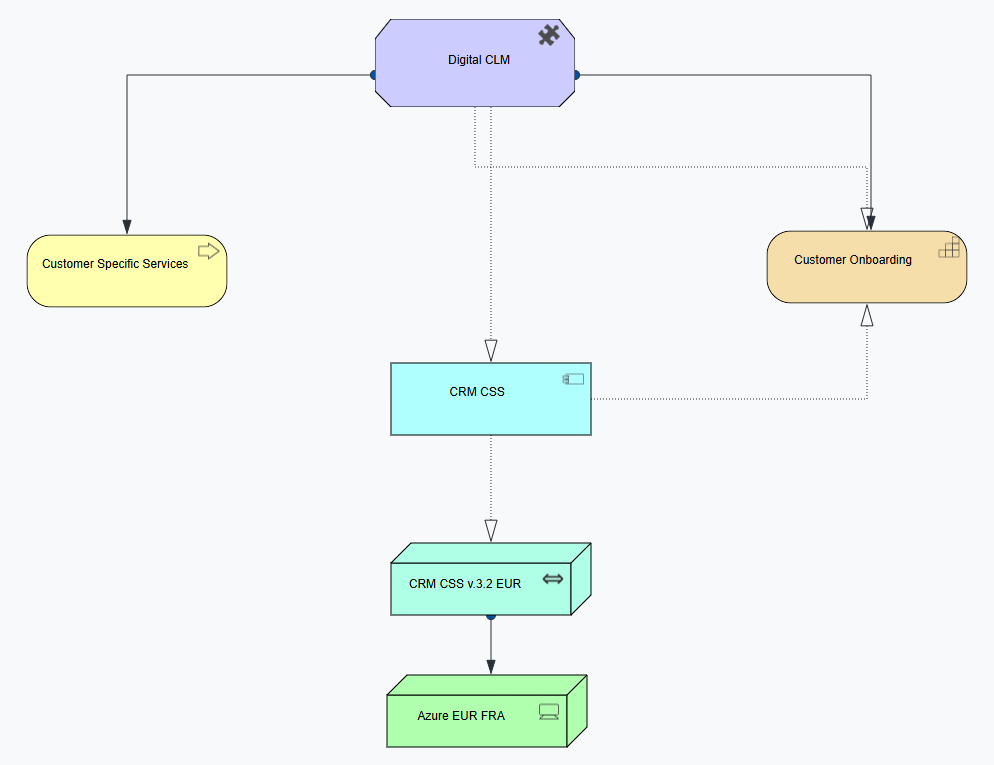
The table shows ArchiMate business elements that can be added as diagram elements to the diagram and the Alfabet classes they are mapped to.
| ArchiMate Element | Alfabet Class |
|---|---|
|
Strategic Theme |
Strategic Theme |
|
Strategic Theme to Object |
Affected Architecture |
|
Business Process |
Business Process |
|
Business Capability |
Business Capability |
|
Application Component |
Application |
|
Server |
Physical Server or Virtual Server |
|
Technology Collaboration |
Deployment |
Follow basic guidelines to create and design the ArchiMate viewpoint in the Diagram Designer.
Physical Viewpoint
The Physical Viewpoint depicts the physical infrastructure of the applications running on servers at specific locations.
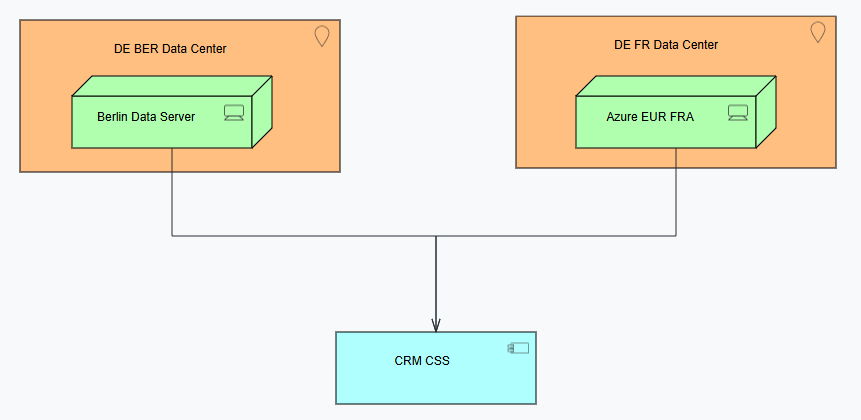
The table shows ArchiMate business elements that can be added as diagram elements to the diagram and the Alfabet classes they are mapped to.
| ArchiMate Element | Alfabet Class |
|---|---|
|
Location |
Location |
|
Application Component |
Application |
|
Server |
Physical Server or Virtual Server |
Follow basic guidelines to create and design the ArchiMate viewpoint in the Diagram Designer.
Product Viewpoint
The license Architecture Enterprise Management is required to work with the Archimate diagram type Product Viewpoint.
The Product Viewpoint depicts how market products are used in the enterprise.
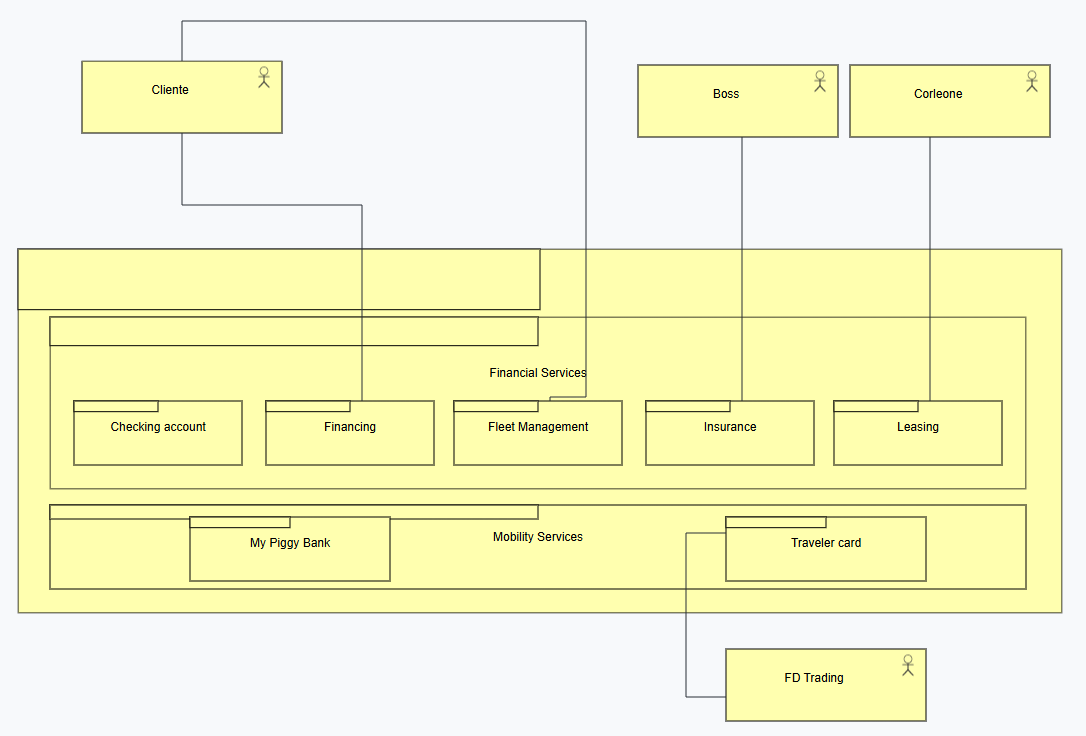
The table shows ArchiMate business elements that can be added as diagram elements to the diagram and the Alfabet classes they are mapped to.
| ArchiMate Element | Alfabet Class |
|---|---|
|
Product Group |
Market Product Group |
|
Product |
Market Product |
|
Business Actor |
Person or Organization |
|
Business Actor to Product |
Role |
Follow basic guidelines to create and design the ArchiMate viewpoint in the Diagram Designer.
Project Viewpoint
The Project Viewpoint describes one or more projects, their dependencies, and the architectural elements that they create, modify, or influence. This viewpoint is useful for architecture governance and portfolio planning.
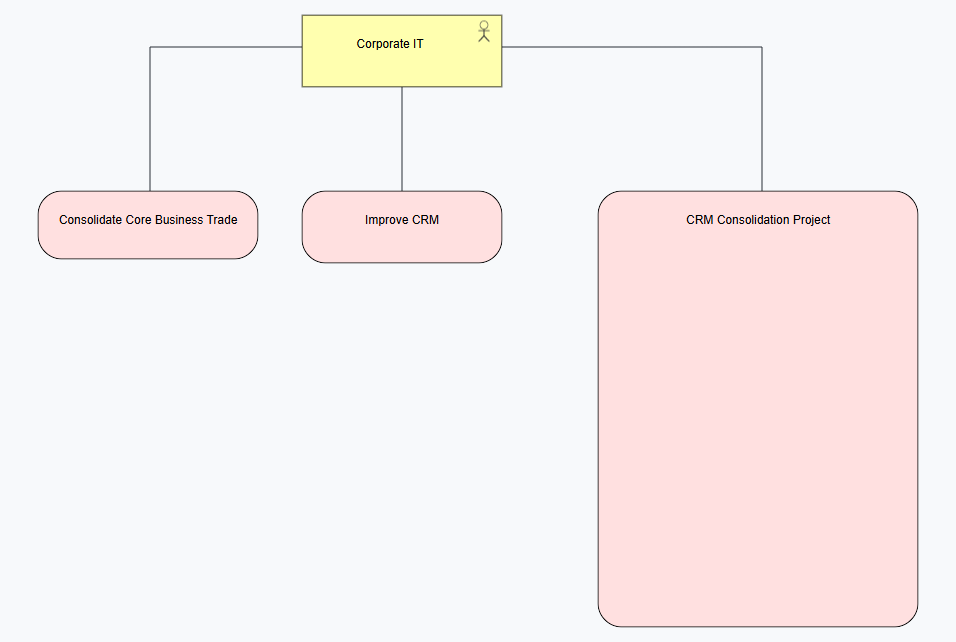
The table shows ArchiMate business elements that can be added as diagram elements to the diagram and the Alfabet classes they are mapped to.
| ArchiMate Element | Alfabet Class |
|---|---|
|
Work Package |
Work Package |
|
Business Actor |
Person or Organization |
|
Business Actor to Work Package |
Role (for Organization) |
Follow basic guidelines to create and design the ArchiMate viewpoint in the Diagram Designer.
Requirements Realization Viewpoint
The Requirements Realization Viewpoint shows how requirements are realized by architectural solutions, capabilities, processes, applications, and technologies. This viewpoint provides traceability from requirements to implementation.
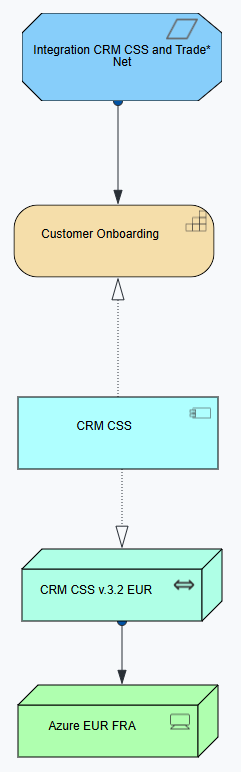
The table shows ArchiMate business elements that can be added as diagram elements to the diagram and the Alfabet classes they are mapped to.
| ArchiMate Element | Alfabet Class |
|---|---|
|
Demand |
Demand |
|
Demand to Object |
Affected Architecture |
|
Business Process |
Business Process |
|
Business Capability |
Business Capability |
|
Application Component |
Application |
|
Server |
Physical Server or Virtual Server |
|
Technology Collaboration |
Deployment |
Follow basic guidelines to create and design the ArchiMate viewpoint in the Diagram Designer.
Resource Map Viewpoint
The Resource Map Viewpoint provides an overview of the resources available to the enterprise and the capabilities they support. This viewpoint helps assess resource allocation and capability support across the organization.
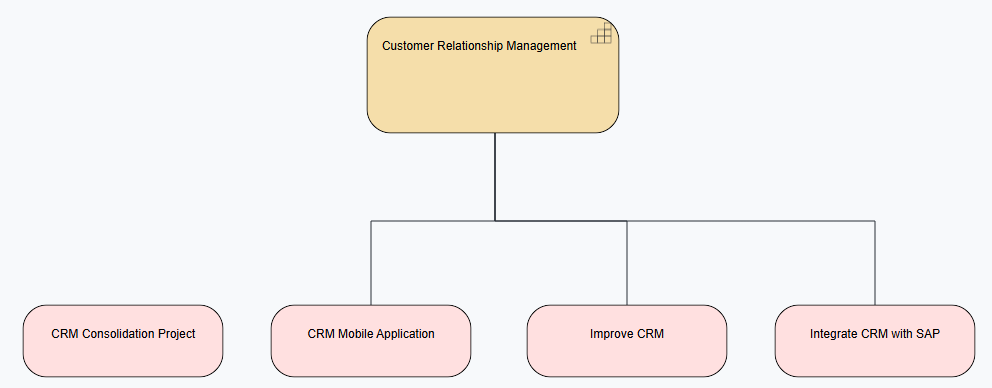
The table shows ArchiMate business elements that can be added as diagram elements to the diagram and the Alfabet classes they are mapped to.
| ArchiMate Element | Alfabet Class |
|---|---|
|
Work Package |
Work Package |
|
Business Capability |
Person or OrganizationBusiness Capability |
|
Work Package to Business Capability |
Affected Architecture |
Follow basic guidelines to create and design the ArchiMate viewpoint in the Diagram Designer.
Service Realization Viewpoint
The license Architecture Enterprise Management is required to work with the Archimate diagram type Service Viewpoint.
The Service Realization Viewpoint shows how a business or application service is realized by processes, functions, components, and technology. This viewpoint is used to understand the implementation and support structure behind services.
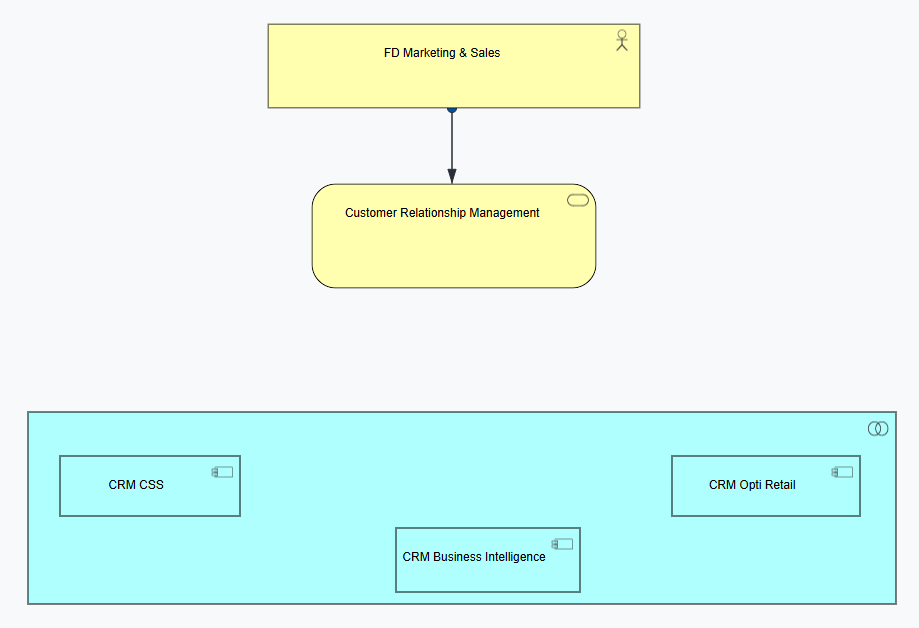
The table shows ArchiMate business elements that can be added as diagram elements to the diagram and the Alfabet classes they are mapped to.
| ArchiMate Element | Alfabet Class |
|---|---|
|
Business Capability |
Business Capability |
|
Application Collaboration |
Application Group |
|
Application Component |
Application |
|
Business Service |
Business Service |
|
Business Actor |
Person or Organization |
|
Business Actor to Business Service |
Role (for Organization) |
|
Information Flow |
Information Flow |
Follow basic guidelines to create and design the ArchiMate viewpoint in the Diagram Designer.
Stakeholder Viewpoint
The license Strategic Portfolio Management is required to work with the Archimate diagram type Stakeholder Viewpoint.
The Stakeholder Viewpoint identifies stakeholders, their concerns, drivers, goals, and requirements. It provides a communication-oriented view of the enterprise architecture. This viewpoint helps ensure that stakeholder concerns are addressed throughout architecture development.
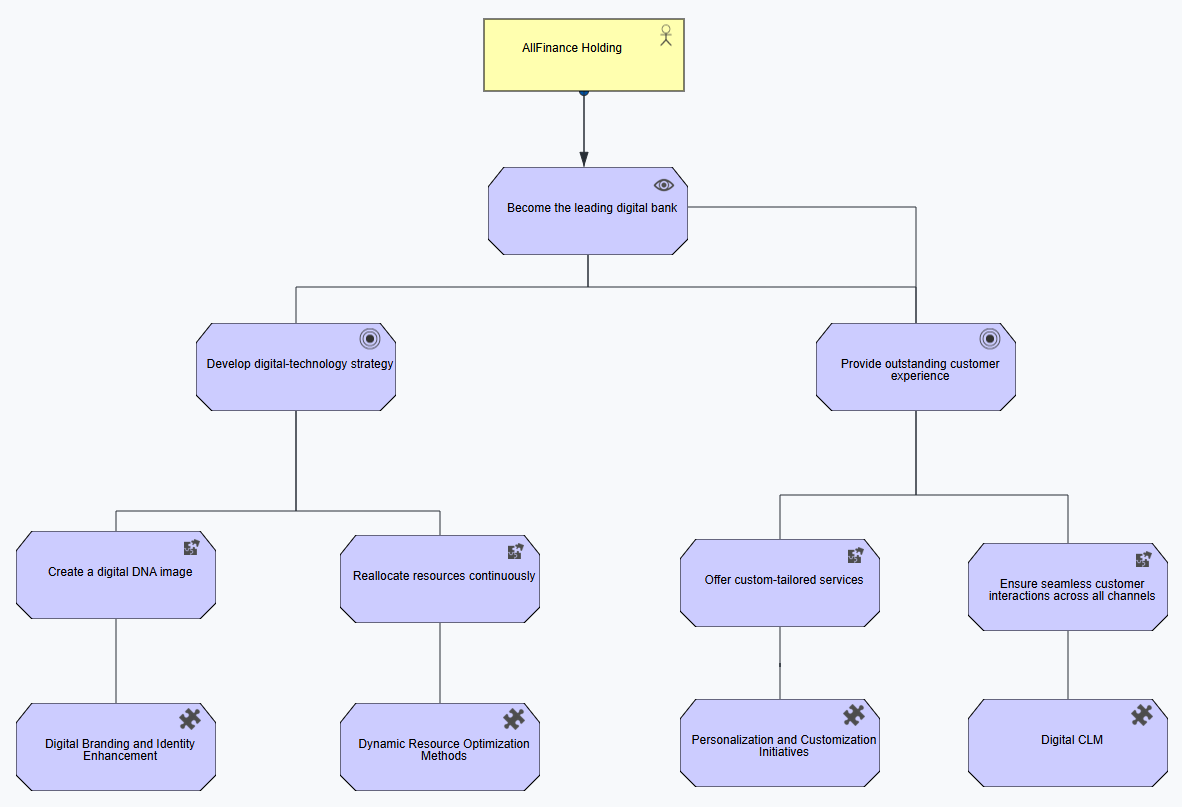
The table shows ArchiMate business elements that can be added as diagram elements to the diagram and the Alfabet classes they are mapped to.
| ArchiMate Element | Alfabet Class |
|---|---|
|
Business Actor |
Person or Organization |
|
Business Actor to Strategy |
Role |
|
Vision |
Vision |
|
Goal |
Goal |
|
Objective |
Objective |
|
Strategic Theme |
Strategic Theme |
Follow basic guidelines to create and design the ArchiMate viewpoint in the Diagram Designer.
Strategy Viewpoint
The license Strategic Portfolio Management is required to work with the Archimate diagram type Stratetgy Viewpoint.
The Strategy Viewpoint describes the strategic direction of the enterprise, including capabilities, resources, value streams, and desired outcomes. This viewpoint is commonly used to communicate business strategy and transformation roadmaps.
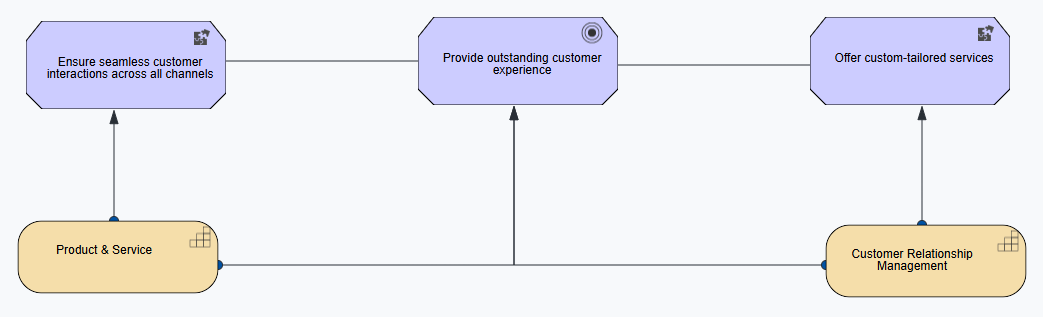
The table shows ArchiMate business elements that can be added as diagram elements to the diagram and the Alfabet classes they are mapped to.
| ArchiMate Element | Alfabet Class |
|---|---|
|
Capability |
Business Capability |
|
Business Capability to Strategy |
Affected Architecture |
|
Vision |
Vision |
|
Goal |
Goal |
|
Objective |
Objective |
|
Strategic Theme |
Strategic Theme |
Follow basic guidelines to create and design the ArchiMate viewpoint in the Diagram Designer.
Technology Usage Viewpoint
The Technology Usage Viewpoint shows how applications and business services use technology services and infrastructure components. It helps demonstrate the technology support required for business and application functionality.
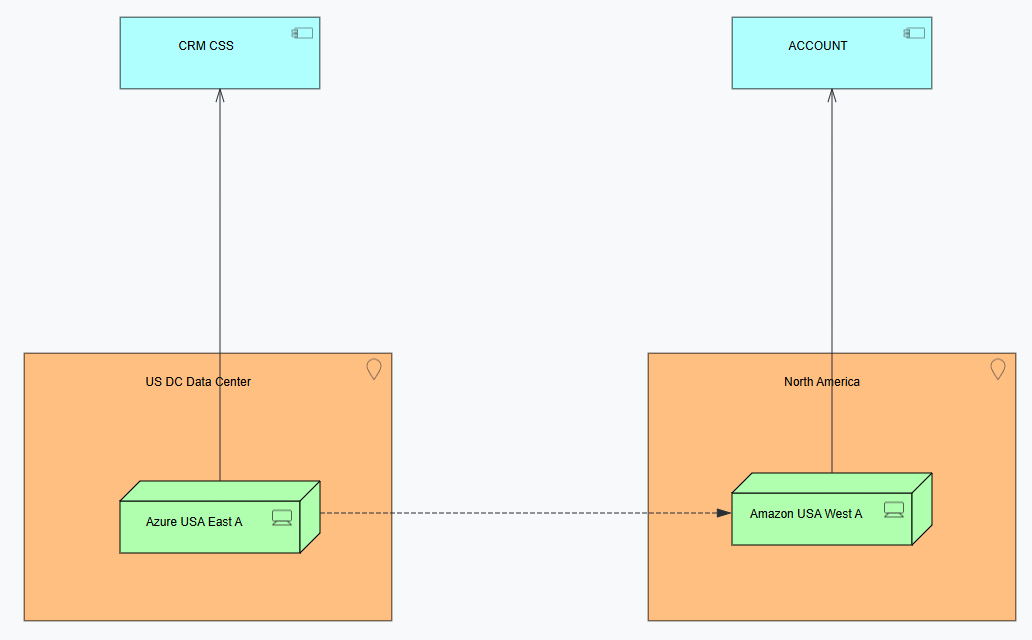
The table shows ArchiMate business elements that can be added as diagram elements to the diagram and the Alfabet classes they are mapped to.
| ArchiMate Element | Alfabet Class |
|---|---|
|
Location |
Location |
|
Application Component |
Application |
|
Server |
Physical Server or Virtual Server |
|
Information Flow |
Information Flow |
Follow basic guidelines to create and design the ArchiMate viewpoint in the Diagram Designer.
Technology Viewpoint
The Technology Viewpoint provides an overview of the technology infrastructure, including networks, servers, platforms, system software, and technology services. It focuses on the technical foundation that supports applications and business operations.
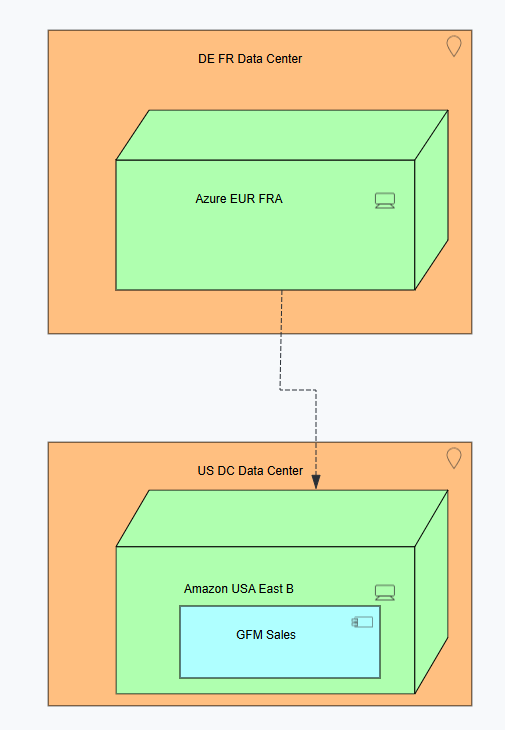
The table shows ArchiMate business elements that can be added as diagram elements to the diagram and the Alfabet classes they are mapped to.
| ArchiMate Element | Alfabet Class |
|---|---|
|
Location |
Location |
|
Application Component |
Application |
|
Server |
Physical Server or Virtual Server |
Follow basic guidelines to create and design the ArchiMate viewpoint in the Diagram Designer.