Bizzdesign logo
  • Contact us
    Alfabet Support Hopex Support Horizzon Support Unify Support
  • Bizzdesign Community
  • Bizzdesign University
  • Bizzdesign
 
  1. Alfabet help
  2. Welcome to Alfabet
  3. Search for your data
  • Welcome to Alfabet
  • Learn the basics
    • Log in to Alfabet
    • Change your password
    • Set your default user profile
    • Specify the color theme for your user interface
    • Specify your email address and picture
    • Change the language of the interface
    • Render your data in compact mode
    • Overview of the user interface
    • Navigate through the user interface
    • Navigate via keyboard through the user interface
    • Search for your data
    • Search for a data workbench or business question
    • Save your favorites
    • Keep track of assets via the Watch functionality
    • Communicate with your colleagues
    • Send your colleague an assignment
    • Share content with your colleagues
    • Share a URL with your colleagues
    • View your notifications
    • Save your data
    • Export your data
    • Store your user context settings
  • Understand access permissions
  • Maintain and plan your IT architecture
    • Methodology and the class model
    • Data capture and maintenance
    • Improve the quality of your data
    • Track the history of changes to an asset via the audit trail
    • Data analysis with business questions
  • How to use data workbenches
    • Define the data you want to see
      • Add and remove columns
      • Filter the data in the data table
    • Create and edit existing data
    • Visualize your data in reports and business charts
      • Set up your business charts
      • View preconfigured reports
      • Add a visualization to the content repository
  • How to use content areas
    • Edit data in a content area
    • Change content areas to your advantage
  • Understand workflows
    • Trigger a workflow
    • Take care of your workflow activities
  • Design diagrams visualizing your IT landscape
    • Define diagram settings
    • Quick guide: Build diagrams with the Diagram Designer
    • Design an application landscape diagram
    • Design a BPM diagram
    • Design Archimate diagrams
    • Change the layout and styling of flow reports and network diagrams
  • How to design and manage storyboards
    • View your storyboards
    • Create and manage storyboards for your user community
  • Complete your data collection tasks
  • Get help if you're lost

Search for your data

  • Search for an asset. Enter the name or part of the name in the Search field in the header. Matches containing the letters you entered will be displayed in the drop-down list ordered by asset type.

    When clicking into the search field, the last five objects you navigated to from the search results are automatically shown in a Recent Objects section in the drop-down. You can just click the search term and immediately go to its content area.

  • Reduce the number of results. Select the relevant asset type in the Category field.
  • Show all search results. Press the ENTER key or click the View More link to display a Search Results table showing all matches. You can edit any asset directly in the Search Results table.

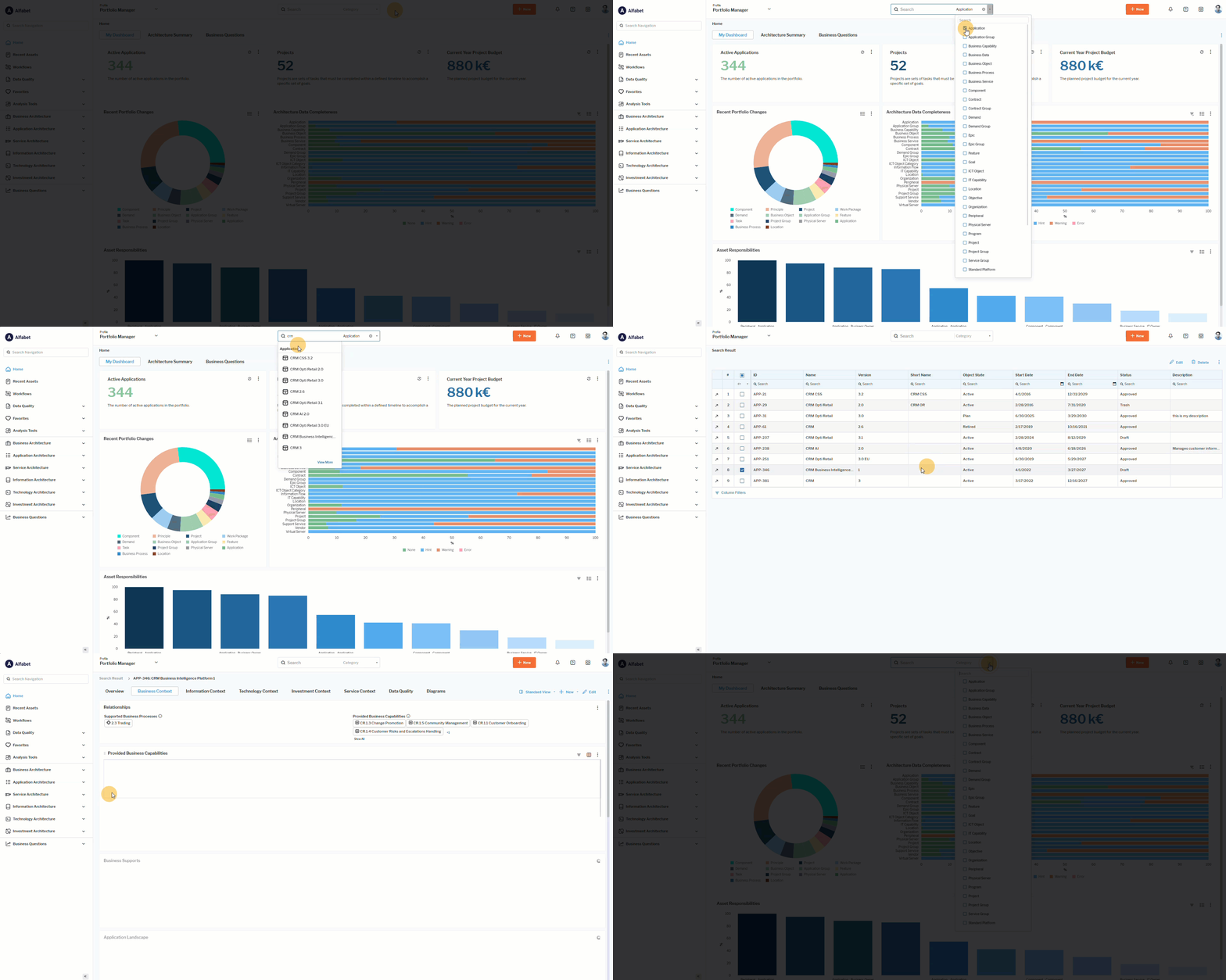
Click here to see how. 

Alfabet Resources

  • Support
  • Learning Portal
  • Downloads
  • Announcements
  • Release Lifecycle
  • Cloud Availability

Support

  • Alfabet Help
  • Hopex Help
  • Horizzon Help
  • Unify Help
  • Knowledge Base

Resources

  • Bizzdesign Community
  • Courses and E-learning
  • Blog Articles
  • Events & Webinars
  • Resource Center

Company

  • Bizzdesign
  • Alfabet Support Policy
  • Hopex Support Policy
  • Privacy Policy
  • Code of Ethics
  • Legal Notices

Copyright © Bizzdesign