
Assigning users and organizations to roles is critical to understanding responsibility for assets in the IT and is required to answer the business question Who is responsible for our assets? A role describes the functional relationship that a user or organization has for an object. Users as well as organizations can be specified to have a role for each asset in the IT portfolio. A user assigned a role for an asset will not have read/write permissions based on the role definition. The role is primarily for documentation purposes to provide information about stakeholders interested or responsible for the asset. To change data about the asset, a user must be specified as an authorized user or member of an authorized user group.
Alfabet provides out-of-the-box role types that enable you to understand who is responsible for your IT assets in your IT portfolio. A user with an administrative user profile may also configure custom role types.
-
- Application Manager: A person who is the subject matter expert for the application from a functional and technical point of view.
- Architect: A person who is responsible for the governance of the asset.
- Asset Owner: A person or organization who legally owns the asset. These users and organizations are responsible for making asset allocation decisions based on strategic and operational objectives.
- Business Owner: A person or organization who owns the asset and is responsible for managing the functional requirements.
- Capability Owner: A person who is responsible for the business capability/IT capability.
- IT Owner: A person or IT organization owning the asset and thus typically responsible for approval decisions.
- Operations: An IT organization responsible for the operations of the asset.
- Project Manager: A person who is responsible for planning, organizing, managing, and executing projects from beginning to end including the project's budget, resources, and scheduling.
- Staffing Manager: A person who is responsible to allocate and balance the human resources required for a project.
- Stakeholder: A person or organization that has an interest in the assets and therefore requires read-only access permissions.
Your portfolio administrator may configure additional role types that are relevant for your company. The role types available for an asset will depend on the object class that the asset is based on.
An application might have the following roles defined:
- Architect: 1 user
- Business Owner: 1 user and 1 organization
- Operations: 1 organization
- Stakeholder: multiple users and multiple organizations
In contrast, an application group might have following permissible roles:
- Application Manager: multiple users
- Architect: multiple users
- Stakeholder: multiple users and multiple organizations
Roles can be specified in an asset's content area > Overview > Responsibilities section.
- Click in the relevant role field to open the selector.
- Expand the ORGANIZATION or USER sections in the selector and select the person or organization fulfilling the role.
- Click OK to save the role definition and close the selector.
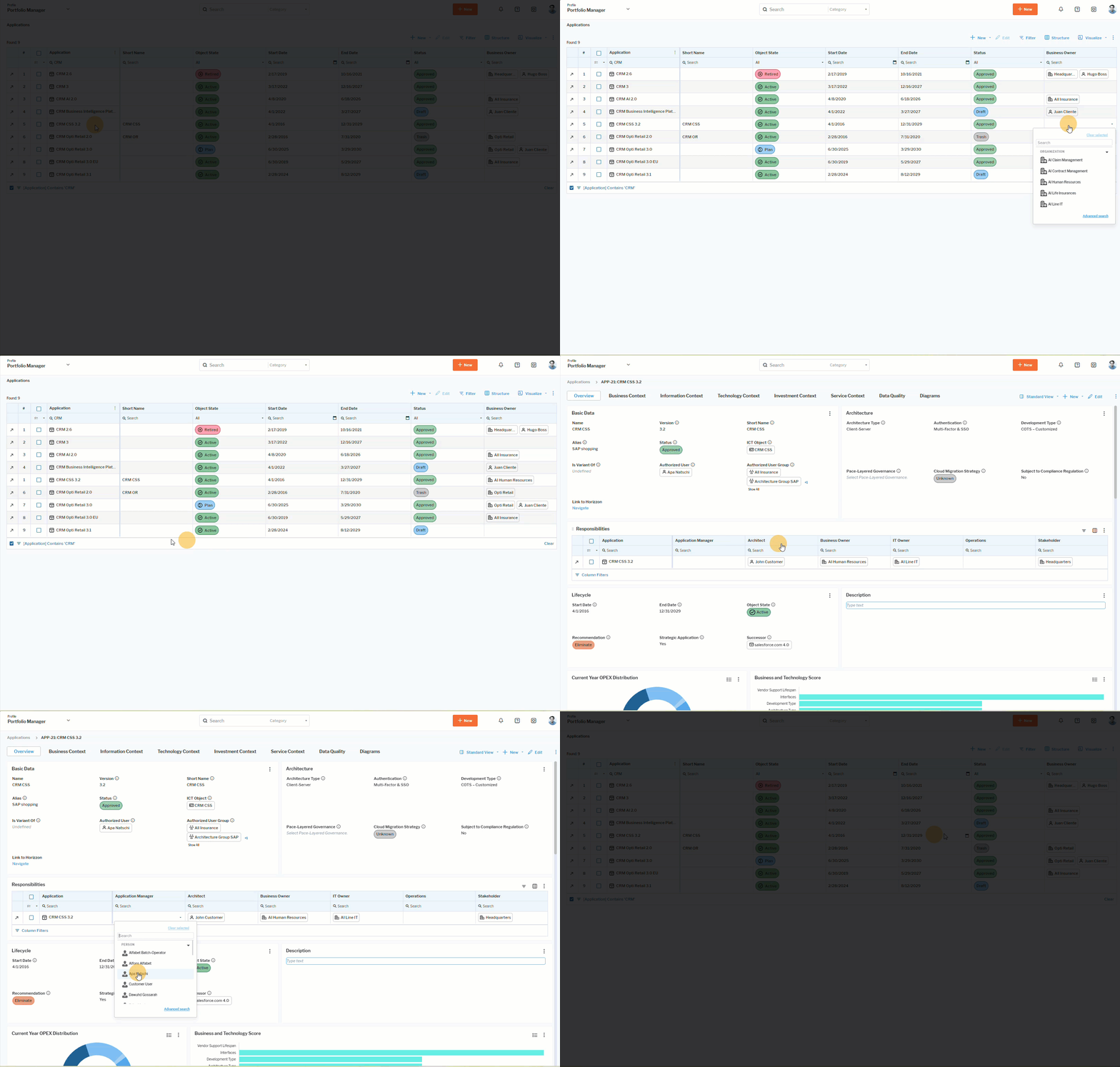 Click here to see how.