
- Next-generation data workbench v. 2 with better performance
- MCP server for AI-driven access to enterprise architecture data
- Data-triggered actions for user-initiated changes
- Restrict access to shared links
- Enhanced role type configuration and access management
- Control property editability using conditions
- Extensions to generic operations
- Amazon Bedrock Guardrails support for connections to the text generation AI
The following is introduced to the Alfabet platform this release.
Next-generation data workbench v. 2 with better performance
Faster data handling. The data workbench implementation has been completely redesigned, delivering significant performance improvements across the application. Data loads are faster, and updates to data are processed more efficiently, resulting in a more responsive user experience.
Enhanced bulk update processing. The bulk update functionality has been refined to improve performance and scalability when working with large object selections:
- If 40 objects or less are selected, the dedicated bulk update editor will open and the uses can make the needed changes.
- If 41 to 300 objects are selected, a message is displayed describing the number of objects and extent of the changes that will be executed asynchronously. Users can continue working without waiting for all background activity to complete.
- If more than 300 objects are selected, bulk update in the user interface is not available. In such cases, a warning message informs the user that the maximum number of objects allowed for a simultaneous update has been exceeded and update via ADIF is recommended.
Targeted focus on new objects. When a new object is created, focus in the data workbench automatically shifts to make the object visible in the data workbench. Newly created objects are no longer displayed at the top of the visible object list.
Note: Following an update of the meta-model to Alfabet 11.13.0, the new data workbench implementation is enabled by default and becomes the standard data workbench for all Cloud installations. If issues are encountered with the new implementation, it is possible to revert to the previous data workbench version through a setting in the SolutionOptions XML object available in the Alfabet Expand and Alfabet Administrator. Learn more about the SolutionOptions setting.
To simplify system administration and troubleshooting, information about the active data workbench implementation has been added to the About Alfabet dialog. The previous implementation is identified as Data Workbench Version: 1, while the new implementation is identified as Data Workbench Version: 2. This allows administrators and support teams to quickly verify which version is currently in use.
MCP server for AI-driven access to enterprise architecture data
The new Alfabet MCP Server provides secure AI-driven access to enterprise architecture data through natural language, eliminating the need for specialized query knowledge and reducing dependency on architecture teams. Alfabet's MCP Server translates AI requests into structured REST API calls and provides flexible, on-demand reporting across applications, technologies, projects, business capabilities, and related data.
Built-in authentication ensure secure access, supporting both username/password and OAuth authentication. The MCP Server is read-only and prevents any modifications to repository data. Access is restricted to users with explicitly configured permissions for the relevant REST services.
The MCP Server is currently available as a beta feature for administrative users only. User interface visibility rules are not yet enforced, which may allow users to access information about objects that are not visible in the standard UI. Access should therefore be granted only to trusted users with appropriate permissions.
Data-triggered actions for user-initiated changes
Data-triggered action rules for user interactions in standard views. Stereotypes have been introduced for data-triggered action rules. The View-Based Data-Triggered Action Rule rule type enables the execution of data-triggered actions in standard views in response to button and inline editing interactions. For button-based actions, the data-triggered action is executed in the context of the object on which the button operates. For inline editing scenarios, the action is executed in the context of the base object of the class-based content area in which the view is embedded. This enhancement enables automated processing and validation logic to be applied directly during user-driven data changes.
The Operation-Based Data-Triggered Action Rule stereotype has been introduced for existing data-triggered action rules targeting data workbenches and content areas. On migration to Alfabet 11.13, all existing data-triggered action rules will be automatically migrated to the Operation-Based Data-Triggered Action Rule stereotype. Learn more about the new data-triggered action rule types and the actions they support.
Enhanced usability of the data-triggered action rule editor. The data-triggered action rule editor now provides additional context for generic class operations, including button captions and base objects. This makes it easier to distinguish between similar operations, such as different relation-creation actions. For example, users can now more easily identify and select the correct relation-creation operation when multiple operations exist for adding relations to different target object types.
Restrict access to shared links
Links to the user interface are included in email notifications when tasks are assigned to users. Users can also generate links to specific views for sharing with colleagues or embedding in third-party applications. To enable access, these links rely not only on information contained in the URL but also on data stored in the database. As a result, links do not expire by default.
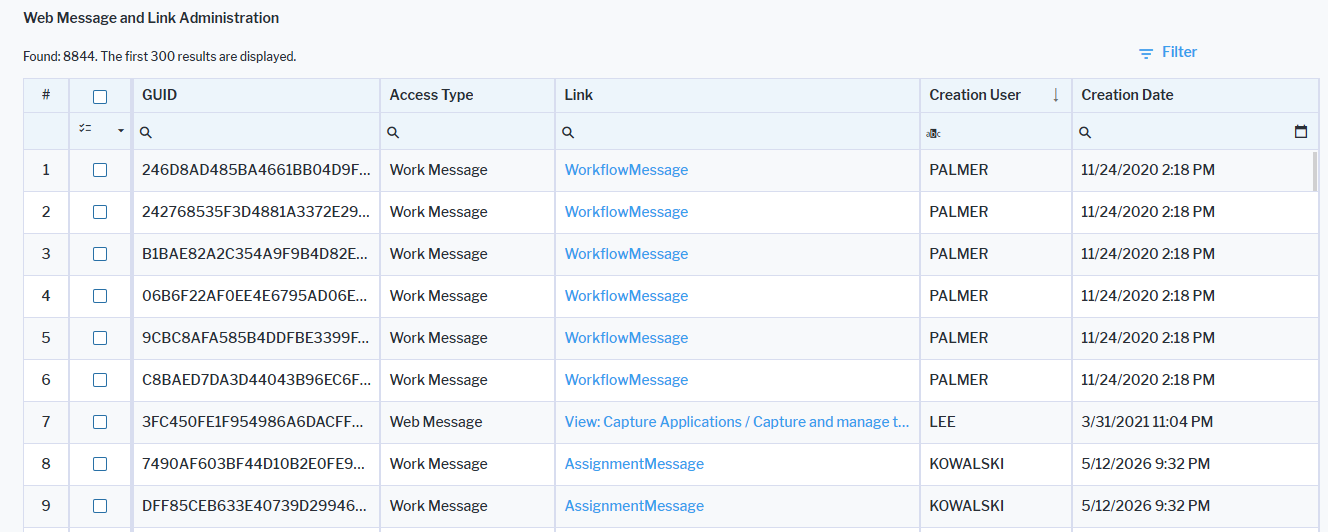
To support security and compliance requirements, access via existing links can now be revoked. A new Web Message and Link Administration (Admin_AlfaWebMessages) view allows administrators to deactivate previously generated links, preventing access through outdated or no longer authorized links. This provides greater control over shared content and helps customers enforce link access policies.
Learn more about the deactivation of links to the Alfabet user interface.
Enhanced role type configuration and access management
Role type configuration has been enhanced to provide greater flexibility and control at the object class level. Administrators can now override role type settings through class settings, allowing role behavior to be tailored for specific combinations of object classes and user profiles. This makes it possible to define how roles are assigned and managed on a per-class basis rather than relying solely on global role type definitions.
Greater flexibility in access management. Access management settings support more advanced configuration options. Alongside general editability and visibility settings, administrators can define conditions that determine whether a role is editable or visible. These conditions can be based on property values of the object for which the role is defined or on characteristics of individual users, enabling more granular access control.
Class setting-based role type assignment. Role type assignments to property groups can be configured via class settings. When a property group assignment is defined both in the Role Type and in class settings, the class-specific configuration takes precedence. Configuring property group assignments in class settings provides the additional benefit that the assigned role types participate in the property group ordering defined within the same class configuration.
Further customization options have been added for role types:
- Modify the caption and hint text displayed for a role type.
- Enable or disable the Advanced Search functionality in the selector to select users or organizations for a role. The underlying selector type for Advanced Search can be changed for role types defined to create roles for organizations only or users only.
A new consistency check has been added to the class settings configuration to simplify the management of role type overwrites. The validation automatically detects whether role types configured in the class settings are no longer available because they have been deleted or removed from the object class. When such a configuration issue is detected, a warning icon is displayed on the affected role type node, helping administrators quickly identify and correct invalid configurations before they cause unexpected behavior.

In addition, a new Check Consistency action is available on the class settings node. The consistency check validates the role type configuration and displays all detected inconsistencies in a validation dialog, enabling administrators to identify and resolve configuration issues more efficiently.
Control property editability using conditions
The editability of object class properties can now be controlled through conditions. Users can be explicitly granted or denied permission to edit data based on criteria such as their role for an object or their membership in a user group. Conditions can also be used to make a property read-only depending on the value of another object class property. Editability conditions are configured in the same way as the existing visibility conditions and can be defined using the new Editability Conditions attribute in the object class property configuration within the class settings.
Editability conditions cannot grant edit access to object class properties if Read Access or No Access is specified in the Access in User Interface attribute of the property. They can only further restrict editing of properties configured if the attribute is set to Write Access.
Extensions to generic operations
Configurable copy, version, and variant creation of objects. A new generic operation type Create As Copy enables customers with access to Alfabet Expand to configure buttons for the user interface to create copies, versions, and variants of objects for any object class.
The generic operation determines which object properties and relationships are transferred from the source object to the newly created object. During the copy process, property values can also be updated automatically from the target object back to the source object. For example, when creating a new version of an object, a property on the original object can be updated to reference the newly created successor version.
The operation supports flexible handling of relationships to other objects:
- Copy relationships only by creating equivalent references from the new object to the existing related objects.
- Copy related objects as well and automatically establish relationships between the copied objects and the newly created objects. In addition, you can configure which object class properties of related objects are copied when new related objects are created.
Learn more about the configuration of a generic copy operation.
Enhanced configuration of affected architecture relationships. The new generic operation types Add Complex Relation , Create and Add Complex Relation , and Delete Complex Relation can be specified to maintain objects that are affected by or relevant to a project, demand, value node, IT policy, or measure type. Business data usage and project bucket allocation can also be managed via the new generic operations.
Customers with access to Alfabet Expand can configure buttons that allow users to create architecture relationships to objects of the class Project, Demand, Value Node, IT Policy, and Measure Type. Buttons can be specified to create new or add existing objects with the architecture relationship or remove an object from architecture relationship. Architecture specifications for these object classes are implemented through an intermediate object class that maintains the relationship between the selected object and the associated architecture object. This intermediate relationship object is not exposed in the user interface.
Learn more about the configuration of generic operations to add new objects , add existing objects , and remove objects if the relation is handled via an intermediate object class.
Improved control of button visibility. In the specification of the Create and Add Relations generic operation, evaluation of the object class to which the new object is added required both the specification of the Base Object Class attribute and the enablement of the Object-Based Operation Context. This has been changed and the base object is evaluated independent of the setting for Object-Based Operation Context. The button can now be configured to be displayed in data workbenches only.
Amazon Bedrock Guardrails support for connections to the text generation AI
Amazon Bedrock Guardrails® blocks harmful content and protects private data in generative AI applications. The AI text generation feature available in Alfabet has been amended with the optional ability to protect requests to the AI service via Guardrails. Responses are directly routed back to the Alfabet application. Customers using the AI service provided by Alfabet on premise must update the server variable configuration with a new server variable provided by Bizzdesign B.V.
Customers using a connection to their own AI service account on Amazon Bedrock can access Alfabet Expand to configure the XML object AIServicesConfig to use Guardrails. Customers must have a Guardrails configuration in Amazon Bedrock for the AI service they want to use.
Learn more about the configuration to use Guardrails in connections to own AI service accounts.