
- Password-protected email address changes
- Better usability in data workbenches
- Expanded lock indicator for read-only objects
- Consistent enforcement of mandatory properties
- Workflow-specific edit permissions
- User-friendly wizards
- Immediate refresh of data quality information
- Enhanced user comments
- Improved usability for cost maintenance
- Usability enhancements for project resource planning
- Support of dark mode in AI help assistant
- Improved document management capabilities
- Extended drill-down navigation from indicator cards
- Enhanced control of diagram visibility
- Richer data analysis in Sankey diagrams
- Manage unassigned objects in Kanban reports
- Richer context for AI text generation
- Enhanced visibility condition handling
- Enhanced usability in runtime editors
- Meta-model updates for risk management classes
- Enhanced data capture for standard platforms
- Alfabet Expand usability enhancements
- Clean-up of deprecated functionalities
- Improved AMM file generation
The following enhancements to the Alfabet platform with this release.
Password-protected email address changes
Users who sign in to Alfabet with a user name and password can request a password reset if they forget their credentials. Temporary login credentials are then sent to the email address associated with their account. To help prevent unauthorized changes to this critical contact information, additional security measures have been introduced.
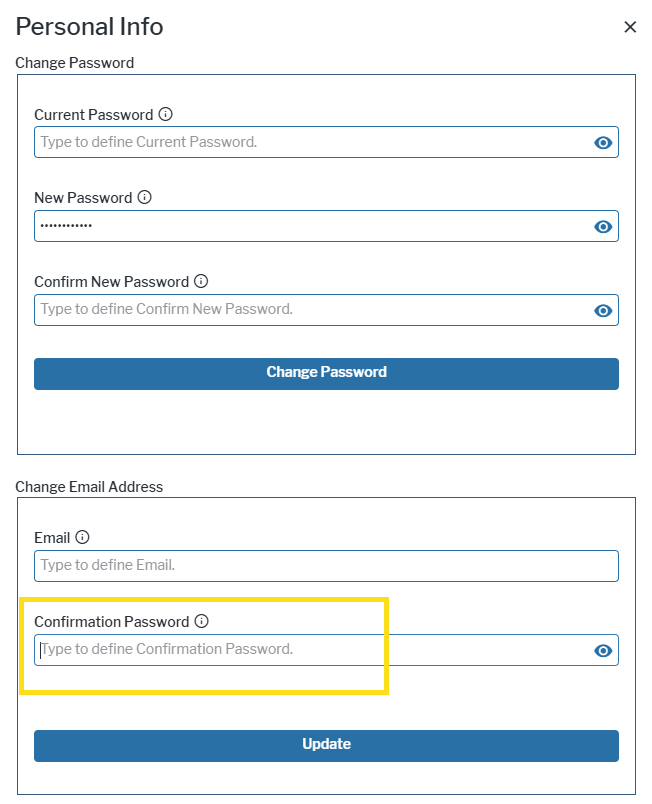
For Alfabet -managed users authenticated through user name and password, changes to the registered email address now require password verification. Before an email address can be updated in the user menu, the currently signed-in user must re-enter their password in the new Confirmation Password field in the Personal Info dialog. This additional authentication step helps protect user accounts by ensuring that only authorized users can modify the email address used for password recovery and account-related communications.
Better usability in data workbenches
The following usability enhancements are available in both data workbenches version 1 and verion 2.
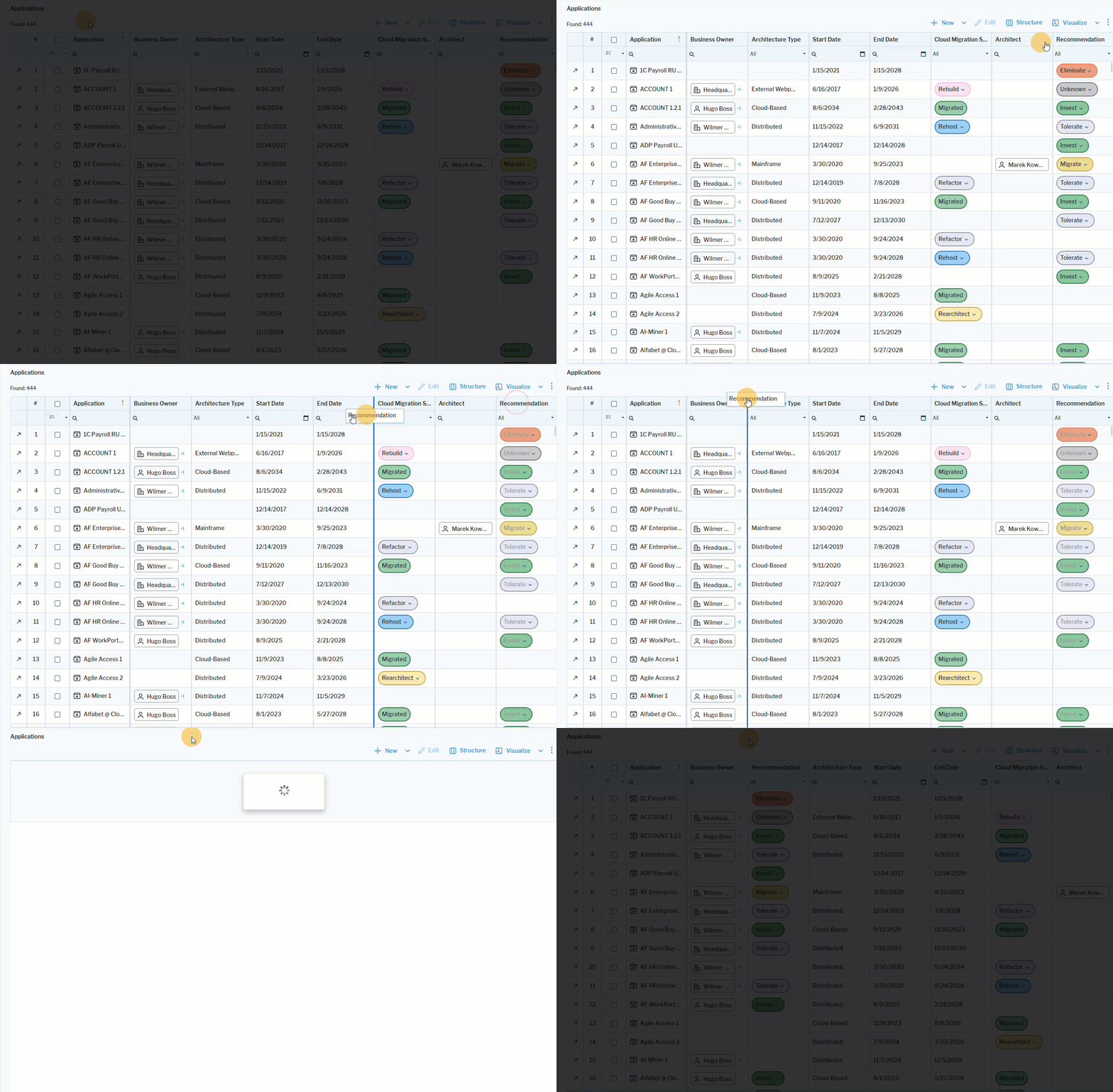 Click here to see how.
Simpler redesign of data set columns. Reorder columns in the data workbench via the new drag-and-drop functionality, eliminating the need to use the Structure editor.
Improved readability in boards. A new zoom toolbar in board visualizations enhances readability by allowing users to focus on specific board elements.
Easy restructure of Gantt columns. Reorder columns in Gantt visualizations in data workbenches via the new drag-and-drop functionality. Users can move the columns included in the Object Attributes to Display definition of the Gantt visualization. The changed column order is saved in the user context settings as well as when the visualization is shared with other users.
Expanded lock indicator for read-only objects
The  lock icon is now also displayed in tabular views to indicate that an object is read-only and cannot be edited when opened. Previously, this indicator was only available in data workbenches.
Consistent enforcement of mandatory properties
In the standard class model, object class properties that are required to satisfy standard Alfabet class model constraints, such as class keys, are designated as mandatory. In the Meta-Model tab explorer in Alfabet Expand, these properties are identified by a yellow background.
Mandatory properties defined in the meta-model are now consistently enforced as non-nullable across all editing interfaces, with the exception of custom editors. Users can no longer clear or set required property values to null, ensuring that mandatory data is always maintained. This enhancement improves data integrity, supports compliance with model constraints, and provides consistent behavior throughout the application. For custom editors, a configuration option for specifying properties as mandatory already exists and remains unchanged. Fields in custom editors enforce strict null handling if the Presence attribute of the field is set to Always.
Workflow-specific edit permissions
The write permission concept for workflow steps has been enhanced to better support approval and review processes. Users assigned as responsible users for a workflow step can now edit the object associated with that step, even if they do not otherwise have write access to the object. This allows workflow participants to perform actions such as approving, rejecting, or updating workflow-related information without requiring broader object maintenance permissions. Standard object access permissions continue to apply outside the workflow context.
Note: Standard and custom editors maintain their own permission model and therefore remain unavailable within workflow steps. Any data that needs to be edited as part of a workflow must be made available through a property group in a guided data view or content area.
User-friendly wizards
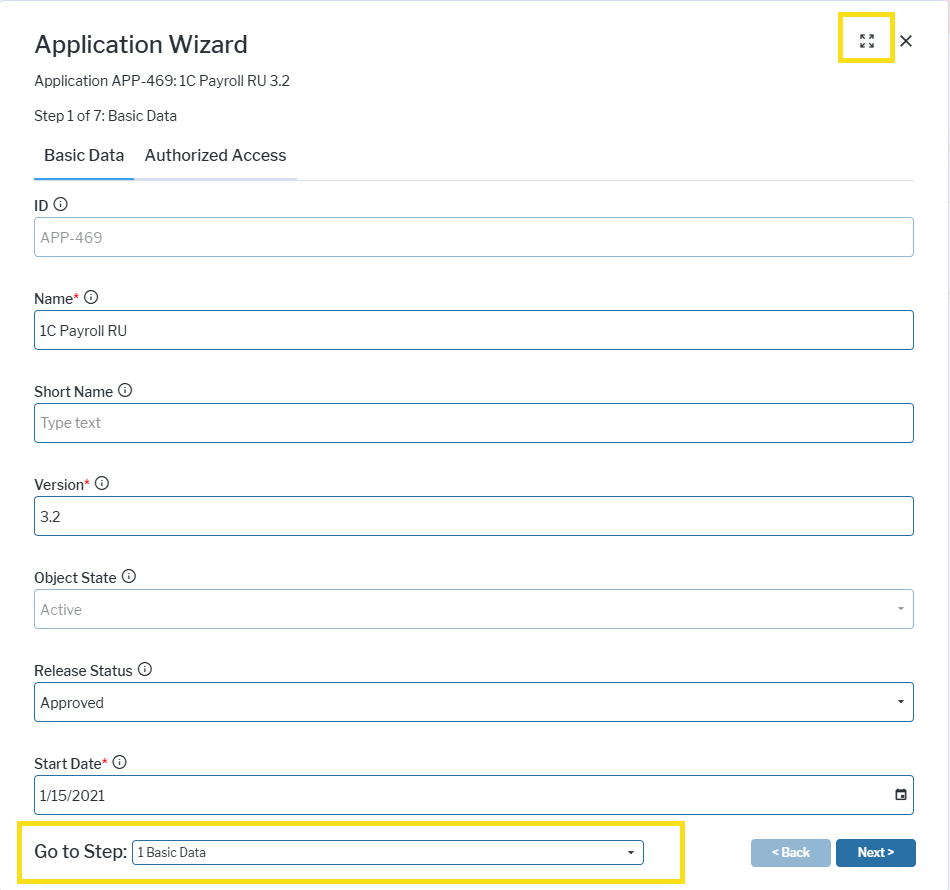
Flexible resizing of wizard. A  resize button has been added to the upper right of wizard windows. Clicking the button allow users to quickly enlarge the wizard for a better overview of the views and editors in the wizard.
Improved readability of next wizard steps. The size of the Go to Step field in the wizard has been made extended so that long wizard step captions are easier to read.
Immediate refresh of data quality information
Data quality information is now updated automatically when a user resolves a data quality issue in a content item. The updates are reflected immediately in both the data quality window and the header, eliminating the need to refresh the page manually.
Note: This does not apply to property groups that are configured to require a manual property group update for data quality rule evaluation.
Enhanced user comments
The User Comments functionality now allows users to edit their own comments after posting. When a user hovers over one of their comments, an edit  button appears in the upper-right corner next to the date and time. Selecting the edit button enables the user to modify the comment and save the changes.
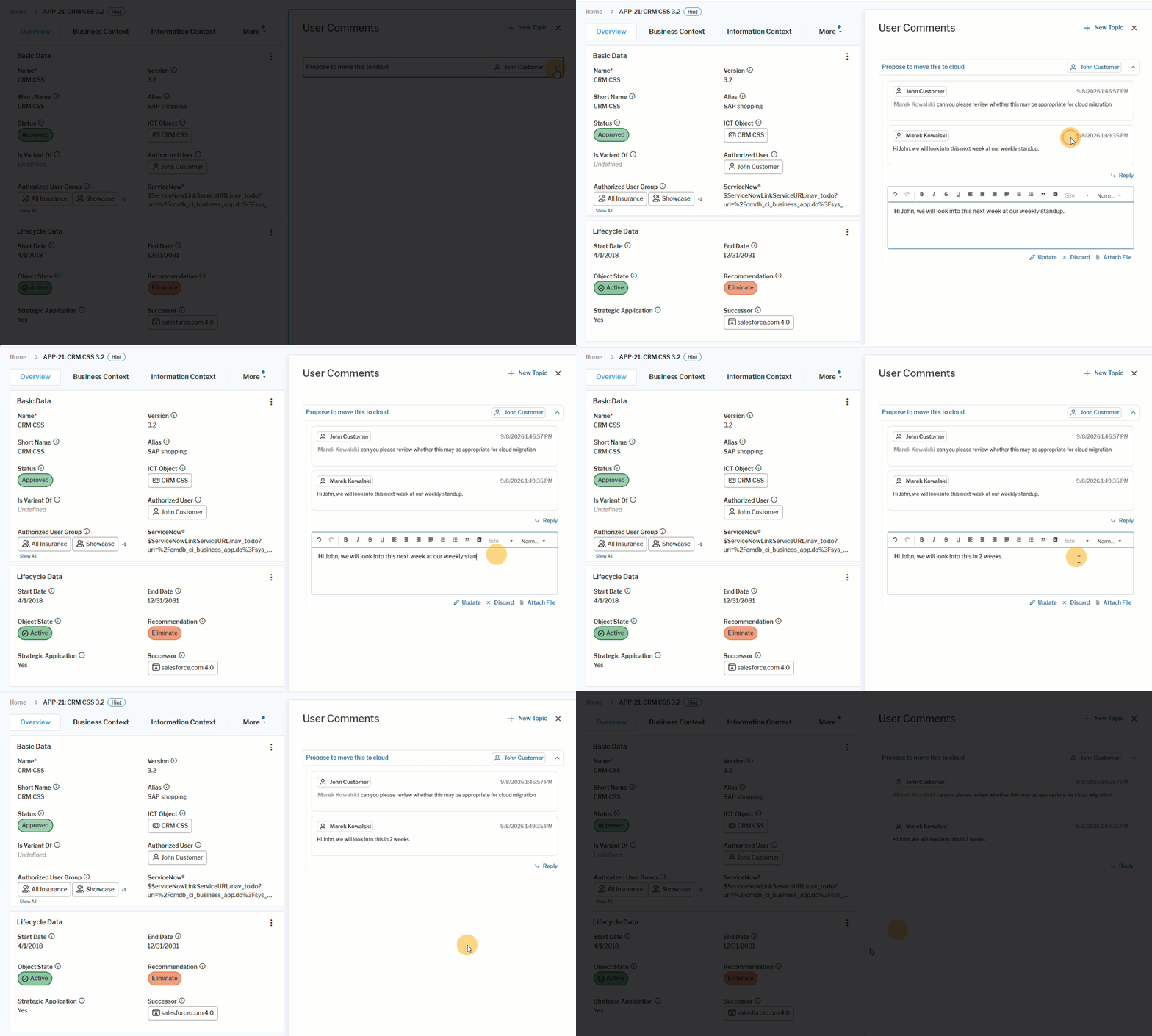 Click here to see how.
Improved usability for cost maintenance
Optimized default column width in cost reports. The default column width in cost reports has been reduced from 200 pixels to 100 pixels. This change minimizes unnecessary white space and improves data visibility, allowing users to view more information on screen without excessive horizontal scrolling. Users can still resize columns manually by dragging the column border. Any adjustments are automatically saved in the user's personal settings and will be retained the next time they open the cost report.
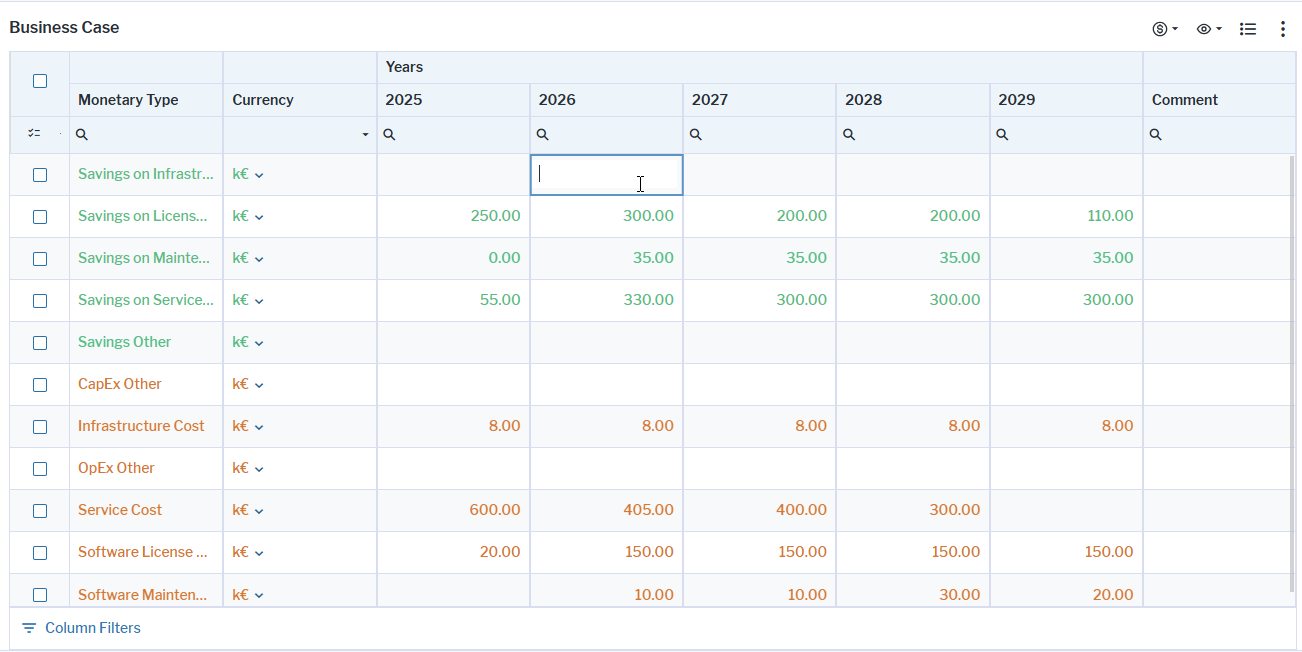
Inline editing available for project costs. The following views have been enhanced:
- Business Case (PRJ_BusinessCase and PRJ_BusinessCaseSimple ) views. Users can edit cost values directly in the dataset if the View > Aggregate Costs Along Project Hierarchy option for the view is not activated.
- Benefit Tracking (PRJ_BenefitTracking) view.
- Benefit Realization / Cashout Planning (PRJ_Cashout) view.
Better filtering for cost views. The filter behavior in the Project Costs view for projects and the Cost Accrual views for applications and service products has been improved. When the Start Year or End Year filters are left blank, the views now default to displaying the respective start/end year of the selected project, application, or service product. In addition, Start Year and End Year filter settings are now maintained independently for each cost report instance, preventing filter values from being shared across cost views for other assets of the same class and enabling asset-specific reporting based on individual timelines.
Usability enhancements for project resource planning
Project resource planning views have been enhanced to improve usability and clarity. Column names and actions have been renamed to better reflect their purpose, additional resource information is now available directly in the views, and error messages have been improved.
- Work Breakdown Structure (PRJ_WorkBreakdownStructure ) view: The Time Schedule column has been renamed to Work Breakdown, and the Resource column is now called Provider. In the toolbar, Create Skill Request has been renamed to Request Skills.
- Project Resource Planning (PRJ_ResourcePlanning ) view: Two new columns, Provider and Count and Daily Rate, have been added to provide additional resource information. The Task Schedule column has been renamed to Resource Breakdown. In the toolbar, Reset Project Resource Plan is now called Revert to Work Breakdown, and Transfer Schedule from Project to Resource Plan has been renamed to Transfer Skill Requests from Work Breakdown.
Support of dark mode in AI help assistant
The AI-based Help Assistant has been updated to provide full support for dark mode. All content, controls, and visual elements have been updated to maintain appropriate contrast and readability, helping ensure a consistent and accessible user experience across light and dark themes.
Improved document management capabilities
Users can add information about a document in a new Description field when documents are uploaded via the Attachments (Object Attachments ) or Internal Documents (IDOC_MANAGER) views.
A new Description (DESCRIPTION) object class property has been added to the Document (ALFA_IDOCUMENT ) object class and the standard editor to edit documents. All properties of the Document (ALFA_IDOCUMENT) object class are now exposed for use in editability and visibility rules. Administrators can leverage these properties to selectively grant or restrict document upload and management capabilities, including through button overrides defined in the object class settings. This change is an enhancement implemented for ticket ASD-9976.
Extended drill-down navigation from indicator cards
Indicator cards now support drill-down navigation to content areas in addition to standard views, configured reports, and data workbenches. The Indicator Type editor has been extended to allow content areas as drill-down targets.
When a class-based content area is selected, the originating object is automatically passed as context, enabling embedded views, workbenches, and reports to display object-specific information. This enhancement provides greater navigation flexibility and delivers more relevant, context-aware insights throughout Alfabet.
Enhanced control of diagram visibility
The Diagram Designer now includes a View Settings editor that helps make large and complex diagrams easier to understand by displaying only the information relevant to a specific audience.
The View Settings editor lists all object classes and relationships that can be shown or hidden in a diagram. Relationships between object classes are displayed using arrow notation, such as Application → Application or Application → Peripheral. By default, all available object classes and relationships are visible. The user designing the diagram can selectively hide specific object classes or relationship types, such as information flows or local components, to reduce visual complexity and focus the diagram on the information that matters most.
Richer data analysis in Sankey diagrams
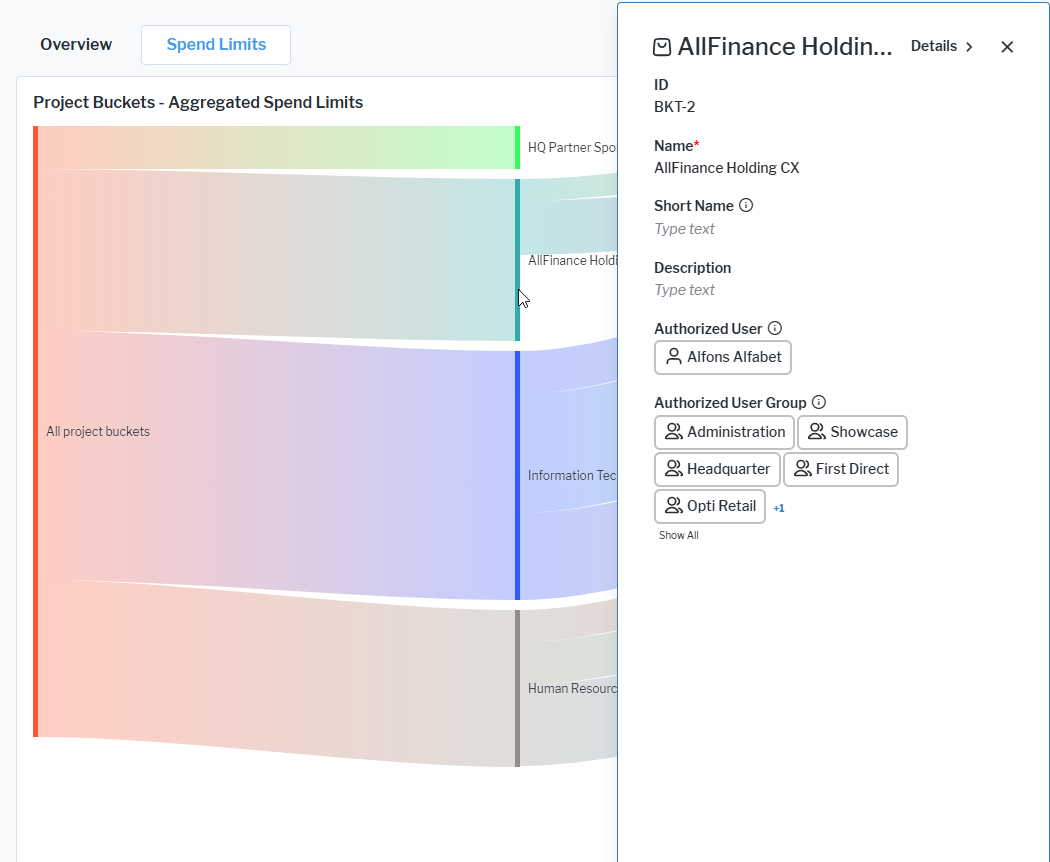
Object inspection supported in Sankey diagrams. Users can open the object inspection panel by single-clicking on any object node in the Sankey diagram. This enhancement aligns the interaction model with other report types, providing a more consistent and intuitive user experience when inspecting objects. This change is a resolution for ticket ASD-11201.
Configurable drill-down navigation in Sankey diagrams. Sankey diagrams now support configurable drill-down navigation to designated views, enabling users to navigate directly from source nodes, target nodes, and links to relevant data views. New configuration options in the report assistant allow administrators to define and customize the navigation behavior for each diagram element, creating a more tailored and efficient analysis experience. These enhancements provide greater flexibility when analyzing relationships and exploring underlying data.
Manage unassigned objects in Kanban reports
Configured Kanban reports can now display objects that are not assigned to a row or column because the object property used for the row or column definition has no value. These objects can be shown in dedicated Unassigned rows and/or columns, making it easier to identify and manage incomplete assignments.
Administrators can configure unassigned rows and columns to appear either at the beginning or the end of the Kanban board. Objects can also be moved from an unassigned row or column to a regular one. When this occurs, the corresponding object property is automatically updated to reflect the new assignment.
A new Unassigned Row/Column section has been added to the Kanban report assistant settings:
- Enable Unassigned Row and Enable Unassigned Column attributes control whether dedicated rows or columns for unassigned objects are displayed.
- Unassigned Row Position and Unassigned Column Position attributes determine whether unassigned objects appear at the start or end of the board.
- Unassigned Row Caption and Unassigned Column Caption attributes allow administrators to define the labels shown for unassigned rows and columns.
Richer context for AI text generation
AI Text Generation now includes object class properties of the type Reference as well as calculated properties for the context used to generate text. This enhancement results in richer, more accurate generated content. The AI Text Generation Related Properties attribute is available in Alfabet Expand for both the object class as well as class settings, offering greater flexibility and control over which properties contribute to AI-generated text.
Enhanced visibility condition handling
Real-time update of object inspection. Visibility conditions defined for object class properties are now applied dynamically in object inspection windows. For example, if a user modifies data in a way that causes the visibility condition for a property to no longer be met, the property is automatically removed from the inspection window immediately. This update is reflected in real time, eliminating the need to close and reopen the inspection window to refresh the displayed properties.
Easier query validation. Queries used in visibility conditions can only be processed if they meet certain requirements: they must be non-complex, and each column in the result set must have a unique name. If a query does not meet these requirements and cannot be processed, the entire column controlled by the visibility condition is removed from data workbenches.
To simplify troubleshooting, logging has been added for queries used in visibility conditions. When the logging level is set to Warning or higher, a warning message is written to the configured NLog system log target whenever a query cannot be processed.
In addition, the .log file generated during a meta-model update from an earlier Alfabet release to Alfabet 11.13.0 now includes warnings for all invalid visibility condition queries detected in the meta-model configuration. This enhancement helps administrators identify and correct configuration issues more efficiently.
Enhanced usability in runtime editors
Runtime editor property sorting. A new Sort Runtime Editor Properties attribute has been added to the Properties node of class settings. It enables sorting of object class properties displayed in runtime editors, including properties exposed through class setting property overwrites. This improvement is a fix for ticket ASD-10452.
Display calculated properties in runtime editors. Calculated object class properties can now be included in runtime editors and object inspection windows for informational purposes. Because these properties are derived automatically, they remain read-only and cannot be edited by users. However, displaying calculated values alongside editable properties provides additional context and can help users make more informed decisions when entering or updating data.
When calculated object class properties are enabled for runtime editors, they can also be reordered using the new sorting capability available in the Properties node of the class settings configuration, allowing administrators to optimize the presentation of property information.
Meta-model updates for risk management classes
- Standard object class properties defined in the Alfabet meta-model have been added to the Risk , RiskManagementTemplate , and RiskSet object classes. These properties are ID , Status , Documents , ResponsibleOrganization , CREATION_DATE , CREATION_USER , LAST_UPDATE_USER , LAST_UPDATE , ICON , and ALFA_LICENSE_POLICY. By making them available out-of-the-box, this enhancement simplifies object class customization and enables the use of these attributes in integration scenarios, such as ADIF imports and RESTful service-based data exchange, without requiring the creation of custom object class properties.
- For the Risk , RiskManagementTemplate , and RiskMitigation object classes, the ProbabilityValue and DamageValue properties have been changed from Private to Protected, enabling range definitions and enhanced configuration options.
- The Risk , RiskGroup , RiskManagementTemplate , RiskMitigation , RiskMitigationCategory , and RiskMitigationTemplate object classes can be enabled for data capture templates. This change is a resolution for ticket ASD-11606.
Enhanced data capture for standard platforms
Several standard Alfabet meta-model settings have been updated to support the creation of data capture templates that include a broader range of platform-related properties.
The Enable for Data Capture Templates attribute has been set to True for the Embedded Standard Platforms (ConsistsOf ) and Associated Master Platforms (MasterPlatforms ) object class properties. In addition, the Access in User Interface attribute for these properties has been changed to WriteAccess, enabling users to view and maintain these relationships directly within data capture templates.
The Diagrams (Diagrams ) object class property has also been updated, with its Access in User Interface attribute set to ReadAccess.
Alfabet Expand usability enhancements
- A text editor has been implemented for the Description attribute of categorized visual items, providing a more user-friendly experience when editing long descriptions.
- The private ADIF jobs for execution of data import and export in the scope of the interface with ITPedia® have been hidden from the ADIF Schemes explorer in Alfabet Expand to enhance the clarity of the explorer. The ITPedia-related ADIF schemes were not editable by customers and only executable via Alfabet internal code.
Clean-up of deprecated functionalities
- Deprecated cyclic monitoring events and their associated private management events have been removed from Alfabet Expand. This streamlines event selection lists and improves usability when configuring data-triggered actions and other event-based configurations.
Improved AMM file generation
The AMM file generation editor has been enhanced by removing deprecated features and adding support for new configuration options.
- The Business Question and Business Question Group object classes have been removed from the Reference Data tab in the AMM file editor. These object classes are deprecated and are no longer supported by the updated meta-model configuration. Removing them simplifies the editor, reduces potential confusion, and ensures alignment with current configuration standards and best practices.
- A new Replace Target Help Context Content checkbox has been added to the Meta-Model Content tab of the AMM file generation editor. When selected, this option removes the existing context-sensitive help content from the target database before importing the content defined in the AMM file. This option is currently applicable only for AMM files used to configure predefined solutions for Alfabet IT Transformation Server licenses. Creating and managing custom context-sensitive help in AMM files is not currently supported for customer-defined configurations.