
The following enhancements to the Alfabet solution configuration are available with this release.
Improved usability in assignment creation
The Notify Authorized User option in the three-dot menu of an asset’s content item has been renamed to Create Assignment for Authorized User. This change clarifies that an assignment is created and helps users more easily locate it in the My Assignments and Sent Assignments views within the navigation panel.
More intuitive filter layout in network diagrams
The ordering of filter fields in the network diagram filters has been updated. Filters that determine the content of the visualization are now listed before layout settings, making it easier for users to distinguish between configuring displayed data and adjusting its presentation.
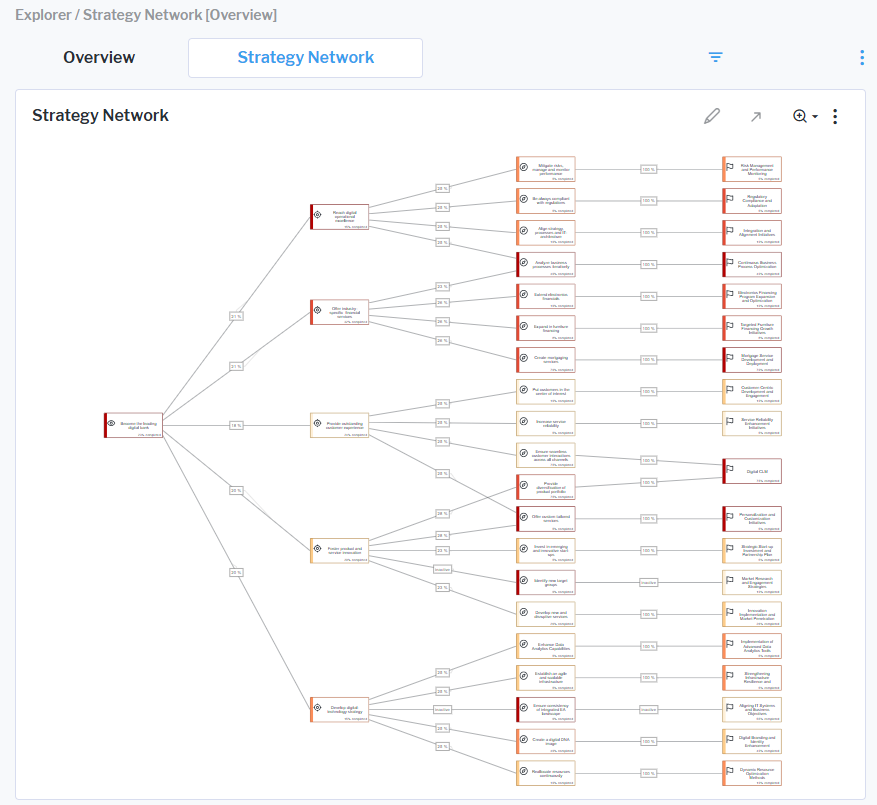
Enhanced strategy network visualization
The Strategy Network view is a network diagram that shows the relationships in the strategy from the company’s high-level vision to its strategic themes. Connections between nodes now more clearly represent the weighted contribution of child elements to their parent elements, with values displayed as percentages (e.g., a value of 25% indicates the contribution of a strategic theme to an objective).
Additional clarity has been introduced through status indicators displayed on the connections. If no updates or dynamic calculations have been applied to a connection, not defined is displayed on the connection. Users can then specify the weighting and recompute the weighting to show the new connection weight. If a child node has a Plan or Retired object state, inactive will be shown on the connection since only sub-nodes that are Active are considered in the calculation. These enhancements improve readability and help users more easily interpret strategic dependencies and contributions within the network.
A new Apply Strategic Weight Heatmap setting has also been added to the report filter. When switched on, a heatmap colors the strategic priorities based on strategic weighting and ranking. This feature illustrates the strategic weight across different levels, providing users with a clear overview of the most important initiatives within the map.
Simplified affected architecture reports
The Affected Architecture matrix is now cleaner and easier to use. The redundant first column which previously displayed the name of the selected asset has been removed from matrix reports within demand, epic, project, policy, vision, goal, objective, and strategic theme content areas. This update reduces clutter and improves focus.
Updated tooltip design in quadrant reports
The visualization of tooltips on bubbles in quadrant reports, such as TIME portfolios, has been redesigned. Borders have been removed from tooltip labels to create a sleeker, more modern appearance and improve visual clarity.
Set default role types for new assets
A new Default Role Type view in the Class Configuration explorer lets user with an administrative user profile assign a predefined role to users creating assets. This helps reduce manual steps and keeps role assignments consistent across your environment.
Help for Lean Portfolio Management:
New use case documentation is now available for Lean Portfolio Management (LPM). The updated help covers all features included in the license and includes a quick-start guide that provides practical, step-by-step guidance for moving from strategic change initiatives to agile execution using LPM capabilities.