
The following is introduced to the Alfabet solution configuration this release.
Strategic target architecture planning
With the introduction of the Target Architecture Design use case, enterprise and solution architects can define, evaluate, and govern future-state architectures that align business objectives with the organization's long-term IT direction. The target architecture is captured in an IT strategy, which serves as a strategic blueprint describing the desired future state of the IT landscape rather than a detailed implementation plan. IT strategies provide a structured framework for documenting architectural objectives, strategic principles, constraints, dependencies, assumptions, and design alternatives, enabling informed decision-making and effective communication with stakeholders. By establishing a clear target state before implementation begins, organizations can ensure that transformation initiatives, solution designs, and investment decisions contribute consistently to the achievement of their strategic architectural goals.
New classes IT Strategy, IT Strategy Folder, IT Strategy Map, and Strategic Business Support are introduced to model the long-term target architecture and support the development of strategic architecture scenarios based on different business assumptions and planning perspectives. An IT strategy provides the strategic direction for medium-term master plans, which define the incremental transformation from the current architecture to the to-be architecture. Each IT strategy can contain multiple IT strategy maps, enabling strategic planning to be organized by organizational unit, business capability, or other business dimensions. IT strategy maps define the target business support landscape through strategic business supports, enabling organizations to plan and govern the evolution of their business support landscape.
New data workbenches and content areas enable users to catalog and manage IT strategies and their IT strategy maps. The new IT Strategies data workbench is available via the Application Architecture section of the left navigation panel. Content areas for IT strategies include the means to capture responsibilities including the roles Architect, Business Owner, IT Owner, and Stakeholder.
To support transformation planning, multiple IT strategy maps can be specified in the IT Strategy Maps data workbench. The Strategic Business Support Definition view allows strategic business supports to be planned and maintained in a business support matrix for an IT strategy map. Strategic business supports represent prescribed business support configurations in the context of the target architecture, which can be based on explicitly preferred ICT objects or even placeholder objects, which can later be specified as concrete applications used to enable and support business capabilities.
Target architecture extended to master planning. The Business Support Definition and Business Support Analysis views available for a master plan map have been renamed and enhanced to incorporate IT strategies and their strategic business supports into master planning. This allows the master planner to understand the IT strategy and defined target architecture and provides the direction for the master plan, which represents the incremental transformation from the current architecture to the target state. A new IT Strategy filter is available in the Business Support Analysis view that allows the IT strategy to be visualized in the matrix for the master plan map if it has at least one organization and one business capability that overlaps with the current master plan.
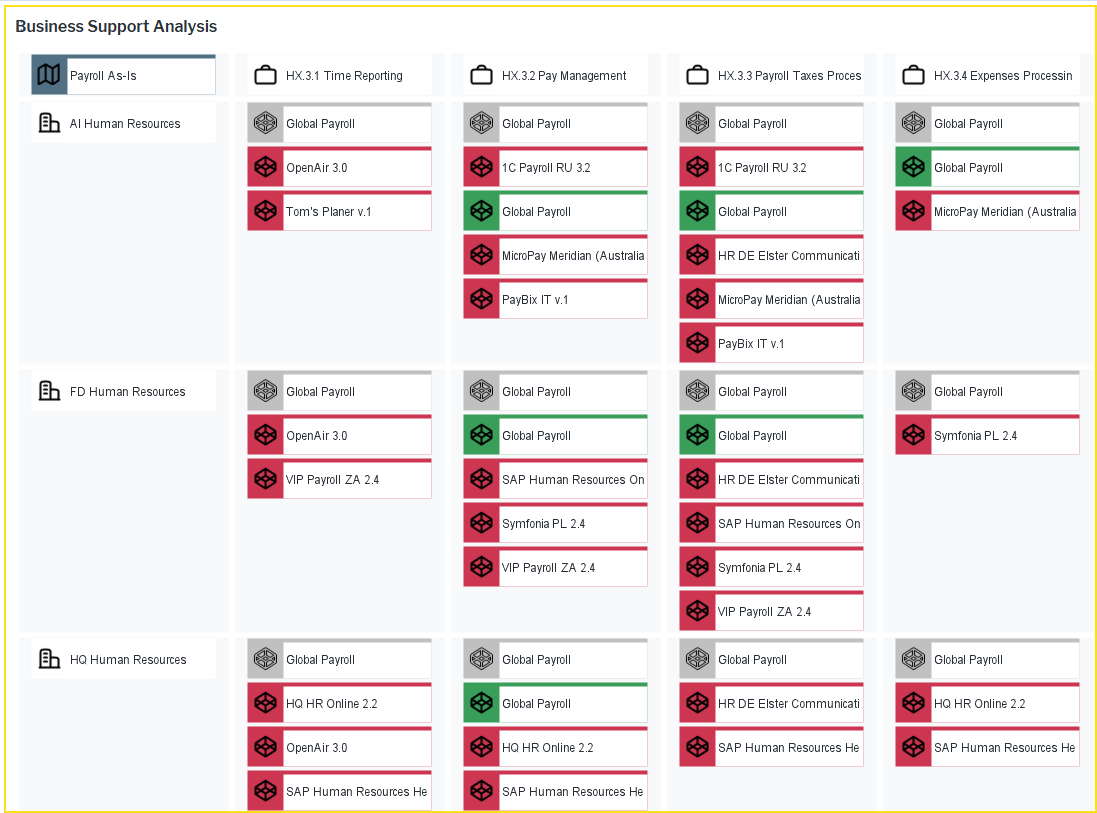
In the Business Support Analysis view, operational business supports are highlighted as strategy-compliant when their supporting applications conform to the strategic business supports defined in the IT strategy. Operational business supports can be aggregated to applications or to ICT objects in order to analyze the business supports in the master plan. This provides transparency into the alignment of current business supports with the target architecture, enabling organizations to identify gaps, prioritize transformation initiatives, and guide architectural evolution toward the desired future state.
The license package Target Architecture Planning is required to work with these capabilities. The use case Target Architecture Design must be activated to work with IT strategies, and the use case Master Planning must be activated to work with master plans.
End-to-end project resource and cost planning
New resource management capabilities now strengthen the entire project lifecycle, from early planning through execution. Project planning can now begin directly within the work breakdown structure, where initial resource needs are assessed and estimated costs can be transferred into the project’s business case.
Better high-level planning of work breakdown. A new Work Breakdown Structure view is available in the Overview page that allows teams to create both resource requests and skill requests for projects, work packages, and tasks. The Gantt view features a new View menu where includes a Count and Daily Rate column that shows the total number of days requested with the associated cost per day. A Provider column displays either the organization or the individual expected to provide the resource or skill, giving clearer visibility into who is supplying the work.
The Show Skill Requests and Show Resource Requests options are available in the View menu to allow users to visualize existing skill and resource requests in the Gantt chart and provide access to the functionality required to create new requests, improving the management and tracking of staffing demands. To support the transition from high-level planning to more detailed staffing, a Derive Skill Request option is available for any selected resource request. This creates a subordinate skill request and automatically carries over key information, including the resource request's name and the providing organization, ensuring consistency and reducing manual entry. Skill requests are displayed with the task name first, followed by the skill name in brackets, making it easier to scan and understand the specific requirements associated with each task.
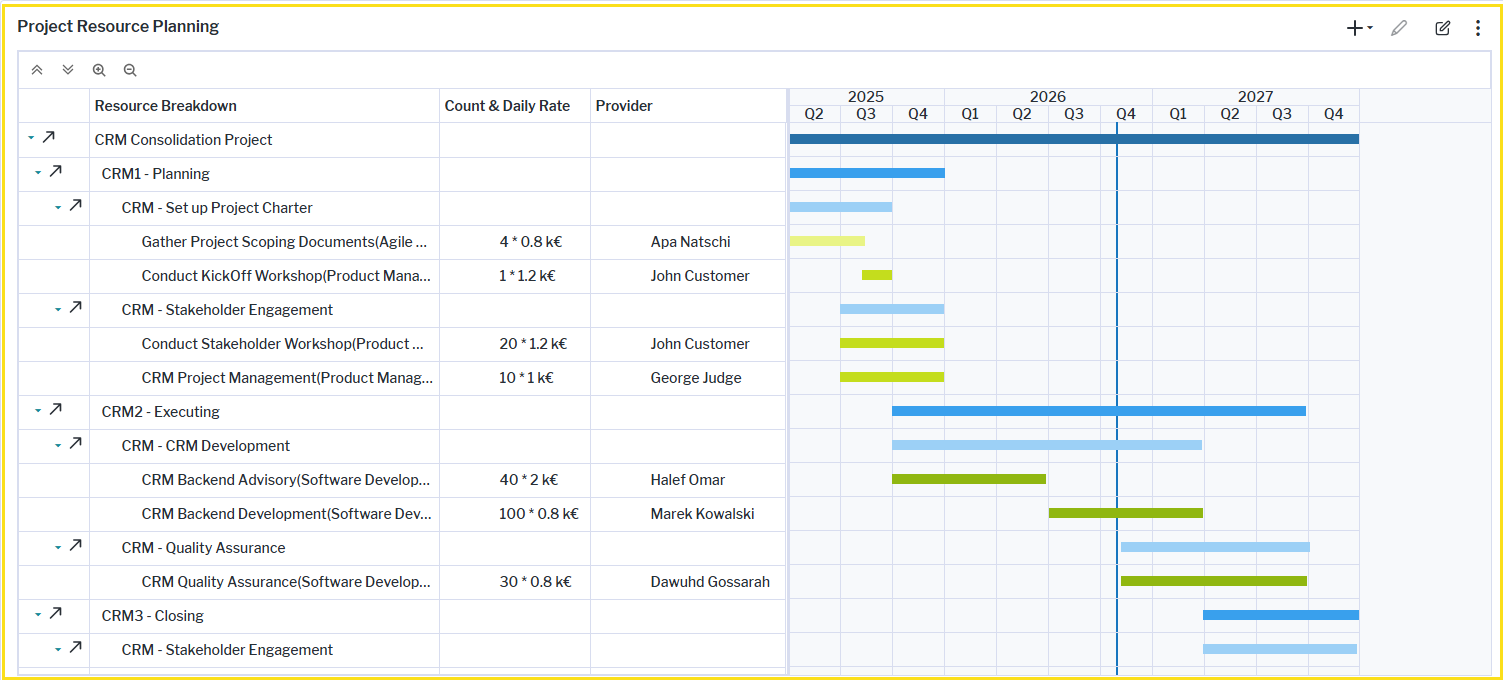
Detailed resource planning of skills and resources. A new Project Resource Planning view is introduced to the Execution page to ensure that the resources, time, and costs can be realistically managed for transformation projects. Skill requests defined in the context of the work breakdown structure can be transferred to the Project Resource Planning view ensuring resource planning flows both top-down and bottom-up for seamless synchronization across planning layers. Users can create new skill requests or refine existing ones by splitting them across multiple providers, breaking them down into more detailed skill sets, or specifying staged delivery timelines. If the project scope changes or becomes more complex than originally anticipated, users can also clear the current project resource plan and revert to the original workflow breakdown structure.
Accurate business case cost planning. The Business Case view allows the cost estimates generated in the project's work breakdown structure to flow directly into the business case. Costs calculated for resource and skill requests can be transferred using the Transfer from Skill Requests/Resource Requests option. All project cost types can be populated from defined skill requests or, when no skill requests exist, from the corresponding resource requests. Whenever updates are made to the work breakdown structure or to skill requests in the Work Breakdown Structure view, the business case can be refreshed to reflect the revised values for the relevant cost categories. The transferred costs can be edited and refined directly in the Business Case view.
Fast implementation of new architecture governance classes
To support customers with extended architecture governance requirements, preconfigured setups are now available for the following classes Network, Network Route, Organization Group, and Vendor Product.
While these classes are not included in the standard offering, they can be enabled on demand to support customer-specific architecture governance requirements. These predefined configurations allow organizations to rapidly introduce additional governance structures while minimizing implementation effort.
The provided default configuration includes:
- Meta-model property settings
- Anonymization settings
- Runtime editors
- Class icons
- Class settings
- Default workbenches
- Content areas with predefined main views
To enable data maintenance for these classes, administrative users can add the following data workbenches/explorers to a user profile in Alfabet Expand:
- Capture_Network
- Capture_NetworkRoute
- ORGG_Function_Main
- Capture_VendorProduct
The license package Enterprise Architecture Management is required to work with the classes Network, Network Route, Organization Group and Vendor Product. The use case Architecture Governance must be activated. The class Organization Group is also available with the license package IT Transformation Server - Enterprise and the use case Application Portfolio Governance.