
The following enhancements to the Alfabet solution configuration are available with this release.
Optimized alignment with SPM
To better align the product experience with Alfabet's strategic positioning as a strategic portfolio management solution, the navigation terminology has been updated in the navigation panel.
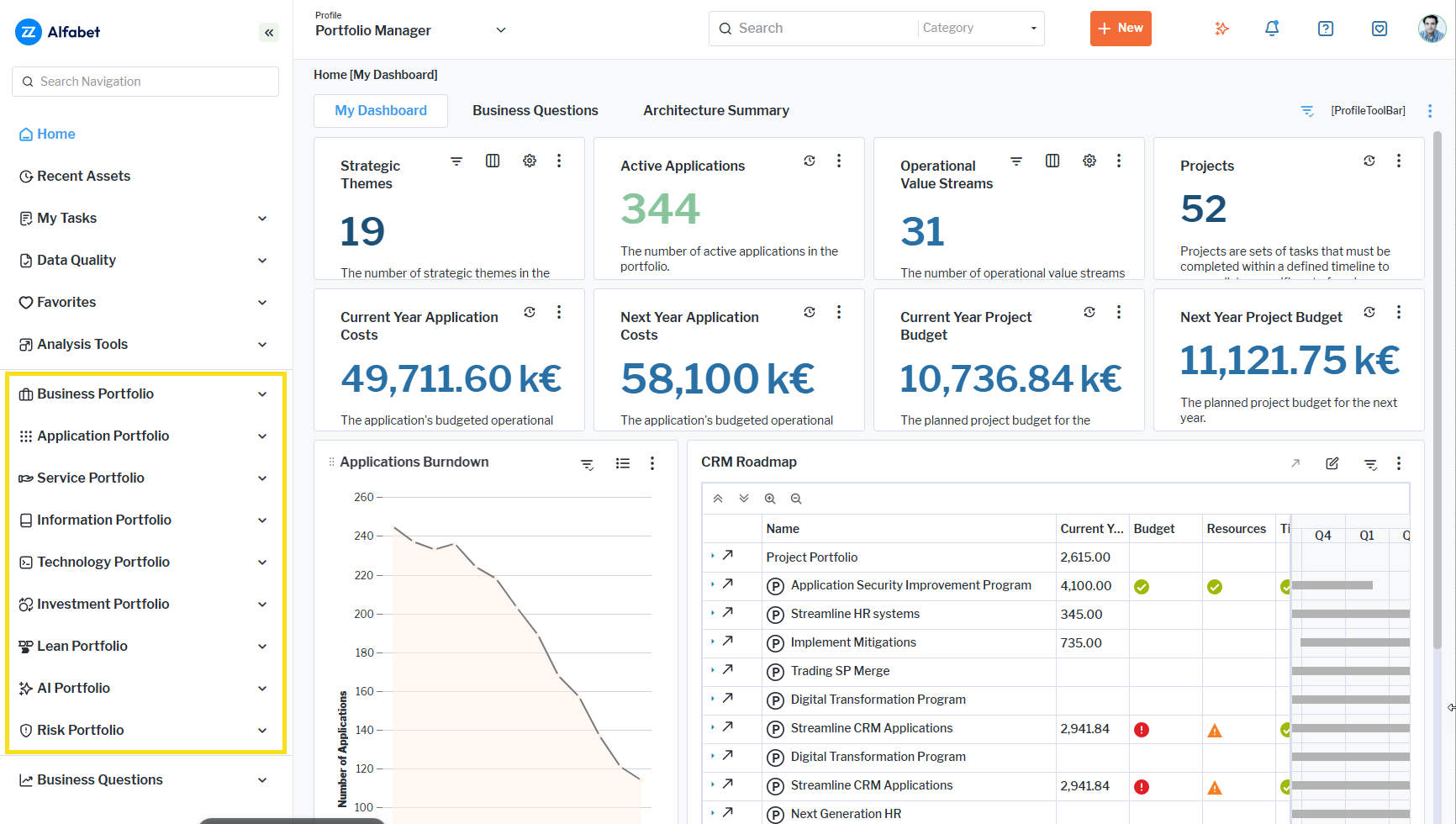
Previously labelled architecture-focused areas have been renamed to portfolio-focused areas, providing a more consistent experience for users. The updated navigation entries are:
- Business Portfolio
- Application Portfolio
- Service Portfolio
- Information Portfolio
- Technology Portfolio
- Investment Portfolio
- Lean Portfolio (formerly Agile Architecture)
- AI Portfolio
Deeper insights into strategic investment
Complex relationships can now be managed more easily directly from supported assets. To improve usability and transparency, new data workbenches have been introduced across project portfolio management and strategic planning that allow complex relationships to be more easily managed. These improvements simplify the management of relationships between strategic assets and make it easier to capture and analyze the connections that drive strategic decision-making and investments.
Capture projects for asset classes
A new Impacting Projects data workbench is available in the Investment Context page of content areas of applications, business capabilities, business processes, components, information flows, and organizations, allowing users to create, add, and detach projects directly from the asset. The view displays demand criticality, status, the underlying business or technology pain points driving the demand, and whether the demand is planned to be realized through a project. This helps stakeholders understand the drivers behind the change requests impacting their assets, prioritize investments, anticipate upcoming changes, and align application roadmaps with business needs.
To support relationship management from both perspectives, the project content area now has asset-specific workbenches, such as Affected Applications, that provide clear visibility into the different types of assets impacted by a project. These new data workbenches enable users to create, manage, and maintain a project's architecture scope from either the asset or project context. By making project relationships more visible and accessible, this enhancement reduces navigation effort and simplifies mapping of projects and assets.
Capture demands for asset classes
A new Relevant Demands data workbench simplifies the management of demand-to-asset relationships by providing direct visibility into the demands that affect an asset.
Available in the Investment Context page of content areas of applications, business capabilities, business processes, components, information flows, and organizations, the Relevant Demands data workbench replaces the standard view with enhanced relationship management capabilities. Users can create new demands, add existing demands, and detach irrelevant demands directly from the asset record, eliminating the need to navigate between multiple views. This enhancement streamlines demand relationship management, reduces administrative effort, and makes it easier to maintain accurate and up-to-date demand information.
The Relevant Demands data workbench is only available with the license package Strategic Portfolio Management with the use case Demand Management activated.
Capture strategic goals for principles
A new Impacting Goals data workbench makes it easier to establish and maintain relationships between principles and strategic goals.
Available in the content area for principles, the Impacting Goals data workbench replaces the previous Impacting Strategy view with a more focused and intuitive approach to relationship management. Users can create new goals, add existing goals, and detach goals directly from a principle, reducing the effort required to maintain strategic relationships. By connecting goals and principles in a single, dedicated workbench, organizations gain greater transparency into how strategic objectives are supported in the enterprise architecture.
The Impacting Goals data workbench is only available with the license package Strategic Portfolio Management with the use case Strategic Validation activated.
Capture demands and projects for strategic themes
New Demands and Impacting Projects data workbenches make it easier to capture, manage, and analyze the investments that support strategic themes.
Available in the Investment Context page of the strategic theme content area, these workbenches enable users to create, add, and detach related demands and projects directly from the strategic theme. By providing greater visibility into related demands and projects, users can more efficiently assess strategic impact and maintain a clearer understanding of how initiatives contribute to organizational priorities.
A Strategic Themes view is also available in the content areas of projects and demands, providing direct visibility into the strategic themes they support. This helps users understand how individual initiatives contribute to organizational objectives and ensures alignment between execution activities and strategic priorities.
These data workbenches are only available with the license package Strategic Portfolio Management with the use case Strategic Validation activated.
Comprehensive view on service delivery
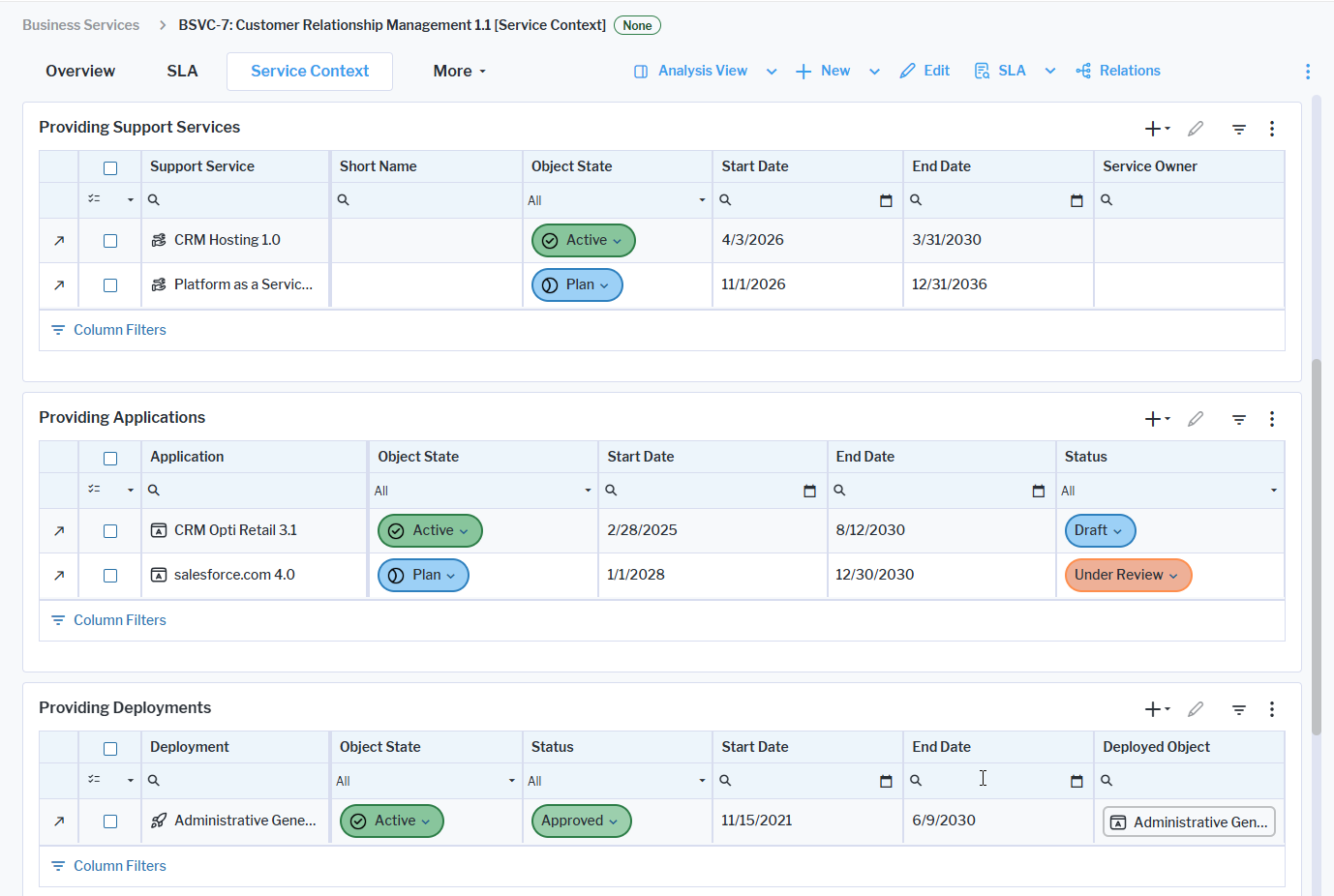
New data workbenches have been introduced to better describe how assets deliver and support business services and support services. The standard Service Items view has been replaced with dedicated data workbenches that provide direct visibility into service relationships.
Business services: In the Service Context page of the business service content area, users can capture and manage Providing Applications and Providing Support Services. For users with the Deployment Management use case scope enabled, the Providing Deployments data workbench allows the deployments that deliver the business service to be captured and maintained. In addition, a new Consuming Organizations data workbench is available on the Business Context page.
Support services: The Service Context page of the support service content area now includes dedicated workbenches for Providing Components, Providing Physical Servers, and Providing Virtual Servers.
This redesign delivers a more intuitive and user-friendly approach to relationship management and analysis. By exposing the actual related assets rather than intermediate service items, the new workbenches provide greater transparency, richer analytical capabilities, and a more efficient way to maintain service relationships. As a result, service management is simplified and users gain a clearer view of the organizational, application, and infrastructure landscape that supports each service.
These data workbenches are only available with the license package Enterprise Architecture Management with the use case Service Portfolio Management activated.
Streamlined contract renewal process
A Create Successor action has been introduced to the New menu in the Contracts data workbench to simplify contract renewal for contract management. The option allows users to create a successor contract from an existing contract while preserving the relevant contract structure and key information. This reduces manual effort and accelerates the creation of follow-on contracts.
When a successor contract is created, all mandatory contract attributes are copied from the source contract. The successor contract automatically receives the suffix - Copy in its name and contract number. All associated contract items are duplicated and linked to the successor contract, with each copied contract item also receiving the - Copy suffix in its name. In addition, all associated contract deliverables are copied and linked to the new contract.
To support a seamless renewal process, the start date of the successor contract and its contract items is automatically set to the end date of the predecessor contract. After creation, the successor contract and all copied contract items can be modified as required.
Richer Sankey data for project buckets
The Sankey diagram Current Year Allocated Costs in the content area of a project bucket has been revised to provide a clearer picture when a budget is overdrawn for a project bucket as well as the current spend limit.
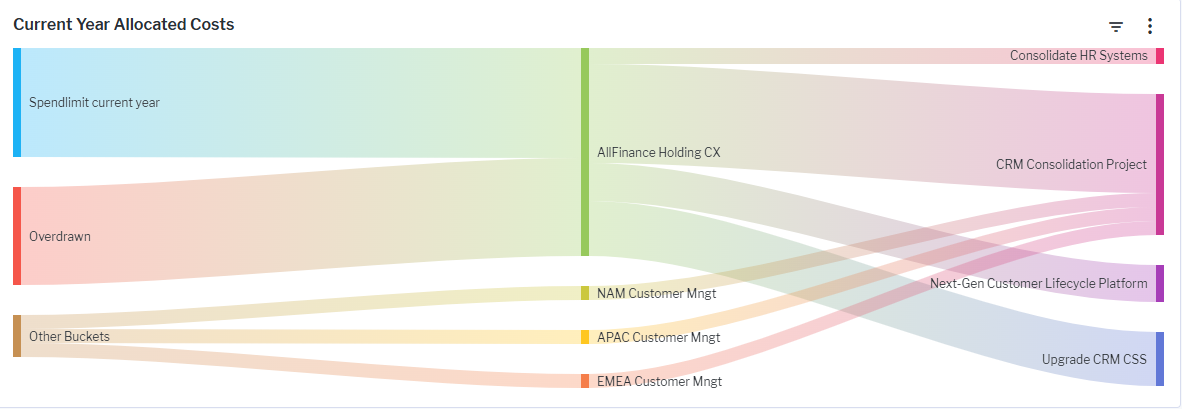
The visualization of the Sankey report has been enhanced to illustrate the current year spend limit for the project bucket, how much of the budget is overdrawn, and how much budget is available for other project buckets.
Hovering over a flow displays a tooltip showing the project bucket name, the project consuming the budget, and the corresponding allocated cost. Projects that exceed their allocated budget are highlighted in grey, and the tooltip clearly indicates that the project is overdrawn.
By visualizing current-year spend limits, overdrawn budgets, and available funding capacity, the enhanced Sankey report provides greater transparency into budget utilization across project buckets. This helps users quickly identify funding shortfalls, understand where budget is available, and make more informed investment and portfolio planning decisions.
The license package Strategic Portfolio Management is required to work with project buckets. The use case Investment Optimization must be activated.
Modernized Gantt visualizations
The Gantt chart experience has been modernized with the introduction of a new DHTMLX-based Gantt component, replacing the legacy solution for Fastlane customers. The new component is available in Gantt reports available for data workbenches as well as time schedule reports for projects, applications, and other assets. The new Gantt chart component delivers faster loading times, improved responsiveness, and a smoother user experience when navigating, scrolling, expanding, collapsing, and highlighting timelines.
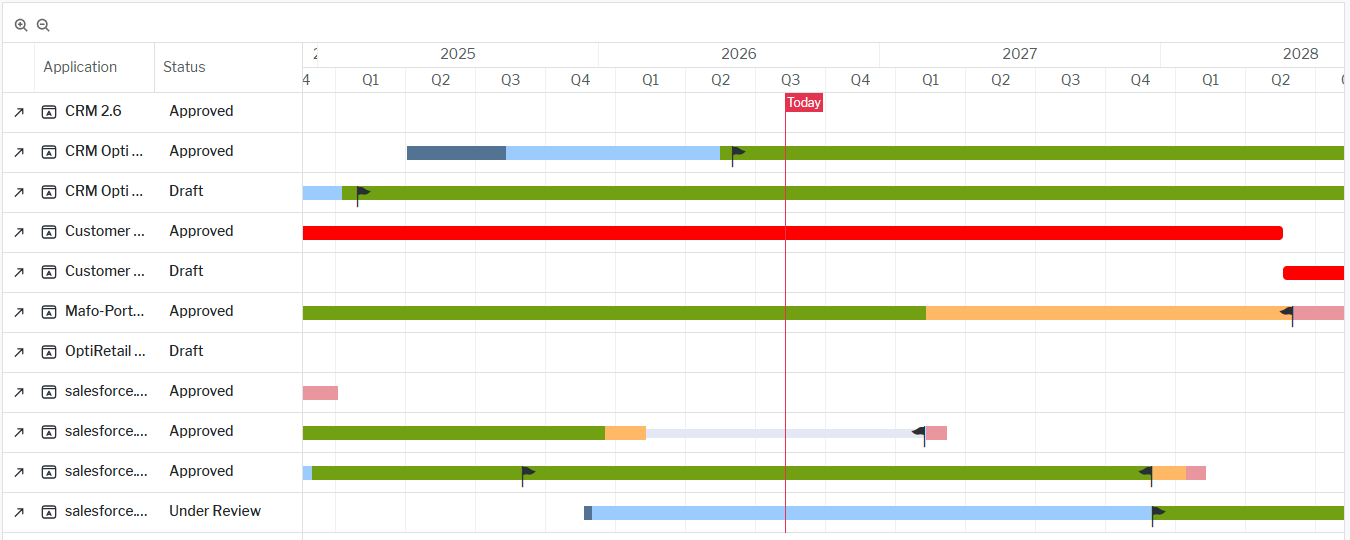
In addition to matching the functionality of previous Gantt visualizations, the new component introduces enhanced timeline editing capabilities. Start and end dates are now displayed directly as draggable flags on Gantt bars, eliminating the need for a separate active lifecycle bar and allowing users to adjust dates with greater precision directly within the chart.
This release represents the first phase of a broader modernization effort to provide a more reliable and performant Gantt experience. Therefore, the new component is currently only available with the license package IT Transformation Server - FastLane.
More intuitive rendering for project costs
The Project Costs view for projects automatically displays the report based on the respective start year to end year of the current project. The filter that was used to specify the start and end year for the view is therefore obsolete and has been removed from the view.
Streamlined role type configuration
Portfolio administrators can now configure a default role type that is automatically assigned to the user who creates a new asset. A new Default Role Type field is available below the Role Types in the Class Configuration section. The field displays the role types currently assigned to the class.
The Role Types view has also been redesigned as a data workbench, providing greater flexibility when managing role type data. From the data workbench, users can navigate to a dedicated content area that displays the most important details of a selected role type.