Specify the deliverables of contracts and contract items
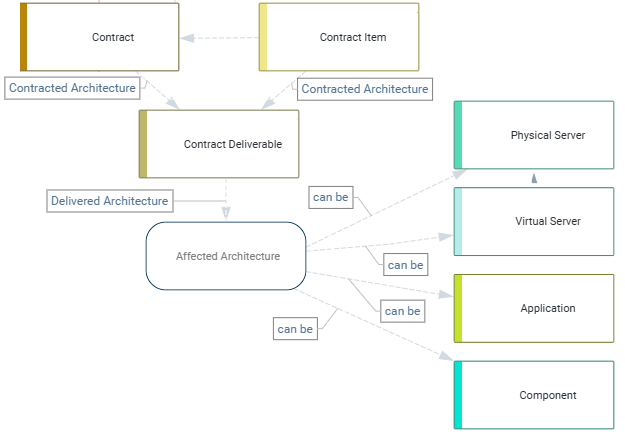
A contract deliverable is the obligated deliverable that must be provided to fulfill the terms of a contract or contract item. A contract deliverable describes the application, component, business service, support service, physical server, or virtual server that is provided by the contract as well as the delivery date and a quantity that must be delivered.
Document the deliverables required to fulfill a contractual agreement as well as the applications, components, business services, support services, physical servers, and virtual servers delivered by the contract. This helps you to assess the validity of contracts so that you can maximize the use of existing contracts, terminate contracts in a timely way, and avoid unnecessary costs associated with obsolete or redundant contracts.
- Go to the contract's content area > Architecture Context > Contract Deliverables.
- Click the
 plus sign button > Contract Deliverable.
 - Click specify the name, delivery date, volume, etc. of the contract. Click in the Architecture Element field and select either Application, Component, Business Service, Support Service, Physical Server, or Virtual Server in the Search for field. Select the asset that the contract delivers and click OK.
- Review the Contract Deliverable - Lifecycles view to analyze the start and and end of the contract and contract items and the lifecycles of the applications, components, business services, and support services that the contract delivers.
- A contract with a
 review date milestone is close to the current date, which is visualized by the blue vertical line. Contracts with an impending review data should be assessed to see whether a successor contract is available.
 - A contract deliverable showing a
 diamond on the bar indicates that more licenses are allocated for the contract deliverable than are permissible.
- A contract with a
- Navigate to the content area of an application, component, business service, support service, physical server, or virtual server to gather more information about the asset. Go to the Business Context page to see the the Contract Deliverables, Contract Deliverable Usage, and Contracts – Lifecycle views to understand all contracts that deliver the selected asset.
To specify the contract deliverable for a contract item, go to the contract's content area > Overview > Contract Items view. Select a contract item and click the  navigate button. Go to the contract's content area > Architecture Context > Contract Deliverables view.