
The following is introduced to the Alfabet platform this release.
Smart AI-powered content and translation
Alfabet introduces advanced AI capabilities designed to enhance productivity by enabling faster comprehension of key information and more intuitive interaction with content. By combining intelligent text generation with secure, multilingual translation, this feature allows users to create, understand, and refine information with greater speed, clarity, and consistency. Users can generate text in content areas and guided data views in the user interface language that they are working in as well as translate texts to any of the other languages supported in Alfabet. Built with security at its core, all translations are processed through protected, compliant mechanisms, and the data in your Alfabet repository is never used to train AI services, ensuring privacy at all times. This feature is available on request. AI service hosted on Amazon Bedrock® is provided for this feature at no extra cost for Alfabet customers, or you can integrate with other AI services to meet your specific requirements.
AI-powered text generation for key fields. AI-driven text generation is available to generate high-quality content on an object-by-object basis for specified text fields such as descriptions, demand benefits, and other textual details. The AI analyzes relevant context such as titles, metadata, and configuration comments, to produce clear, relevant, and stylistically consistent text in the user’s preferred language. The solution designer can go to Alfabet Expand to activate custom or protected properties of the type Text by setting the new Local Settings > AI Text Generation attribute to True. In the AI Text Generation Related Properties field, the solution designer can specify which other properties shall be used as context for generating the text. For example, to support the generation of text for the Description property of the class Application, the solution designer might specify the application name, architecture type, and development type to be used as context to generate an application's description. The specification of AI text generation can also be refined on the level of class settings to ensure that the relevant context is used for a class stereotype, for example.
For enabled properties, the Generate with AI functionality will be available in the 3-dots menu of the text field in content areas and guided data views. Once the text generation is triggered, the AI service will generate the text in the language of the user interface. Users may modify the generated text and save the text or retrigger the text generation again based on the edited text.
Secure AI-Driven Translation for Text Fields The new AI-translation capability allows users to work with content in their native language thus removing language barriers, clearer communication and better decision-making occurs across global teams. Properties of the type Text that have been enabled for text generation can be automatically translated in any supported language via the Translate Text with AI that is available in the 3-dots menu of the text field. Translations are handled through a secure, compliant process that protects sensitive information at all times. This ensures consistent understanding and adoption of content worldwide while maintaining trust and data security.
Any field for which AI text generation and translation is enabled must reside in its own dedicated property group containing no other properties.
Learn more about how to use and activate AI services.
Compact mode for enhanced visibility
A new compact mode rendering is introduced to improve screen real estate, especially for large datasets and low-resolution displays. Designed especially for users with data-heavy roles, the compact mode delivers a sleek, zoom-like experience that fits 30–100% more information on screen, minimizing scrolling and maximizing productivity.
Compact mode streamlines the masthead to maximize usable space and brings a crisp, high-density experience across the interface. Standard datasets and expandable tables are fully optimized with slimmer headers, tighter rows, narrower columns, and refined font scaling. Content areas display more information at a glance with reduced spacing and padding, and customized content area layouts remain fully intact. All inline editing functionalities are preserved in datasets, content areas, and guided data views.s
Each user can decide for themselves whether to use the compact mode by enabling the new Compact Mode checkbox in their User Settings. The Compact Mode Level field lets users choose between the default compact mode rendering or an even higher level to further increase density. The compact mode setting is saved to the user context settings and persist across user sessions.
Sankey diagram report type
A Sankey diagram provides a clear and intuitive way to visualize how resources such as IT budgets, capacity, or data flow across systems, projects, or processes. By representing flow magnitude through varying connection widths, it enables stakeholders to immediately understand how resources are allocated, uncover dependencies between elements, and identify inefficiencies or imbalances that may otherwise remain hidden in traditional reports.
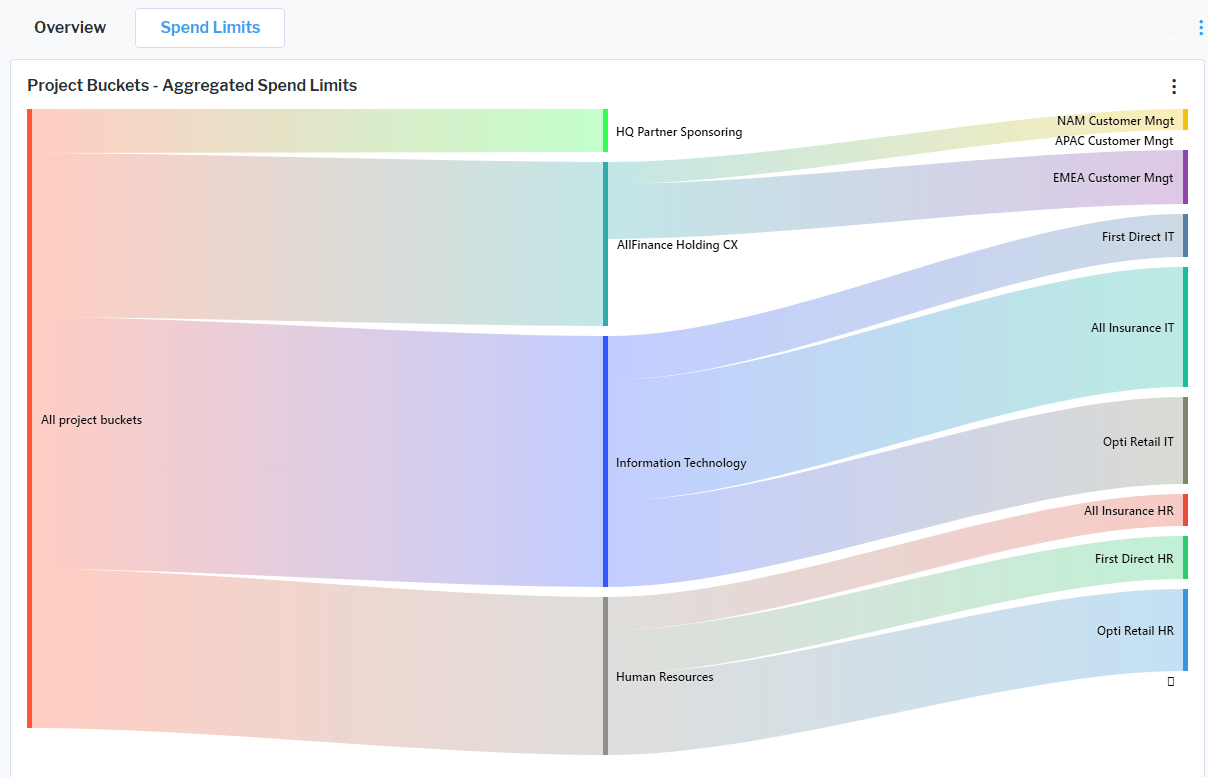
The new configurable Sankey diagram report template allows solution designers with access to Alfabet Expand to configure Sankey diagrams based on queries and share them with the user community. Nodes and flow weights are derived from a query and the report can visualize a single level or multiple levels of nodes. The diagram’s appearance can be customized via the report assistant, and when nodes represent objects, optional navigation can be enabled to allow users to drill down directly into the underlying data.
Sankey diagram visualization in dark mode is not fully supported. The diagram will be visible, but with low contrast between background and items .
Learn how to design a Sankey diagram
Share and embed views with secure links
Shareable links make it easy for users to quickly distribute and access views, improving collaboration and transparency. A new Share Link option has been added to the three-dot menu of views, enabling users to generate links that can be shared via email. Depending on the server alias security configuration, these shareable links can be accessed either by anonymous visitors or restricted to named users.
In addition, embeddable links can be created for use in iframes within third-party components or external websites, allowing views to be seamlessly integrated into other contexts. These embedded views always display up-to-date information retrieved at runtime, while preserving the filter settings applied at the time the link was created. The view is presented in read-only mode without masthead or navigation, and access from external sites is limited to explicitly allowed URLs defined in the alfasettings.json security configuration.
For Alfabet Cloud customers: This feature is available on request. On-premise customers need to activate the feature in the server alias settings of the Alfabet Web Application via the new Allow Shareable Links checkbox in the Server Settings > Security tab of the server alias editor.
Learn more about the activation and the security settings for link embedding and sharing.
Display of CUI texts
Customers who are required to label content as CUI (Controlled Unclassified Information) or display similar security notices can configure user profiles to show persistent messages in the user interface. These messages can be positioned as a header or footer, appearing above or below the Alfabet user interface to ensure visibility.
The header or footer is displayed automatically when a text is defined in the user profile settings and the user logs in with that user profile, ensuring consistent and prominent communication of security requirements.
Learn how to configure a user profile to show a header or footer text.
Migration to Microsoft® .NET 10
Microsoft® support for .NET Framework 8 ends on November 10, 2026. Alfabet 11.12.0 has therefore been migrated to .NET Framework 10. This change also enhances overall system performance.
All embedded third-party components were updated to the latest versions supporting .NET Framework 10. The list of of third-party components provided under https://bizzdesign.com/policy/licenses has been updated accordingly.
The following changes apply to the installation of Alfabet 11.12.0 compared to previous releases:
- .NET Framework 10.0 and ASP .NET Core 10.0 must be installed on the server host prior to installation of the Alfabet Server and Alfabet Web Application. If the installer is started on a host without the required components, a prompt will be shown which provides you with a download link for one of the required components. After installation, restart of the installer will show a prompt for installation of the second component.
- To align with ASP.NET Core's built-in support for environment variables, the alfa-web.config configuration file containing variable definitions has been added to the configuration infrastructure of the Alfabet Web Application. The configuration file is mandatory and has been added to all relevant sub-folders and the Examples folder. The file must be copied to the config folder.