
The following enhancements to the Alfabet solution configuration are available with this release.
Focused insights in How are we executing our strategy?
The filters for the business question How are we executing our strategy? have been enhanced to make it easier to focus on the data most relevant to you. These improvements provide more precise filtering and better visibility into how strategic ownership aligns with execution:
- A Strategy Node filter has been modified so that the user can select the vision, goal, objective, or strategic theme that matters to you. All strategic themes associated with the selected node in the strategy network are displayed in the report.
- The Business Owner filter has been updated so the report shows operational or developmental value streams, solutions, ARTs, or epics owned by the selected organization.
- The Business Owner role has been added to the Responsibilities section in the epic content area.
This business question is available with the license Lean Portfolio Management. The use case Agile Transformation must be activated.
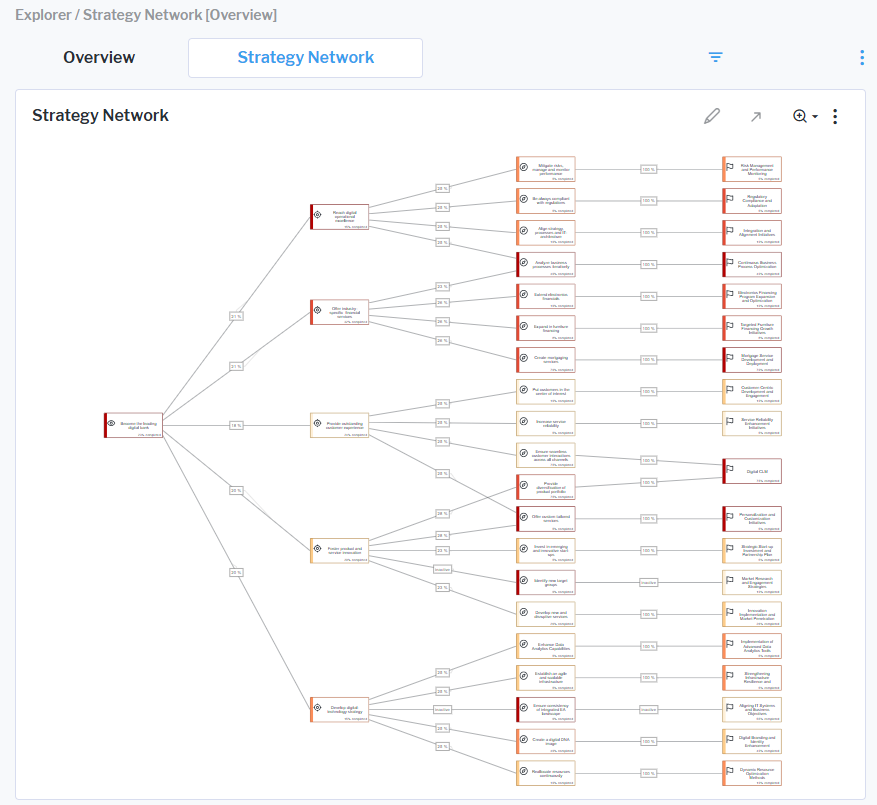
Enhanced strategy network visualization
The Strategy Network view is a network diagram that shows the relationships in the strategy from the company’s high-level vision to its strategic themes. Connections between nodes now more clearly represent the weighted contribution of child elements to their parent elements, with values displayed as percentages (e.g., a value of 25% indicates the contribution of a strategic theme to an objective).
Additional clarity has been introduced through status indicators displayed on the connections. If no updates or dynamic calculations have been applied to a connection, not defined is displayed on the connection. Users can then specify the weighting and recompute the weighting to show the new connection weight. If a child node has a Plan or Retired object state, inactive will be shown on the connection since only sub-nodes that are Active are considered in the calculation. These enhancements improve readability and help users more easily interpret strategic dependencies and contributions within the network.
A new Apply Strategic Weight Heatmap setting has also been added to the report filter. When switched on, a heatmap colors the strategic priorities based on strategic weighting and ranking. This feature illustrates the strategic weight across different levels, providing users with a clear overview of the most important initiatives within the map.
Improved feature assignment in PI planning
The PI Planning view has been enhanced to make it easier to associate features with a program increment. A new Feature Type column in the selector allows users to clearly distinguish between Business Features and Enabler Features, improving visibility and helping teams better understand feature context during planning.
Program increments are available with the license Lean Portfolio Management. The use case Agile Transformation must be activated.
Consistent and improved RAG status visualization
The layout and coloring of the RAG Status indicator have been refined and standardized across the Overview page of the program content area as well as in the Projects data workbenches. This consistent and visually clear visualization helps stakeholders quickly assess whether projects are on track (green), at risk or need attention (amber), or facing significant issues (red).
Programs are available with the license Strategic Portfolio Management. The use case Project Portfolio Governance must be activated.
Better visibility of evaluation type usage
The content area for an evaluation type has been extended to provide better transparency into its usage. It now clearly shows where the evaluation type is applied. The Class Configuration field lists all classes to which the evaluation type is assigned. The Prioritization Schemes and Portfolios fields display the names of the respective prioritization schemes and portfolios where the evaluation type is used. In addition, the Time Series Evaluation Type (Classes) section shows all classes where the evaluation type is configured for time series evaluations.
Prioritization schemes and portfolios are available with the license IT Transformation Server - Enterprise. Time series evaluation types are available with the license Enterprise Architecture Management must be activated.