
The Demands data workbench displays all demands included in the portfolio. The dataset includes the columns for Business Value, Architectural Impact and Realization Assessment.
The scores in the Realization Assessment column are dynamically generated for each demand based on the demand's current Business Value and Architectural Impact scores, taking the configured prioritization weightings into account. Depending on the assessment outcome, demands are categorized as Permit, Explore, Defer, or Unassessed.
You can edit the weightings of the Business Value and Architectural Impactscores by changing the weighting of the indicators the generate these values.
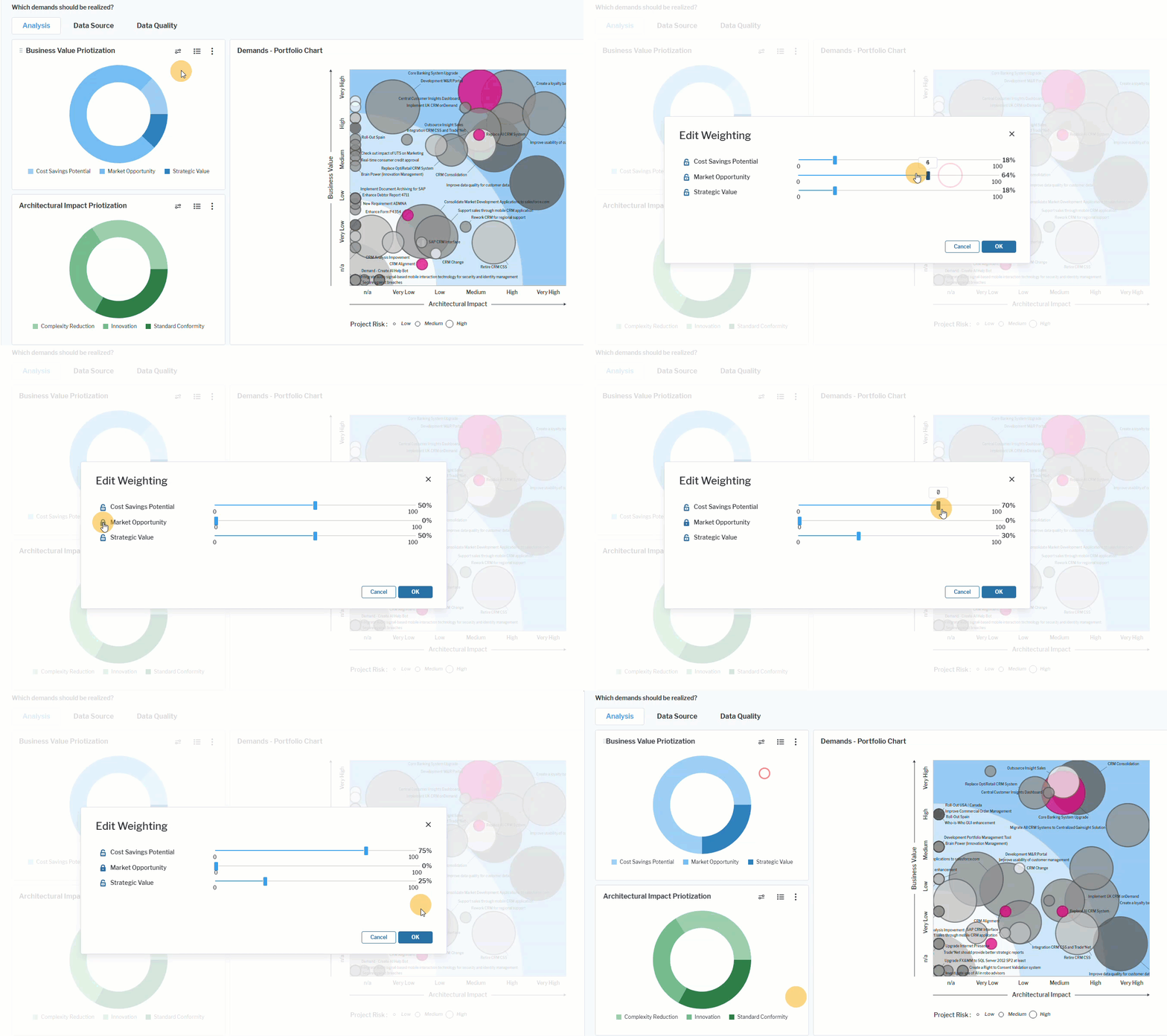 Click here to see how.
- Go to the Business Value Prioritization doughnut chart. Click the Edit weightings button to change the weightings of the indicators Cost Savings Potential, Market Opportunity, and Strategic Value.
- Adjust the weighting of the indicators by dragging the slide rule in the appropriate direction. The sum of the values must equal 100. You can lock any one of the weights by clicking the lock icon. The lock is red when activated and the weight will not automatically adjust when another weight is modified.
- Follow the same procedure as needed in the Architectural Impact Prioritization doughnut chart, which is based on the indicators Complexity Reduction, Standardization, and Innovation.
- The weighting of the indicators will automatically be updated in the Demands data workbench and reflected in the calculated property Realization Assessment