
The business question What is our AI portfolio? offers a comprehensive overview of the entire AI portfolio of AI use cases, AI features, AI models, and AI technologies. Up-to-date reports provide a single source of truth about the applications and components providing AI in your enterprise. Review the overall level of risk of AI features to the enterprise as well as the approval status of your AI uses cases and AI architecture.
The license package Enterprise Portfolio Management is required to work with this business question. The use case AI Portfolio Management must be activated.
Navigate to What is our AI portfolio?
Use the method that is most convenient for you:
- In the left navigation panel, enter What is our AI portfolio? in the Search Navigation field.
- In the left navigation panel, expand the sections Business Questions and Transparency and click What is our AI portfolio?
What information is displayed in What is our AI portfolio?
This business question shows the following information:
- The AI Feature Risk Levels bar chart displays risk levels of AI features. Point to a bar to understand how many AI features have that risk level. Click the bar chart to display the AI Features data workbench showing with AI features with that risk level.
- The pie charts visualize the number of AI use cases, AI features, AI models, and AI technologies in a specific status. Click a slice in the pie chart to open a data workbench that shows the AI architecture with the relevant status. For example, go to the AI Features report and click the In Review slice to understand all AI features that are still under review.
- The AI-Enabled Applications data workbench shows all applications for which the Has AI Features attribute is set to either Yes has an AI feature assigned. Click the
 navigate button to open the content area of an application and go to the AI Context page to understand details about how the application is used in AI features.
- The AI-Enabled Components data workbench shows all components for which the Has AI Models/Technologies attribute is set to either Yes or has an AI feature or AI model assigned. Click the navigate button to open the content area of a component and go to the AI Context page to understand details about how the component is used in AI models or AI features.
What data is required for What are our AI dependencies?
Business question: What is our AI portfolio?
Purpose: Overview of the entire AI portfolio of AI use cases, AI features, AI models, and AI technologies and the supported business capabilities.
DATA REQUIREMENTS
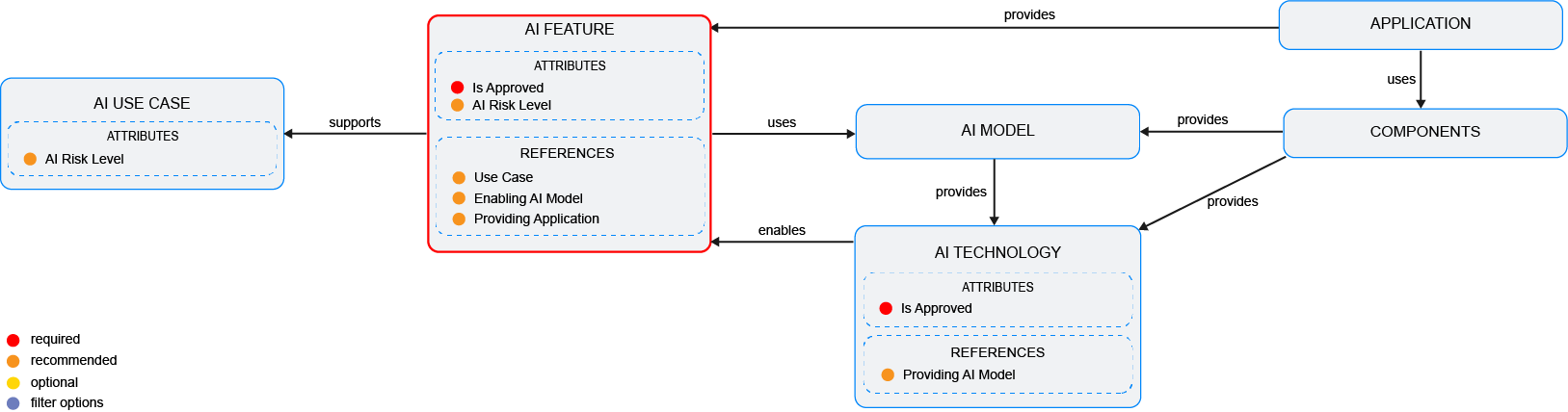
Capture the data necessary for the business question. The AI architecture must be in the repository and well documented.Capture AI Use Cases ,AI features , AI models , and AI technologies as possible because complete data considerably improves the results of the business question and your ability to focus on the data that is most important to you.
- Specify the AI use case's attributesincluding the supported business capabilities.
- Assign AI features to the AI use case
- Assess the risk level of the AI use case
- Review the approval details of the AI use case
- Specify the AI feature's attributes Specify the AI feature's attributes including the enabling AI models, enabling AI technologies, providing application, providing component, and risk level and approval status.
- Specify the AI technology's attributes inlcuding its approval status.
- Add the AI technologies that the AI model provides.
Improve the data and correct data quality issues. Go to the business question's Data Quality > Data Completeness. This visualization helps you to assess whether sufficient data is available to produce meaningful and reliable results for the business question.
- Go to Pending Issues to resolve data quality issues and improve the data that the business question is based on. Only the first 5000 issues are displayed.
- Go to the Data Source page to understand the underlying data relevant to the business question. The data source is a list report and cannot be edited.